People now find websites through ChatGPT, Gemini, Claude and other AI assistants. If you run a small business, you’ve probably wondered whether any of those sessions are reaching your site.
You can now track AI traffic in GA4 without any custom setup. Finding the number is the easy part. Interpreting it correctly is harder, especially on a small website.
We checked our own GA4 property for October 2026. 21% of our recorded sessions were attributed to ChatGPT. That sounds impressive, but the details tell a more modest and more useful story.
The Short Answer: How to Track AI Traffic in GA4
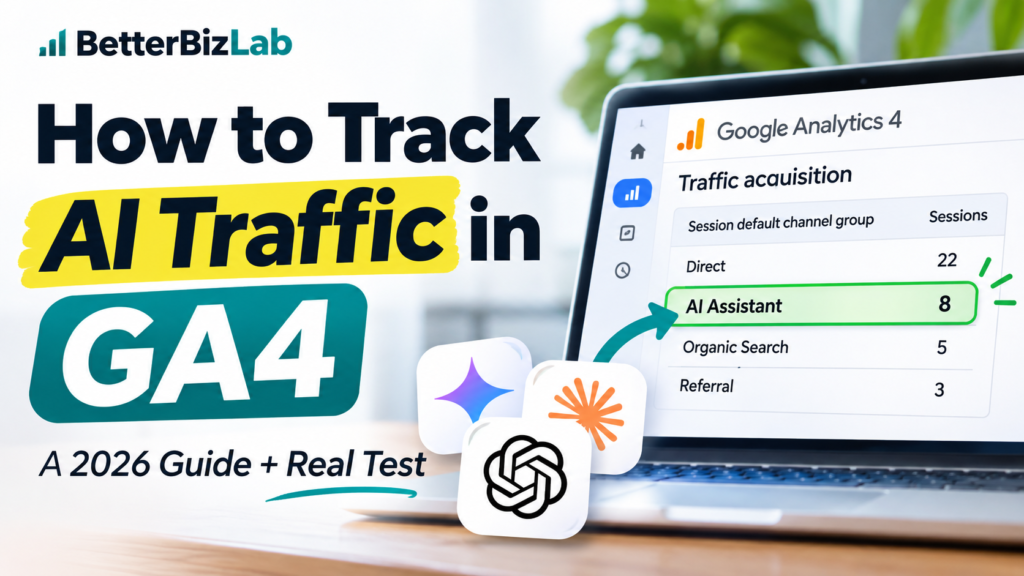
- In GA4, open the Traffic acquisition report. On our property, the path is Reports → Generate leads → Traffic acquisition.
- Look for the AI Assistant row in the channel table.
- Change the first column to Session source / medium to see which assistant the session came from, for example
chatgpt.com / ai-assistant. - Open the Landing page report and filter for that source to see where those sessions started.
You don’t need to build anything first. Since May 13, 2026, GA4 has recognized supported AI assistant referrers on its own.
What Changed in Google Analytics in 2026
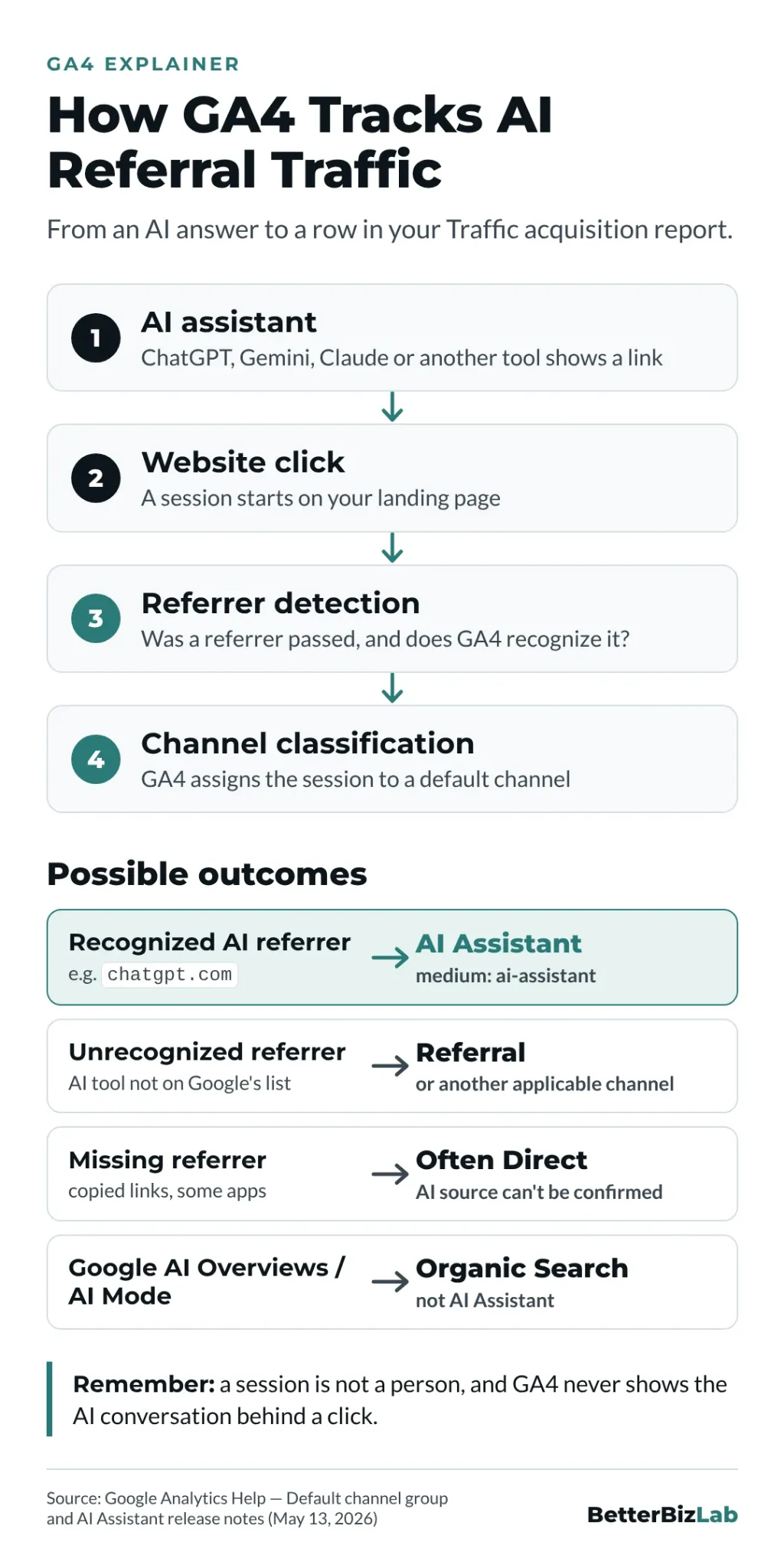
On May 13, 2026, Google added AI assistant traffic measurement to GA4 (Google Analytics release notes). When a session’s referrer matches a recognized AI assistant, GA4:
- sets the medium to
ai-assistant - sets the campaign to
(ai-assistant) - places the session in the AI Assistant channel of the Default Channel Group
Google’s default channel definitions describe the channel as covering sources like ChatGPT, Gemini, DeepSeek, Copilot and Grok. The release notes name ChatGPT, Gemini and Claude. Google hasn’t published a complete list, and neither document mentions Perplexity.
Two details matter:
- Google AI Overviews and AI Mode are not counted as AI Assistant traffic. Google classifies them as Organic Search, so they’re mixed in with your regular Google traffic.
- If there’s no referrer, GA4 can’t detect the AI source. If a visitor copies a link out of an AI app, or the app opens it without passing referrer information, the session usually shows up as Direct (as noted in Search Engine Journal’s coverage).
When you track AI traffic in GA4, the AI Assistant channel shows sessions GA4 could attribute to an AI tool. It doesn’t show every time an AI tool mentioned your business.
Step-by-Step: Find ChatGPT and Other AI Referrals
A note on menus: GA4 report menus vary by property. Report collections can be set up differently, and admins can add or remove reports. The steps below use the path on our property. If yours looks different, use the search bar at the top of GA4: type “Traffic acquisition” or “Landing page” and open the report from the results. Users with Editor or Administrator access can also add missing reports back through Reports → Library (Google’s guide).
Open Traffic Acquisition
Go to Reports → Generate leads → Traffic acquisition. Set your date range in the top-right corner. If you’re comparing against older data, start on or after May 13, 2026.
Find the AI Assistant Channel
The default table is grouped by Session default channel group. Look for a row called AI Assistant. If there isn’t one, GA4 recorded no recognized AI assistant sessions in that date range. See the troubleshooting section below.
Write down four numbers: Sessions, Engaged sessions, Engagement rate, and Average engagement time per session.
Switch to Session Source / Medium
Click the dropdown above the first column and choose Session source / medium. AI assistant sessions use this format:
| Row you might see | What it means |
|---|---|
chatgpt.com / ai-assistant | GA4 recognized ChatGPT as the referrer. This row appeared in our data. |
[assistant domain] / ai-assistant | Another AI assistant that GA4 recognizes |
[AI tool domain] / referral | An AI tool GA4 treated as an ordinary referral. Worth checking for. |
(direct) / (none) | No referrer was passed. Some AI clicks may end up here, but you can’t confirm which ones. |
Filter Landing Pages by AI Source
To see which pages AI-referred sessions started on, use the workflow we used on BetterBizLab:
- Go to Reports → Generate leads → Landing page.
- Click Add filter.
- Choose the dimension Session source / medium.
- Set the match type to exactly matches.
- Select chatgpt.com / ai-assistant.
- Click Apply.
Repeat with any other / ai-assistant source that appears in your Traffic acquisition report. Google’s Landing page report documentation explains the report in more detail.
Our Real BetterBizLab Test: 38 Sessions, 8 From ChatGPT
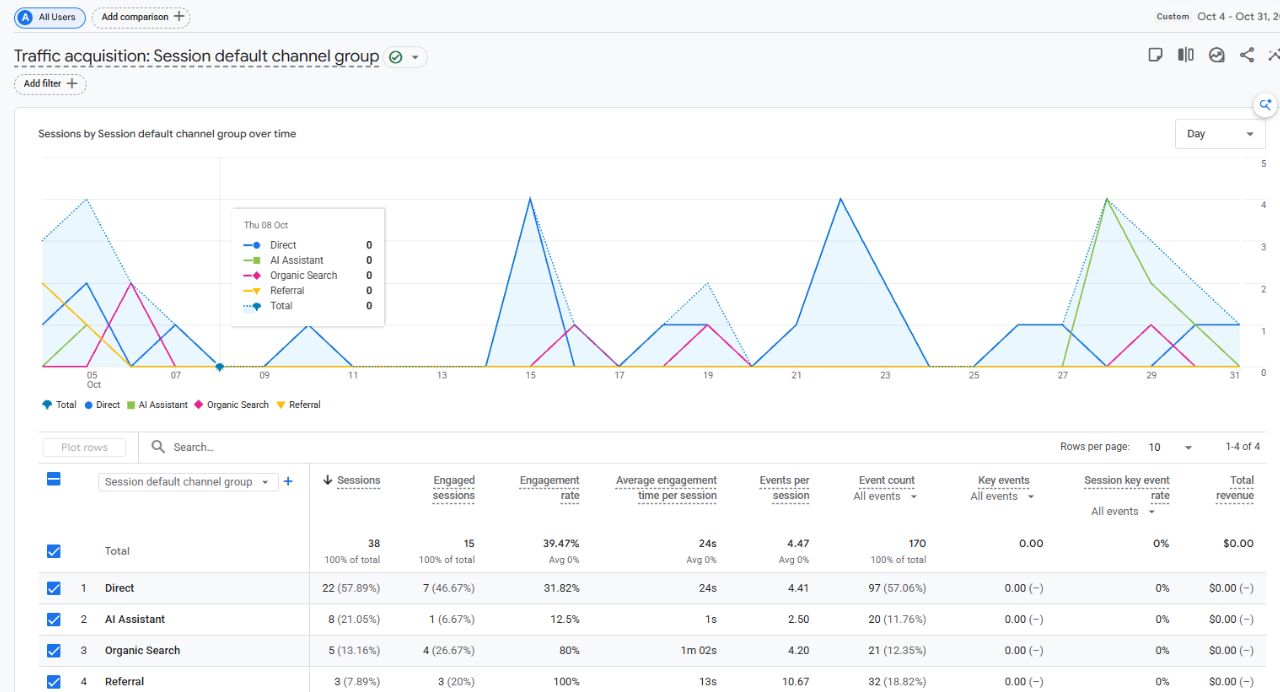
Method: We reviewed BetterBizLab’s own GA4 property using standard reports for October 4–31, 2026. Every figure below comes from our GA4 report screenshots. This is a small observational sample from a young website. It is not a controlled experiment, and the results shouldn’t be applied to other sites.
Traffic Acquisition Overview
| Metric | Whole site | AI Assistant channel |
|---|---|---|
| Sessions | 38 | 8 (21.05% of sessions) |
| Active users | 26 | — |
| New users | 24 | — |
| Engagement rate | 39.47% | 12.5% |
| Engaged sessions | 15 | 1 |
| Average engagement time per session | 24 seconds | 1 second |
| Event count | 170 | 20 |
“—” means our Traffic acquisition view doesn’t include that column, not that the value was zero. Active and new users for the ChatGPT sessions appear in the landing page section below.
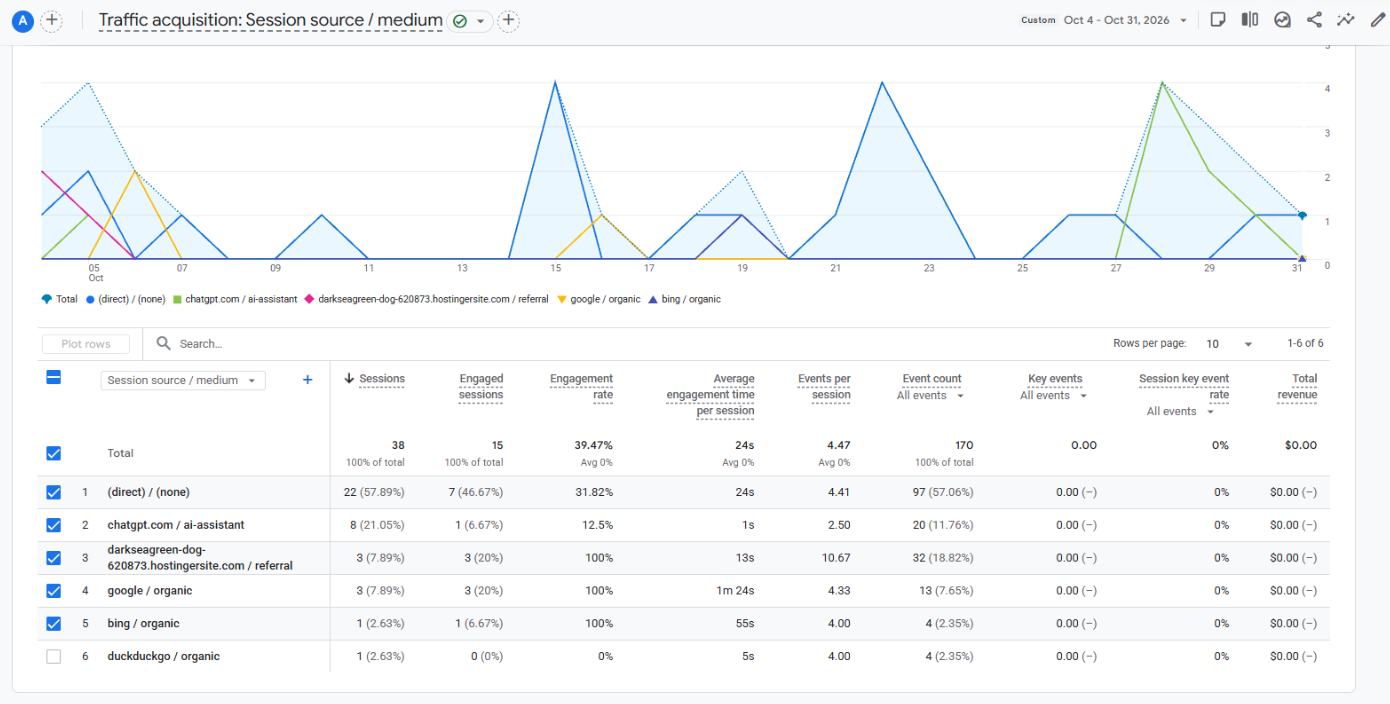
Session Source / Medium
| Session source / medium | Sessions |
|---|---|
| (direct) / (none) | 22 |
| chatgpt.com / ai-assistant | 8 |
| betterbizlab.com / referral | 3 |
| google / organic | 3 |
| bing / organic | 1 |
| duckduckgo / organic | 1 |
| Total | 38 |
Where ChatGPT Sessions Landed
| Landing page | Sessions | Share |
|---|---|---|
| /meta-muse-review | 6 | 75% |
| / (homepage) | 1 | 12.5% |
| (not set) | 1 | 12.5% |
| Total | 8 | 100% |
Those 8 ChatGPT sessions came from 2 active users, 1 of them new.

A Closer Look at October 28
Half of the ChatGPT sessions happened on a single day:
| October 28, 2026 | Value |
|---|---|
| ChatGPT sessions | 4 |
| Active users | 1 |
| New users | 1 |
| Sessions landing on /meta-muse-review | 3 |
| Sessions landing on (not set) | 1 |
| Average engagement time | 0 seconds |
What we observed: GA4 recognized ChatGPT, labeled those sessions chatgpt.com / ai-assistant, and 6 of the 8 sessions started on our Meta Muse review. The Session source / medium report we inspected for this period showed no Claude, Gemini or Perplexity rows. That’s all it tells us. It doesn’t prove those tools never sent anyone here, because sessions without a referrer show up as Direct.
What we can’t conclude: most of the rest, as the next section explains.
Why 21% AI Traffic Doesn’t Necessarily Mean AI Search Success
Sessions aren’t people. Our 8 ChatGPT sessions came from just 2 active users. On October 28, 1 active user accounted for 4 sessions. By default, GA4 ends a session after 30 minutes of inactivity (Google), so one person returning to a ChatGPT-linked tab several times can produce several sessions.
We couldn’t verify whether any of these sessions came from internal testing. As a result, we treat the eight ChatGPT-attributed sessions as observed GA4 traffic, not confirmed visits from eight independent readers.
Unclear referrals need the same caution. The 3 sessions from a hostingersite.com domain come from a temporary hosting address. They could be staging, internal or other activity. We’re not counting them as external visitors without more evidence.
Small numbers swing wildly. With 38 total sessions, one person’s activity can move the AI share by more than 10 percentage points. A 21% share on a small site and a 21% share on a site with tens of thousands of sessions are very different findings.
Low engagement time is ambiguous. GA4 counts engagement time only while the page is in focus and reports it with later events (Google). If someone reads in a background tab, or the timing data is never sent, a session can show 0 seconds even if the person did read. Our 1-second average is a warning sign, but it doesn’t prove nobody read the page.
| Category | Our conclusion |
|---|---|
| Observed | 8 sessions labeled chatgpt.com / ai-assistant from 2 active users, 6 of them starting on one review, with low recorded engagement |
| Plausible | One or two people returned to ChatGPT-linked pages several times |
| Unverified | That ChatGPT recommended BetterBizLab to independent readers, or that these sessions had any business value |
GA4 reported zero key events and zero revenue for these sessions.
Being mentioned by an AI assistant and receiving sessions from it are separate questions. If you want to work on whether ChatGPT mentions your business at all, see our test on how to get your business recommended by ChatGPT.
How to Evaluate AI Traffic Quality
Session counts alone are the weakest signal. Look at these instead:
- Engaged sessions. GA4 counts a session as engaged if it lasts longer than 10 seconds, includes a key event, or includes 2 or more page views (Google). Ours: 1 engaged session out of 8 AI Assistant sessions.
- Engagement rate compared with your site average. Our AI Assistant engagement rate (12.5%) was well below the site overall (39.47%). With samples this small, treat that as a reason to keep watching, not a final verdict.
- Landing pages. Which pages do AI-referred sessions start on? If one page dominates, ask why. In our case, the Meta Muse review covers a new product people may be asking AI assistants about.
- Key events that mean something. Mark real business actions as key events, such as contact form submissions, quote requests, phone-number clicks and purchases. AI-referred sessions only matter if they lead to something.
- A trend over several months. Compare month to month. One month of data on a small site is a starting point, not a finding. To review your monthly exports, you can analyze the data with AI the same way we did in our sales data test.
What to Do When AI Traffic Is Zero
Seeing no AI traffic is common, especially for local businesses. Work through this list:
- Check the date range. The AI Assistant channel began May 13, 2026. For earlier dates, look for AI tool domains in the Referral channel instead.
- Search Session source / medium for AI tool domains such as chatgpt, perplexity, claude, gemini or copilot. A tool GA4 doesn’t recognize will appear with the
referralmedium. - Remember AI Overviews and AI Mode. Sessions from those are counted as Organic Search, not AI Assistant.
- Check that your GA4 tag works on every page. Open Reports → Realtime and browse your site in a private window. If you don’t show up, fix the tag before trusting any channel data.
- Allow for processing delays. Standard reports can lag behind Realtime. Check again after a day or two.
- Handle your own test sessions carefully. If you click your own site from ChatGPT to test it, those sessions are counted. GA4 lets you define internal traffic (Admin → Data streams → Configure tag settings → Define internal traffic) and then create a data filter under Admin → Data filters. Leave the filter in Testing mode first and review which sessions it would exclude before you activate it. Once active, a filter permanently excludes matching data from that point on. It doesn’t clean up data that was already collected, and excluded data can’t be recovered.
- Ask whether AI has a reason to link to you. Assistants usually link to pages that answer specific questions. Zero AI traffic may simply mean you don’t have those pages yet.
Should You Build a Custom AI Channel in GA4?
For most small businesses, not at first. Check the built-in AI Assistant channel first. It needs no setup, and Google maintains it.
A custom channel group is worth building when:
- An AI tool you care about appears as a referral instead of
ai-assistant. - You need history from before May 13, 2026. Google hasn’t said whether the built-in classification applies to older data. Custom channel groups do apply retroactively (Google).
- You want your own grouping, such as all AI sources combined with links you tag yourself.
How to set one up: Go to Admin → Data display → Channel groups (you need Editor access or higher). Copy the default group and add a channel such as AI (custom) where Session source matches regex:
chatgpt|openai|perplexity|claude|gemini|copilot|deepseek|grokPlace this channel above Referral so those sessions aren’t counted as ordinary referrals first. Standard properties can have two custom channel groups, so use them carefully.
A Practical AI Referral Tracking Checklist
- Open Traffic acquisition and find the AI Assistant row
- Switch to Session source / medium and note each
/ ai-assistantsource - Check Referral rows for AI tool domains
- In Landing page, filter Session source / medium exactly matches chatgpt.com / ai-assistant (and any other AI source you find)
- Compare the AI engagement rate with your site average
- Compare sessions with active users so you don’t mistake repeat sessions for new readers
- Mark real business actions as key events
- Test any internal traffic filter before activating it
- Record your results monthly in a simple spreadsheet
- Add a custom channel group only if one of the cases above applies
Frequently Asked Questions
Does GA4 track ChatGPT traffic automatically?
Yes, when ChatGPT passes a referrer that GA4 recognizes. Those sessions appear as chatgpt.com / ai-assistant in the AI Assistant channel.
Is Google AI Mode traffic in the AI Assistant channel?
No. Google classifies AI Overviews and AI Mode traffic as Organic Search.
Does GA4 track Perplexity?
Google hasn’t named Perplexity as a recognized AI assistant. Check Session source / medium for a Perplexity domain. If it appears as a referral, a custom channel group can group it with your other AI sources.
Can GA4 show what someone asked ChatGPT?
No. GA4 shows the session’s source and landing page, not the conversation.
Why is my AI engagement time 0 seconds?
The visitor may have left right away, read in a background tab, or the timing data may never have been sent. Look at engaged sessions and landing pages before drawing a conclusion.
How much AI traffic is normal for a small business?
There’s no reliable benchmark for small sites. Compare yourself with your own past months, not with industry averages.
What We’ll Watch Next
At first, seeing 21% of our traffic attributed to ChatGPT caught our attention. For a small website, that looked promising.
But the landing page report told a different story. Those eight sessions came from just two active users. Six landed on our Meta Muse review, and only one session was classified as engaged.
We learned something useful from this: GA4 can identify some ChatGPT referrals, but the percentage alone doesn’t tell us whether we’re reaching new readers or generating meaningful business interest.
For our next monthly review, we’ll look at whether AI-referred traffic comes from more active users, which articles attract those visits, and whether visitors take any meaningful actions.
Eight sessions are a starting point. We need more data before calling it a success.
Explore more practical guides in our AI for Small Business hub.
About this case study: Data comes from BetterBizLab’s GA4 property for October 4–31, 2026. It is a small observational sample, not a controlled experiment.