Meetings create more work than most small businesses realize.
Someone has to take notes, remember what was decided, identify action items, send follow-up emails, update the CRM, and make sure important details do not disappear a week later.
AI meeting assistants can automate much of that work.
But choosing one has become surprisingly difficult. Fathom, Fireflies.ai, Otter.ai, and Granola all promise better meeting notes, summaries, and follow-ups, yet they are built for slightly different types of users.
For a small business, the best choice is not necessarily the tool with the longest feature list.
The better question is: What needs to happen after your meeting ends?
This guide compares four of the best AI meeting assistants for small businesses in 2026 and explains which one makes the most sense for different workflows.
Affiliate Disclosure: The Fireflies.ai links in this article are affiliate links. If you purchase through them, BetterBizLab may earn a commission at no additional cost to you. The Fathom, Otter, and Granola links are not affiliate links. The affiliate relationship does not change the research methodology described below.
Quick Answer: Which AI Meeting Assistant Is Best?
If you want the short version:
Fathom is a strong free starting point: its free plan includes unlimited recordings and transcription plus instant AI call summaries, so a small business can try automated meeting notes without adding another subscription.
Fireflies.ai is built with teams in mind: every plan includes meeting search, Pro adds unlimited integrations, and Business adds conversation intelligence and team analytics across multiple employees.
Otter.ai fits workflows where live transcription and searchable meeting records are the priority.
Granola stands out for business owners and professionals who want AI-generated notes without sending a visible meeting bot into every call.
There is no universal winner.
For a five-person business, paying for sophisticated team analytics may be unnecessary. For a 20-person sales organization, however, automatically capturing customer conversations and connecting them to a CRM can save meaningful administrative time.
How We Compared These AI Meeting Assistants
This is a research-based comparison. BetterBizLab did not conduct a hands-on test of these four tools for this article.
We checked each product’s capabilities, plan limits, and pricing against the vendor’s official pricing, help, and product pages. We then compared the tools on the factors that matter most to a small business: which meeting problem each one is built for, what it costs to add seats, what each free plan limits, and how well each fits an existing workflow.
The recommendations below are based on those documented factors and BetterBizLab’s small-business analysis, not on claimed firsthand testing.
Fathom: Best Free Starting Point
Fathom‘s main advantage for small businesses is its free plan.
The Free plan includes unlimited recordings and transcription, plus instant AI call summaries. Transcripts are supported in 38 languages, but not every AI feature is available in all of those languages. Fathom lists advanced summaries and Ask Fathom as “limited use” on the Free plan, while AI action items and AI follow-up emails require a paid plan.
For individuals, Premium costs $20 per user per month, or $16 billed annually. For teams, Team costs $19 per user per month ($15 billed annually) and Business costs $34 per user per month ($25 billed annually), both with a two-user minimum. Enterprise pricing is custom.
That makes Fathom particularly attractive to business owners who want to test AI meeting automation without immediately adding another recurring software expense.
Fathom can also connect meeting information to tools small businesses already use. Its integrations include platforms such as HubSpot, Salesforce, Slack, Zapier, and Asana.
Where Fathom Works Best
Imagine a small wholesale company where the owner has several buyer, vendor, and internal meetings every week.
Instead of taking handwritten notes, the owner could let Fathom capture the meeting, produce the summary, identify action items, and then use those notes to prepare a follow-up.
The value is not simply transcription.
The real benefit is reducing the amount of administrative work created by every meeting.
Potential Drawback
Businesses that need deeper organization-wide conversation analytics or highly structured team intelligence may eventually want something more team-focused.
Best for: Owners, managers, consultants, and small teams that want a low-friction way to automate meeting notes and follow-ups.
Fireflies.ai: Best for Teams and Sales Workflows
Fireflies.ai takes a more team-oriented approach.
Its Free plan includes transcription, limited AI summaries, 400 minutes of storage per team, meeting search, limited use of the AskFred AI assistant, and support for major meeting platforms including Zoom, Google Meet, and Microsoft Teams.
Pro costs $10 per seat per month billed annually, or $18 billed monthly. Business costs $19 per seat per month billed annually, or $29 billed monthly.
Pro adds capabilities such as unlimited AI summaries, video recording, downloadable transcripts and recordings, action-item and task management, and unlimited integrations.
Business goes further with conversation intelligence, team analytics for admins, unlimited storage, and user groups.
That distinction matters.
If your business simply wants notes from the weekly team meeting, Fireflies may be more software than you need.
But if five salespeople are having dozens of customer conversations every week, those meetings collectively contain valuable business information.
Questions begin to change from:
“What did we discuss with this customer?”
to:
“What objections are customers mentioning repeatedly?”
That is where a searchable meeting system becomes much more valuable.
Where Fireflies Works Best
Consider a 12-person company with four salespeople.
Each salesperson talks with prospects and existing customers throughout the week. Without a central system, useful information stays scattered across notebooks, emails, CRM entries, and employees’ memories.
Fireflies can help turn those conversations into a searchable knowledge base while connecting meeting information with other business systems.
Watch the Per-Seat Cost
Small businesses should calculate team pricing before rolling any AI meeting assistant out company-wide.
At $19 per user per month, for example, a 10-seat Fireflies Business subscription represents a materially different expense than giving the tool only to the employees who spend significant time in meetings.
Start with the people who can actually save enough time to justify the subscription.
Best for: Sales teams, customer-facing teams, and growing businesses that want structured meeting intelligence and integrations.
Otter.ai: Best for Live Transcription
Otter is built around transcription, and live transcription is included even on its free Basic plan.
The free Basic plan includes 300 monthly transcription minutes, a 30-minute limit per conversation, speaker identification, AI Chat (20 queries per user per month), live transcription, three lifetime audio or video file imports, and support for Zoom, Microsoft Teams, and Google Meet.
Otter Pro, which Otter positions for individuals and small teams, costs $16.99 per user per month, or $8.33 billed annually. It raises the limits to 1,200 transcription minutes per month and up to 90 minutes per meeting, and adds advanced AI workflows, advanced meeting templates, unlimited storage, advanced search and export, and integrations including Zapier.
Otter Business costs $30 per user per month, or $19.99 billed annually, and includes unlimited meetings and in-app recordings.
Otter’s focus on transcription is most relevant when the transcript itself matters.
A team can follow the conversation as it is being transcribed rather than waiting until the meeting is over to see what was captured.
Where Otter Works Best
Otter makes sense for interviews, research calls, brainstorming sessions, training discussions, and meetings where employees need a detailed searchable record afterward.
It can also be useful when employees want to review exactly how a topic was discussed rather than relying only on an AI-generated summary.
Potential Drawback
Small businesses primarily looking for a simple “meeting finished → summary → action items → follow-up” workflow may prefer a tool whose plans put more emphasis on post-meeting automation, such as AI action items and follow-up emails.
Best for: Businesses where live transcription and detailed searchable meeting records are especially important.
Granola: Best for People Who Don’t Want a Meeting Bot
Granola takes a noticeably different approach.
It does not require a visible AI bot to join the meeting as another participant. Instead, Granola uses your computer’s audio to generate notes, and its iPhone and Android apps can be used for in-person meetings.
For some business owners, that difference alone may determine the winner.
Customer calls can feel different when a participant named something like “AI Notetaker” suddenly appears in the meeting.
Granola avoids that experience.
Its Basic plan is free and includes AI meeting notes, 30 days of meeting history, AI chat, shared folders, customized templates, multilingual support, and a Slack integration.
Granola Business costs $14 per user per month and adds unlimited meeting notes and history, access to advanced AI models and features, integrations with tools including Notion, HubSpot, Attio, Affinity, and Zapier, plus centralized billing, broader MCP integration, and API access.
Where Granola Works Best
Imagine a business owner who spends the day switching between vendor calls, internal conversations, Zoom meetings, and customer discussions.
The owner wants AI notes but does not necessarily want to introduce a recording bot into every conversation.
Granola is particularly attractive in that situation.
Important Consideration
No visible bot does not eliminate the need to think about meeting privacy and consent.
Businesses should still establish clear practices for AI-assisted meeting notes and follow applicable recording and privacy requirements.
Best for: Founders, executives, consultants, and customer-facing professionals who want a less intrusive meeting-note experience.
Fathom vs Fireflies vs Otter vs Granola
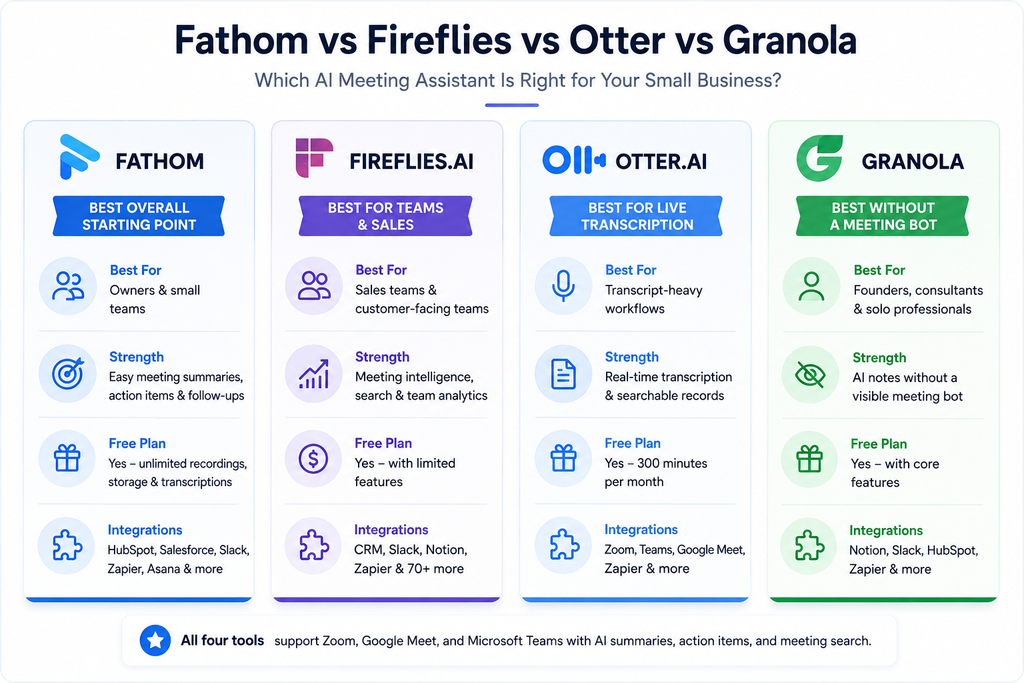
Here is the practical way we would think about the four tools:
| Tool | Best For | Free Option | Key Advantage |
|---|---|---|---|
| Fathom | Owners and small teams | Yes | Strong free starting point and meeting follow-up workflow |
| Fireflies.ai | Sales and growing teams | Yes | Searchable meeting intelligence and integrations |
| Otter.ai | Transcription-heavy workflows | Yes | Live transcription and detailed searchable records |
| Granola | Owners and professionals | Yes | No visible meeting bot required |
Pricing and plan details checked September 25, 2026 against official vendor sources. Plans and pricing can change.
Which AI Meeting Assistant Is Best for Your Small Business?
For most small businesses, we would not start by asking which product has the most AI features.
Instead, identify your actual meeting problem.
If your biggest problem is:
“I waste too much time writing notes and follow-ups.”
Start with Fathom.
If the problem is:
“Important customer information is scattered across our sales team.”
Look closely at Fireflies.ai.
If the problem is:
“We need accurate, searchable transcripts during and after meetings.”
Consider Otter.ai.
If the problem is:
“I want AI meeting notes, but I don’t want another bot joining my calls.”
Try Granola.
That approach prevents a common small-business mistake: buying software because the feature list looks impressive instead of because it solves a recurring workflow problem.
A Better Way to Calculate the ROI
Suppose a manager attends eight meetings per week.
If taking notes, organizing action items, and preparing follow-ups requires an additional 15 minutes per meeting, that creates roughly two hours of administrative work every week.
Across four weeks, that is approximately eight hours.
Now compare the value of those eight hours with the monthly cost of the meeting assistant.
That is a much better purchasing framework than comparing subscription prices alone.
The equation is simple:
Monthly value = time saved × value of employee time
Then compare that number with the subscription cost.
A $15 or $20 monthly tool that reliably saves several hours can be inexpensive.
A $20 tool that nobody consistently uses is expensive.
The same principle applies when evaluating other AI tools for small business: focus on measurable time savings instead of feature counts.
Don’t Automate Every Meeting
AI meeting assistants are useful, but that does not mean every conversation needs to be recorded, transcribed, summarized, and stored forever.
Small businesses should decide:
Which meetings actually need AI notes?
Who should have access to the transcripts?
How long should meeting information be retained?
Which meetings contain sensitive information?
When should participants be notified?
The goal is not to create the largest possible database of conversations.
The goal is to make important meetings more actionable.
Our Recommendation
For a typical small business trying AI meeting assistants for the first time, Fathom is a practical place to start because its free plan includes unlimited recordings, transcription, and AI call summaries, so you can test the workflow before committing to another software subscription.
For businesses with multiple employees handling sales or customer conversations, Fireflies.ai becomes more compelling because meeting intelligence and integrations can create value across the team.
Choose Otter.ai when transcription itself is the priority.
Choose Granola when you want AI-assisted notes without a visible meeting bot.
Most importantly, test the tool against real meetings.
After two weeks, ask one question:
Did this tool actually reduce the work that happens after our meetings?
If the answer is no, more AI features probably will not fix the problem.
If the answer is yes, you have found an automation worth keeping.
Final Takeaway
The best AI meeting assistant is not the one that records the most information.
It is the one that turns conversations into useful work with the least friction.
For small businesses, that could mean automatically capturing a customer commitment, remembering a pricing discussion, creating an action list after a staff meeting, or eliminating 15 minutes of administrative work after every call.
Start with one workflow, test one tool, and measure the time saved.
That is how AI meeting assistants become a productivity investment instead of another monthly software bill.