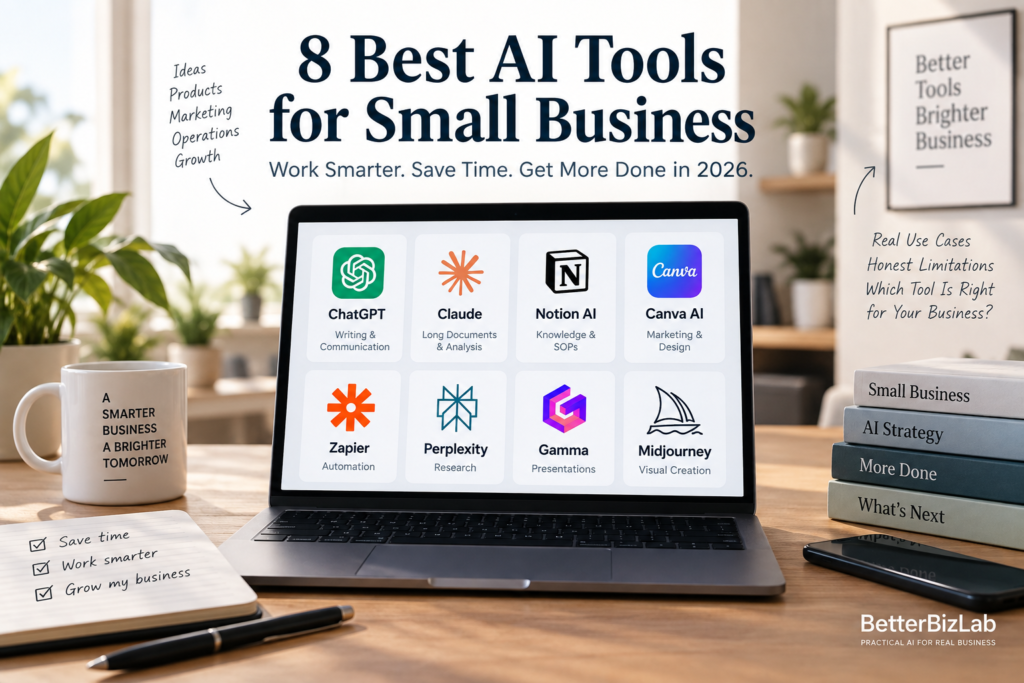
Small business owners don’t need a dozen AI subscriptions. They need a handful of tools that solve specific, recurring problems — and nothing more. The AI tool market has grown crowded fast, and it’s easy to end up paying for five or six overlapping products that all promise the same vague productivity boost.
This guide takes a more practical approach. Instead of listing every AI tool on the market, it compares eight of the best AI tools for small business in 2026 — tools chosen because each one consistently solves a specific problem: writing and customer communication, research and analysis, marketing and design, presentations, internal knowledge, workflow automation, and visual content. For each tool, you’ll find what it actually does, where it fits into daily operations, and where its limitations are, so you can build a lean AI toolkit instead of collecting apps you’ll never fully use.
Quick Comparison: 8 Best AI Tools for Small Business in 2026
Before diving into the details, here’s a quick side-by-side look at where each tool fits best.
| Tool | Best For | Learning Curve | Best Fit |
|---|---|---|---|
| ChatGPT | Everyday business tasks | Easy | Most small businesses |
| Claude | Long documents & analysis | Easy | Research-heavy work |
| Notion AI | Knowledge & team workflows | Medium | Teams and operations |
| Canva AI | Marketing & design | Easy | Marketing-heavy businesses |
| Zapier | Workflow automation | Medium | Repetitive processes |
| Perplexity | AI-powered research | Easy | Research and planning |
| Gamma | Presentations & business content | Easy | Sales and presentations |
| Midjourney | AI image creation | Medium | Visual and creative work |
How We Evaluated These AI Tools
We evaluated these tools from the perspective of a small business with roughly 5–20 employees—not an enterprise with a dedicated AI or IT team.
Our criteria are practical: how quickly a team can get started, whether the tool solves a recurring business problem, how much human review it requires, how easily it fits into existing workflows, and whether the added complexity is justified by the potential time savings.
We also distinguish between tools we have tested directly and recommendations based on product documentation and broader research. Not every tool needs to be personally tested to be useful, but we do not want to present research-based observations as firsthand experience.
In this guide, ChatGPT, Claude, Zapier, and Gamma include BetterBizLab hands-on tests. Notion AI, Canva AI, Perplexity, and Midjourney are research-based recommendations drawn from each vendor’s documentation and illustrative use cases; we have not run a BetterBizLab test on those four tools for this guide. Each tool section is labeled so you can see which is which.
Pricing in each section was checked September 24, 2026, against each vendor’s official pricing page or help center. AI pricing changes often, so confirm the current price before you buy.
Best AI Tools for Small Business: Our Quick Picks
| Business Need | Our Pick | Best For |
|---|---|---|
| General AI assistant | ChatGPT | Everyday writing, analysis, brainstorming, files |
| Long-form work | Claude | Documents, analysis, structured writing |
| Automation | Zapier | Connecting apps and automating repetitive workflows |
| Research | Perplexity | Web research and source discovery |
| Design | Canva | Marketing graphics and visual content |
| Presentations | Gamma | Quickly building business presentations |
| Knowledge & productivity | Notion AI | SOPs, internal knowledge and workspace productivity |
Choosing the best AI tool for a small business is not just about which platform has the longest feature list. We evaluated these tools based on how useful they are for practical work in a small team, including the quality of their output, setup difficulty, learning curve, need for human review, and whether the tool solves a problem that would otherwise consume employee time.
We also look at where tools overlap. A small business does not necessarily need eight separate AI subscriptions just because eight useful tools exist. In many cases, one or two general-purpose AI tools combined with a specialized tool for a specific workflow may be enough.
Where firsthand testing materially improves our assessment, BetterBizLab tests practical business tasks and compares the results. We distinguish those observations from product capabilities, pricing, and other information based on vendor documentation and research.
Our goal is not to identify the AI tool with the most features. It is to determine which tools are actually useful for a small business, what they are good at, and when adding another tool may not be worth the cost or complexity.
1. ChatGPT — Best Overall AI Tool for Small Business
How we assessed it: Hands-on BetterBizLab test (below), plus OpenAI’s official pricing page for plan details.
ChatGPT is the closest thing to a default AI assistant for small business owners. It’s a general-purpose writing and reasoning tool, which means it can help with almost anything that involves language: drafting emails, answering customer questions, writing product descriptions, brainstorming names and taglines, summarizing long threads, or turning a rough voice memo into a clear policy document.
For example, a small service business might use it to draft first-response replies to common support questions, or to turn a messy set of notes into a polished FAQ page. A solo consultant might use it to draft proposals or turn a client call transcript into a clean summary. If you do that after every meeting, a dedicated tool may fit better; see our comparison of the best AI meeting assistants for small business. These are illustrative examples of how the tool is commonly used, not claims about specific results any one business will get.
What makes ChatGPT stand out is its breadth. It doesn’t specialize in one type of task the way some other tools on this list do, which makes it a reasonable first AI tool for almost any business, regardless of industry. It’s also widely integrated into other software, so it tends to be the tool people are already somewhat familiar with.
The limitations are worth knowing up front. Output still needs a human review pass — for tone, accuracy, and brand voice — especially for anything customer-facing. Generic prompts tend to produce generic-sounding text, so getting good results usually means learning a handful of better prompting habits. And while it’s strong at writing and reasoning, it isn’t built for source-cited research the way a tool like Perplexity is.
If you’re just getting started, our guide on how to use ChatGPT for small business walks through practical starting points, and our list of 15 practical ChatGPT prompts for small business owners gives you ready-to-use prompts for common tasks like customer replies, job descriptions, and marketing copy.
BetterBizLab Test: Small-Business Decision Making
We gave ChatGPT and Claude the same small-business capital-allocation problem: a nine-person e-commerce company had an extra $20,000 to invest, but it was already dealing with repeated stockouts, an eight-week inventory lead time, rising shipping complaints, an underused 14,000-subscriber email list, and unreliable paid-ad attribution.
Both models identified the same underlying problem: the business did not need more demand yet. It needed to improve its ability to capture and service the demand it already had.
ChatGPT allocated the hypothetical $20,000 as follows: $9,000 to inventory, $6,000 to email marketing and automation, $5,000 to customer support and shipping communication, and $0 to additional paid advertising.
What stood out to us was its instruction discipline. The prompt defined paid advertising specifically as increasing ad spend, and ChatGPT refused to put additional money there because the company was already spending $18,000 per month without reliable attribution.
It also translated the recommendation into measurable 90-day priorities: keeping the best-selling products in stock, increasing the contribution from email, and reducing customer-support response times.
Claude reached a similar overall diagnosis but spent more of its response discussing operational trade-offs and downstream risks.
BetterBizLab takeaway: In this specific test, ChatGPT was particularly useful when we wanted a structured recommendation, a precise budget allocation, and measurable next steps while staying closely within the constraints of the prompt. That does not mean ChatGPT will outperform Claude on every business task—which is why we tested both rather than declaring a universal winner.
A note on this test: This is a separate run from the $20,000 allocation test in our ChatGPT vs Claude comparison. The two articles show different screenshots of different responses, and the dollar amounts differ. In that run, ChatGPT put $10,000 into inventory and Claude put $11,000 there, and neither added paid advertising. The screenshots in this article show ChatGPT in Instant mode and Claude Sonnet 5. AI outputs can vary from run to run, so treat the exact figures as one sample rather than a fixed answer. What held up in both runs: both models put the largest share into inventory, funded email and customer support, and ChatGPT recommended $0 in additional ad spend.
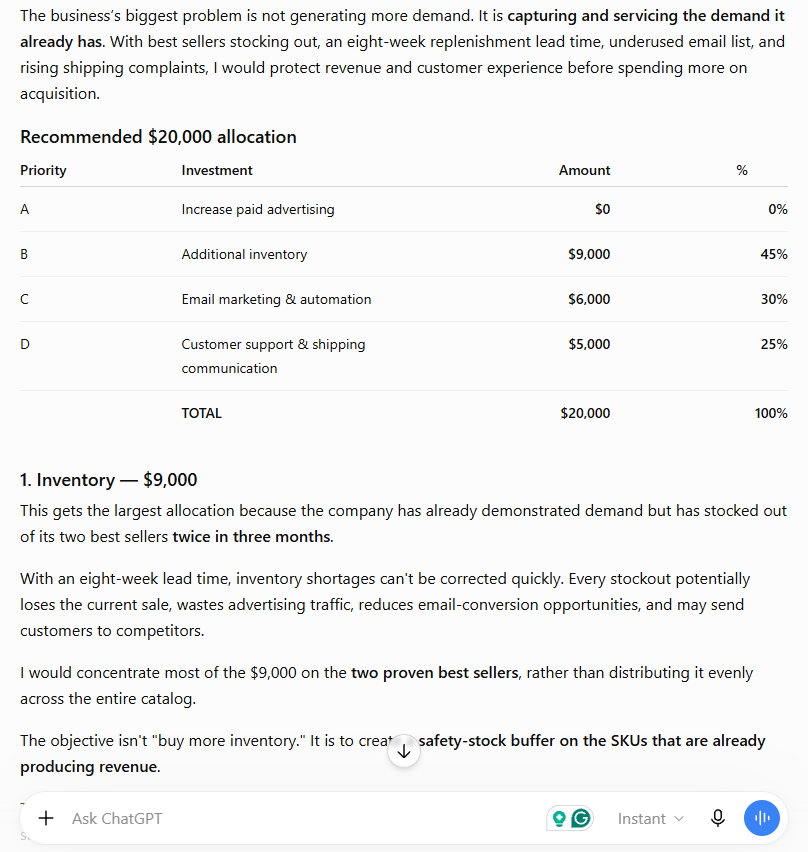
Our ChatGPT test allocated the full $20,000 budget across inventory, email automation, and customer experience while recommending no incremental ad spend.
Pricing and value (checked September 24, 2026): ChatGPT has a free plan. Individual paid plans start with Go at $8/month and Plus at $20/month. ChatGPT Business costs $20 per user/month billed annually or $25 billed monthly for a standard seat, and starts at two users. For a single owner, Plus is the practical first upgrade. Once several employees use ChatGPT for company work, Business is usually the better value because it adds a shared workspace, centralized billing and admin controls, and does not train on business data by default.
Who should use it: Nearly every small business, as the default first AI tool to learn before adding anything more specialized.
2. Claude — Best for Long Documents and Analysis
How we assessed it: Hands-on BetterBizLab test (below), plus Anthropic’s official pricing page for plan details.
Claude is another general-purpose AI assistant, but it tends to be the better choice when the task involves long, dense material — contracts, reports, research documents, or multi-step reasoning that requires holding a lot of context at once.
Practical small-business use cases include reviewing a lease or vendor contract for anything unusual before signing, summarizing a long industry report into a one-page briefing, or working through a detailed operational plan step by step. A business that regularly deals with paperwork — leases, supplier agreements, insurance documents — may find it useful to have a tool that can hold an entire document in context rather than losing track partway through.
What makes Claude stand out for this kind of work is its ability to handle long, detailed inputs without losing the thread, along with a writing style that tends to be careful and measured rather than overly enthusiastic. That combination is useful for tasks like legal-adjacent review, structured analysis, or long-form writing that needs a consistent tone.
The main limitation is that many small business owners find themselves unsure whether to reach for Claude or ChatGPT for a given task, since both are general-purpose assistants with overlapping capabilities. Claude also isn’t built for design, automation, or presentation tasks — for those, you’ll want one of the more specialized tools below. If you’re trying to decide between the two, our ChatGPT vs Claude for small business comparison breaks down when each one tends to make more sense, and our Claude for Small Business review tests Anthropic’s newer business workflows hands-on.
BetterBizLab Test: Where Claude Differed From ChatGPT
We also gave Claude the same $20,000 capital-allocation scenario used in our ChatGPT test. Claude reached the same central conclusion: the business should fix inventory, customer experience, and owned-channel marketing before meaningfully increasing customer acquisition.
The difference was in how Claude approached the decision. It allocated $9,000 to inventory, $6,000 to customer support and shipping communication, $4,000 to email marketing and automation, and $1,000 to paid advertising-related work.
That final $1,000 did not go toward simply buying more ads. Claude suggested using the limited allocation to improve attribution and measurement so the business could make a better-informed advertising decision later. This attribution budget appeared only in this run; in our separate ChatGPT vs Claude run, Claude allocated $0 to paid advertising.
Claude also spent more time examining the trade-offs behind its recommendations. For example, it noted that additional inventory ties up cash, that support tooling or contractor costs may become recurring expenses, and that email automation can take time to build and optimize before its full value becomes visible.
BetterBizLab takeaway: In this test, Claude was especially useful when we wanted to examine the assumptions, risks, and trade-offs behind a business decision. ChatGPT gave us the cleaner execution-oriented allocation and measurable next steps, while Claude pushed further into what could go wrong and what management should consider before committing the money.
This was one run of one scenario, not evidence that Claude is universally better at analysis or that ChatGPT is universally better at execution. The more useful distinction is the type of response each model produced from the same business problem.
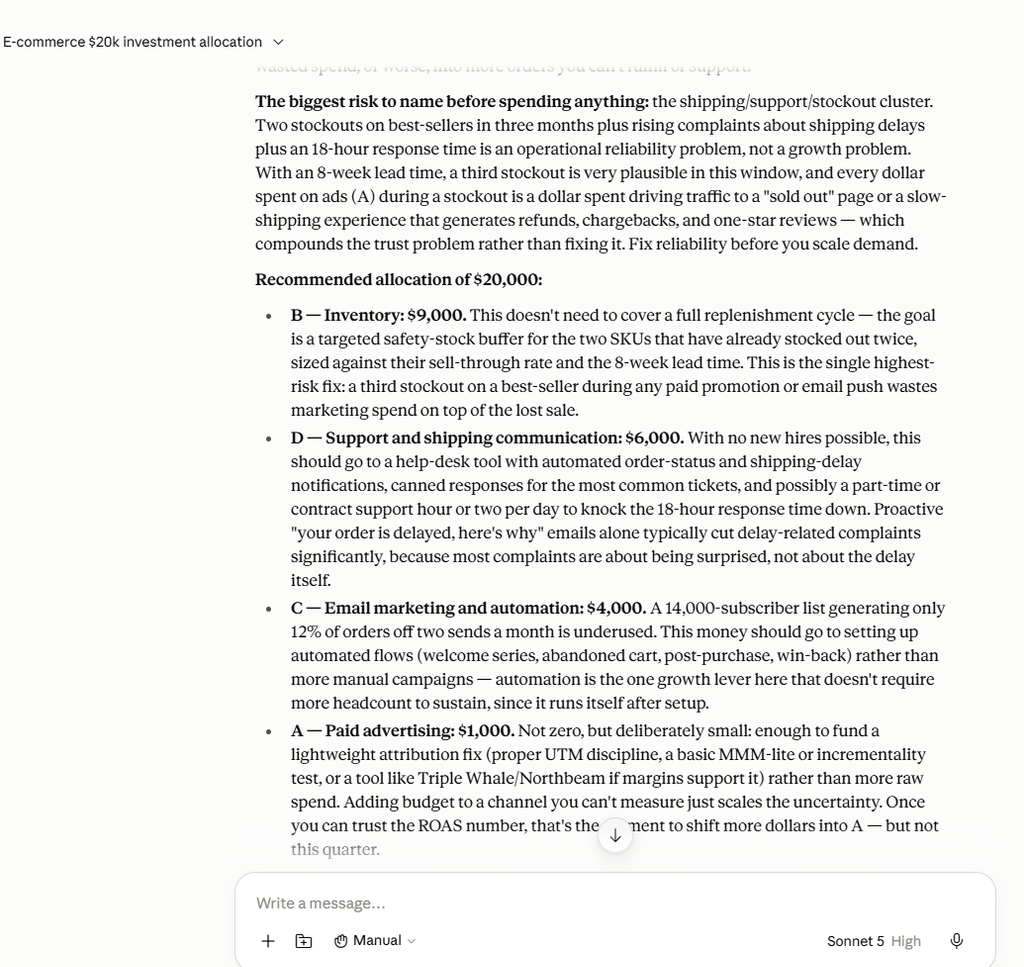
Claude allocated the same hypothetical $20,000 across inventory, customer experience, email automation, and a small attribution-focused advertising budget.
Pricing and value (checked September 24, 2026): Claude has a free plan. Claude Pro is $20/month, or $17/month billed annually; Max starts at $100/month for much heavier individual use. Team standard seats are $25 per seat/month billed monthly or $20 billed annually. Pro makes sense for an owner or manager who works through long documents every week. Team makes sense once several people need shared projects and centralized billing.
Who should use it: Businesses that regularly work with long documents — contracts, reports, research summaries, or detailed multi-step planning.
3. Notion AI — Best for Knowledge, SOPs, and Team Workflows
How we assessed it: Research-based. BetterBizLab has not tested Notion AI for this guide; this section is based on Notion’s documentation and illustrative use cases.
Notion AI is built into Notion’s workspace platform, which combines documents, wikis, and databases in one place. The AI features are less about generating content from scratch and more about organizing, summarizing, and maintaining the knowledge a business already has.
For a 10-person business, that might mean keeping employee onboarding instructions, return policies, vendor procedures, marketing guidelines, and recurring checklists in one shared workspace. Instead of asking the same operational questions repeatedly, team members can use AI to find, summarize, or work from information the company has already documented.
This is especially useful for SOP-heavy tasks. A manager could start with rough notes describing how a recurring process works, turn them into a more structured SOP, and then have a human owner review the final instructions before the document becomes part of the company’s knowledge base. If your team doesn’t use Notion, our guide on how to create SOPs with ChatGPT covers the same notes-to-SOP process with a general AI assistant.
What makes Notion AI stand out is that it’s paired with an actual workspace rather than being a standalone chat window. For a business trying to centralize standard operating procedures, onboarding materials, and project tracking in one place, having AI features built directly into that same workspace is a meaningfully different experience than switching between a chat tool and a separate notes app.
The tradeoff is a steeper setup curve. If a business isn’t already using Notion (or a similar workspace tool) to organize its documents and processes, adopting it just for the AI features is probably more effort than it’s worth. It also isn’t the right fit for a solo owner with no team and no real need for a shared knowledge base.
The AI is most valuable when the underlying workspace is already organized; it cannot compensate for outdated, incomplete, or poorly maintained company documentation.
Pricing and value (checked September 24, 2026): Notion has a free plan, but on Free and Plus, Notion AI is only a limited trial. Notion’s pricing page lists Plus at $10 and Business at $20 per member/month, with up to 20% off for yearly billing, and full Notion AI features (Notion Agent, AI Meeting Notes, and Enterprise Search) start on Business. That matters for a team: 10 people on Business is about $200/month at list price. It is worth paying for when the team already runs its documentation in Notion, not as a reason to adopt Notion.
Who should use it: Small teams and businesses with recurring processes, onboarding needs, or knowledge that currently lives in scattered notes, chats, and someone’s memory.
4. Canva AI — Best for Marketing and Design
How we assessed it: Research-based. BetterBizLab has not tested Canva AI for this guide; this section is based on Canva’s documentation and illustrative use cases.
Canva‘s AI features let a non-designer put together professional-looking marketing materials without hiring one. That includes AI-assisted layout suggestions, background removal, and text-to-image generation built directly into a design tool most small business owners already recognize.
For a small retail, e-commerce, or service business, Canva can be most useful for repeatable marketing production rather than one-off design experiments. A team could create a branded template for a promotion, resize it for social posts, email graphics, and ads, then reuse the same visual system for future campaigns.
That matters for a small team because the goal is not necessarily to replace a professional designer. It is to let employees handle routine marketing assets quickly while reserving professional design resources for higher-value work such as major campaigns, packaging, or a brand redesign.
What makes Canva AI stand out is accessibility. The learning curve is relatively approachable, the template library is large, and the AI features are layered on top of a tool that’s already built for fast iteration. For a business that produces marketing materials regularly, this can meaningfully reduce how often you need outside design help for routine work.
The limitation is that speed does not guarantee brand consistency. AI-generated layouts, images, and copy can still introduce mismatched typography, awkward visual choices, inaccurate text, or assets that simply do not look like the rest of the brand. A human should review customer-facing materials before publishing them.
Canva also becomes less compelling if a business rarely produces visual content or already has a dedicated design workflow that works well. And for highly customized AI imagery where visual generation itself is the main goal, a specialized image-generation tool may offer more creative control.
Pricing and value (checked September 24, 2026): Canva Free includes up to 20 AI uses. Canva Pro is $144/year for one person and includes 10x more AI use than Free, and Canva Business is $250/year per person with 20x more AI use than Free. Pro is usually enough when one person produces the marketing assets. Business makes more sense once several people need to create on-brand materials together.
Who should use it: Small businesses that regularly need social graphics, promotional materials, presentations, or other repeatable visual assets but do not want every routine design task to depend on a professional designer.
5. Zapier — Best for Business Automation
How we assessed it: Hands-on BetterBizLab test (below), plus Zapier’s official pricing page for plan details.
Zapier connects different apps and tools so that an action in one automatically triggers an action in another, without writing any code. In practice, that means building simple automated workflows — often called “Zaps” — that quietly handle repetitive admin work in the background.
A common starting point: automatically adding every new form submission to a spreadsheet, sending a welcome email to a new customer, and posting a notification in Slack — all from one trigger, without touching any of the three tools manually. Other businesses use it to sync data between an invoicing tool and an accounting platform, or to route new leads from a website form directly into a CRM. If you’re still deciding whether you need a CRM at all, our guide to the best AI CRM for small business covers when HubSpot’s free CRM is enough.
What makes Zapier stand out is the sheer number of apps it connects, and the fact that it removes manual, repetitive steps that otherwise eat into a business owner’s day without adding real value. If you’re trying to figure out where automation fits into your business more broadly, our guide on how to automate a small business with AI is a useful starting point, and our roundup of best AI automation tools for small business covers Zapier alongside other automation options.
The learning curve is a step up from the other tools on this list. Basic triggers and app connections are relatively approachable, but a real business workflow can become more complex quickly once you add date calculations, delays, conditional logic, record lookups, and multiple services. Reliable automation also requires testing and occasional troubleshooting rather than assuming a workflow will keep running perfectly forever.
What We Found in Our Zapier Follow-Up Test
For this guide, we built a customer follow-up workflow in Zapier using a hypothetical lead stored in Google Sheets.
Our test lead, Sarah from Bright Dental Group, had received pricing for a $1,500-per-month social media management service and had not yet responded. We wanted the workflow to wait three days after the last contact, verify that the lead still needed a follow-up, and only then allow the process to continue.
What sounded like a simple “follow up after three days” rule required several distinct steps. We connected Google Sheets, used Zapier’s date/time formatter to calculate the last-contact date plus three days, added a Delay Until step, looked up the spreadsheet row again after the delay, and then added a filter.
The second spreadsheet lookup was an important design choice. A lead marked “No Reply” when the workflow starts may respond during the three-day waiting period. Checking the record again prevents the automation from relying only on stale information captured at the original trigger.
In our test, Zapier successfully retrieved the latest record and the filter continued only when Lead Status = “Pricing Sent” and Customer Replied = “No.”
We then explored adding ChatGPT to prepare a personalized follow-up draft. At that point, Zapier’s ChatGPT connection asked for separate OpenAI API credentials. We chose to stop the test rather than configure another paid service simply to complete the demonstration, so we did not test AI-generated email drafting or automatic email sending in this workflow. For the drafting side, our guide on how to automate customer follow-ups with AI covers what customer data an AI draft needs and why human review still matters.
BetterBizLab takeaway: Zapier gave us the building blocks to create a fairly sophisticated follow-up workflow without writing code, but “no-code” did not mean “zero setup.” Date logic, delays, fresh-record checks, filters, account connections, and external AI credentials all added configuration. For a small business, the best starting point is likely one narrow, repetitive workflow that is valuable enough to justify maintaining it—not automating every process at once.
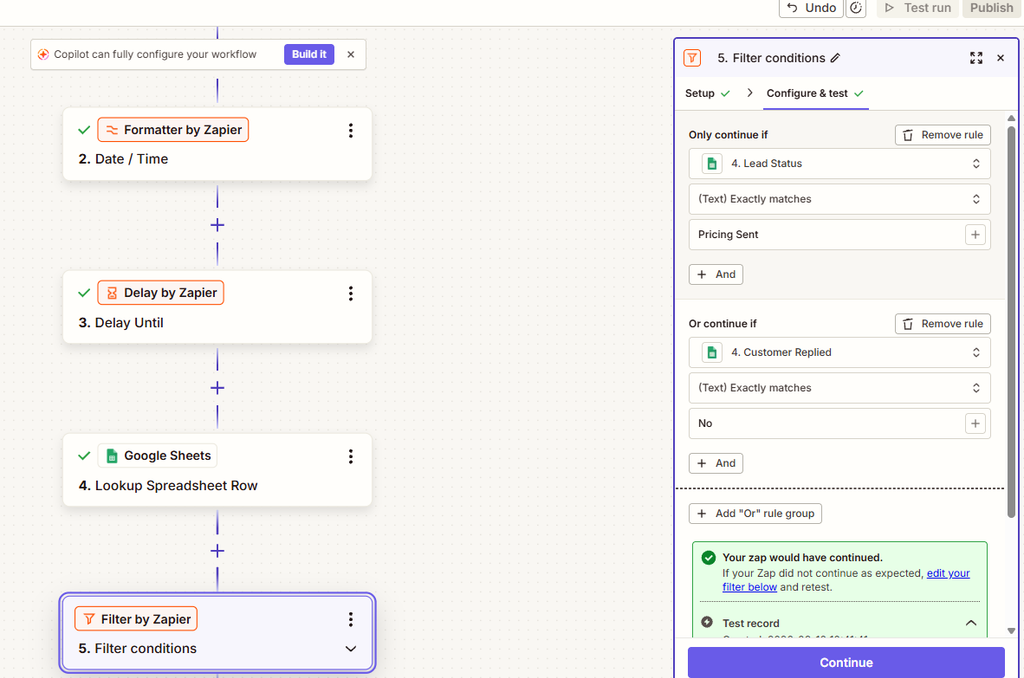
Our Zapier test continued only after the latest lead record still showed “Pricing Sent” and “Customer Replied: No.”
Pricing and value (checked September 24, 2026): Zapier’s free plan includes 100 tasks/month but only two-step Zaps. Professional starts at $19.99/month with 750 tasks/month and multi-step Zaps, and Team starts at $69/month with 2,000 tasks/month and up to 25 users. A workflow like the one we built, with a date calculation, delay, second lookup, and filter, needs multi-step Zaps, so plan on at least Professional for real follow-up automation. Adding ChatGPT steps also requires separate OpenAI API credentials, which are billed by OpenAI, not Zapier.
Who should use it: Small businesses with repetitive processes that span multiple apps—such as lead follow-ups, form submissions, notifications, and data transfers—and that are willing to spend some time building and maintaining the workflow.
6. Perplexity — Best for AI-Powered Research
How we assessed it: Research-based. BetterBizLab has not tested Perplexity for this guide; this section is based on Perplexity’s documentation and illustrative use cases.
Perplexity is an AI research tool that answers questions with cited sources, rather than generating a response from a blank page the way a general chat assistant does. That distinction matters for research tasks where knowing where an answer came from is part of the value.
For a small business, Perplexity can be useful at the beginning of a decision rather than at the end of one. A team might use it to research competitors before changing prices, compare software options before requesting demos, investigate an unfamiliar market before a sales meeting, or find original sources behind statistics used in an article or presentation.
For example, instead of asking an AI assistant to simply “tell me the latest trends in my industry,” a business owner can use Perplexity to identify relevant reports, articles, and source material, then open the most important sources and verify the details before using them in a business decision.
What makes Perplexity stand out is its citation-first approach. Instead of treating the AI response as the final authority, users can follow the cited sources and inspect the underlying material themselves. For research-heavy tasks, that makes it easier to move from AI answer → original source → human verification than relying on an uncited response alone.
The limitation is that citations still require human judgment. A cited page may be outdated, weak, secondary, or may not fully support the claim the AI attached to it. For important business decisions, statistics, pricing information, legal requirements, or other consequential claims, the underlying source should still be opened and checked directly.
Perplexity also solves a narrower problem than ChatGPT or Claude. We would view it primarily as a research and source-discovery tool rather than the one AI platform a small business should use for everything.
Pricing and value (checked September 24, 2026): Perplexity’s free Standard plan includes practically unlimited basic searches with very limited Pro Searches, and an individual Pro plan is available for heavier use. For teams, Perplexity’s help center lists Enterprise Pro at $40 per seat/month or $400 per seat/year, adding data-privacy controls, team collaboration, and seat management. For most small businesses, the free plan is enough to see whether cited research fits your workflow. Enterprise Pro is worth considering when employees research with confidential business information.
Who should use it: Businesses doing regular market research, competitive analysis, or content research that needs to be grounded in verifiable sources.
7. Gamma — Best for Presentations and Business Content
How we assessed it: Hands-on BetterBizLab test (below), plus Gamma’s official help center for plan details.
Gamma is an AI tool built for creating presentations, one-pagers, and structured business documents quickly, starting from a prompt or a rough outline instead of a blank slide deck.
Common use cases include building a sales deck ahead of a client meeting, putting together a pitch deck for investors, turning a set of talking points into a polished internal report, or drafting a proposal document without starting the layout from scratch. For a consultant or agency that regularly needs to turn ideas into a presentable format under time pressure, that draft-to-deck workflow can save a meaningful amount of formatting time.
What makes Gamma stand out is speed: In our test, it was fast at turning a detailed prompt into something that looked presentable, which matters most for businesses that build decks and proposals often rather than occasionally. If presentations, proposals, or visual business documents are a regular part of your workflow, read our full Gamma AI Review 2026 for a deeper look at its strengths, limitations, and small-business use cases.
The tradeoff is control. Gamma is better suited to structured business content than free-form creative design, and businesses that need pixel-perfect, highly customized layouts may still prefer a dedicated design tool for those specific projects.
BetterBizLab Test: Creating a 90-Day Business Presentation
We tested Gamma by asking it to create a management presentation for a hypothetical 12-employee e-commerce company. The prompt described four operational problems and asked Gamma to build a practical 90-day AI automation plan without unrealistic ROI claims or fully autonomous customer communication.
We asked for an eight-slide presentation. Gamma produced nine slides, so the overall structure followed our instructions well but the requested slide count was not followed exactly.
Gamma turned the prompt into a polished presentation with a clear executive summary, three recommended automation workflows, human-review guardrails, a 30/60/90-day implementation roadmap, and success metrics. The roadmap was particularly strong: it organized implementation into clear phases that a small management team could understand without technical expertise.
The first draft was not ready to present without review, however. Gamma introduced several specific performance targets that were not provided in our prompt, including reducing a three-hour reporting process to 15 minutes and numerical targets for hours saved, response time, follow-up coverage, and cart recovery.
BetterBizLab takeaway: Gamma was strongest at structure, visual presentation, and turning a detailed business prompt into a usable first draft. The 30/60/90-day roadmap was particularly strong. But the test also showed why AI-generated business presentations still need human review: Gamma introduced unsupported numerical targets and did not follow our requested slide count exactly. We would use it to accelerate the first draft—not to make final business claims without verification.
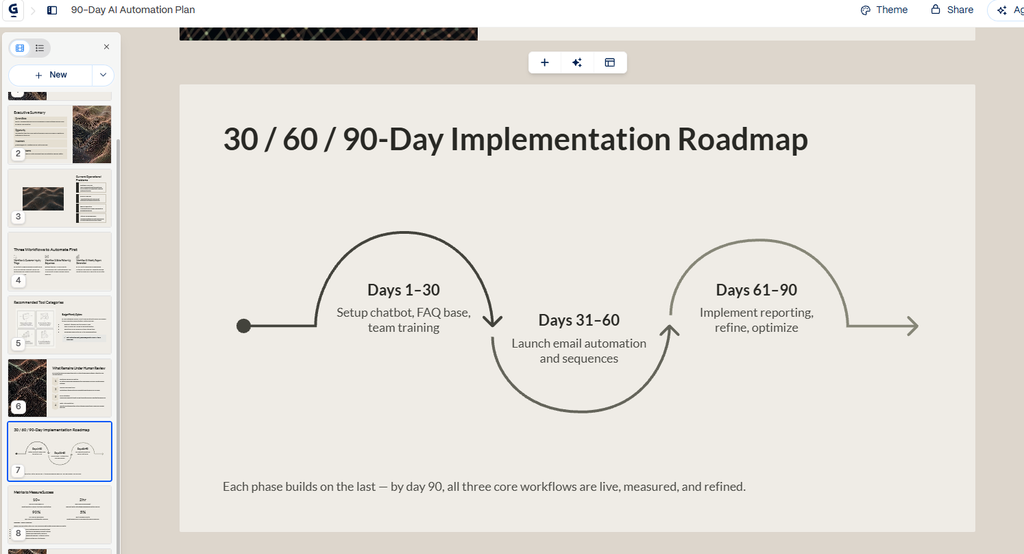
The 30/60/90-day roadmap was one of the strongest slides in Gamma’s untouched first draft.
Pricing and value (checked September 24, 2026): Gamma’s free plan starts with 400 one-time AI credits and up to 10 slides per prompt. Paid individual plans (Plus, Pro, and Ultra) are listed on Gamma’s pricing page; Plus removes Gamma branding and allows up to 100 slides per prompt. Gamma’s help center lists Business at $40 per member/month, billed annually. The free credits are enough to repeat a test like ours; paying makes sense once you build client-facing decks or proposals every week.
Who should use it: Small businesses, consultants, agencies, and sales teams that regularly create presentations, proposals, internal plans, or client-facing business documents and want to reduce the time spent building the first draft.
8. Midjourney — Best for AI Image Creation
How we assessed it: Research-based. BetterBizLab has not tested Midjourney for this guide; this section is based on Midjourney’s documentation and illustrative use cases.
Midjourney is an AI image-generation tool that produces custom visuals from text prompts. Unlike Canva, which is built around templates and layout, Midjourney is built around generating original imagery that doesn’t exist yet.
For a small business, useful applications might include campaign concepts, website hero imagery, mood boards for a rebrand, social creative, or visual exploration before a designer develops the final asset. A product brand might also use generated images to explore different creative directions before spending money on a professional photo shoot or campaign production.
The important distinction is that these images work best as creative assets and concepts—not as evidence of what a real product, location, employee, or customer actually looks like.
What makes Midjourney stand out is its ability to generate highly customized visual concepts rather than relying on a library of pre-made templates or stock photography. That can be useful when a business wants a particular visual direction that is difficult to find in conventional stock libraries.
The learning curve is real, though. Getting a consistent, usable result can require prompt iteration, reference images, and experimentation rather than a single generation. AI-generated visuals can also introduce incorrect details or visual inconsistencies, so customer-facing assets still need human review.
Midjourney is also a poor substitute for accurate product photography when customers need to see exactly what they are buying. Small businesses should be especially careful not to use generated imagery in ways that could misrepresent a real product’s appearance, features, packaging, or results.
Pricing and value (checked September 24, 2026): Midjourney’s plan comparison lists Basic at $10/month ($8/month billed annually), Standard at $30/month ($24/month annually) with unlimited Relax-mode images, and Pro at $60/month ($48/month annually). Two details matter for businesses: Stealth Mode, which keeps images private, requires Pro or Mega, and a company with more than $1,000,000 in gross annual revenue must use the Pro or Mega plan. Paying is only worth it if custom visuals are a regular part of your marketing.
Who should use it: Small businesses and creative teams that need distinctive campaign concepts, brand imagery, or other custom visual assets and are willing to spend some time refining the output.
How to Choose the Right AI Tools for Your Small Business
The mistake most businesses make isn’t picking the wrong tool — it’s trying to adopt too many tools at once. A more useful approach is to identify your actual bottleneck first, then pick the one or two tools that address it directly.
- Too much writing, customer communication, or everyday knowledge work → ChatGPT
- Long documents, detailed analysis, or complex planning → Claude
- Scattered SOPs and internal knowledge → Notion AI
- Too much time spent producing routine marketing assets → Canva AI
- Repetitive work moving between multiple apps → Zapier
- Research that needs traceable sources → Perplexity
- Too much time turning ideas into presentations → Gamma
- Need for custom visual concepts beyond templates and stock imagery → Midjourney
If you’re not sure where your bottleneck is, a simple test is to think about the task you or your team dread doing most every week. That’s usually a more reliable signal than trying to evaluate every tool on this list from scratch.
Before paying for another AI subscription, ask three questions: Does this solve a recurring problem? Will someone on the team actually use it every week? And is the expected time or quality improvement worth the setup, review, and subscription cost? If the answer to any of those is unclear, test the workflow before adding the tool permanently.
Which AI Tools Should You Start With?
You don’t need all eight of these tools to get real value from AI in your business — and starting with all of them at once is a good way to end up using none of them well.
A sensible starting stack for most small businesses is one general AI assistant, paired with one specialized tool for the business’s biggest recurring problem. A few examples of what that combination might look like in practice:
- ChatGPT + Canva for marketing-heavy businesses
- ChatGPT or Claude + Zapier for operations-heavy businesses
- ChatGPT + Gamma for sales or presentation-heavy businesses
- ChatGPT + Perplexity for research- and content-heavy businesses
These are examples, not universal prescriptions — the right combination depends on where your specific bottleneck is. Start with two tools, use them consistently for a few weeks, and only add a third once the first two have become part of your normal routine.
What a starter stack costs: Using the list prices checked September 24, 2026, before taxes:
| Example stack | Plans | Approximate cost |
|---|---|---|
| Solo owner, marketing-heavy | ChatGPT Plus + Canva Pro | About $32/month ($20/month + $144/year) |
| Solo owner, operations-heavy | Claude Pro (monthly) + Zapier Professional | About $40/month ($20 + $19.99) |
| 5-person team, operations-heavy | ChatGPT Business (5 standard seats, billed annually) + Zapier Team | About $169/month ($100 + $69) |
Treat these as starting points. Usage limits, extra seats, add-on credits, and separately billed API usage (such as OpenAI API credentials for ChatGPT steps in Zapier) can raise the real cost.
Final Thoughts
The most useful lesson from evaluating these tools is that AI adoption is less about collecting software and more about matching the right tool to a recurring business problem.
Our hands-on tests also reinforced an important distinction. ChatGPT and Claude could analyze the same business problem in meaningfully different ways. Gamma could turn a detailed prompt into a polished presentation quickly, but its generated numbers still required verification. Zapier could handle surprisingly sophisticated workflow logic without code, but the setup became more involved as we added dates, delays, fresh-data checks, filters, and external AI connections.
That is why we would not recommend building an eight-tool AI stack on day one. Start with one recurring problem, choose the simplest tool that can address it, keep a human involved where accuracy or customer communication matters, and measure whether the workflow actually improves the business.
The best AI stack for a small business is not the one with the most tools. It is the smallest stack that reliably solves problems your team actually has.