Customer follow-up sounds simple until your team gets busy.
A potential customer submits an inquiry. Someone responds with pricing. A few days pass. The customer does not reply.
Then the lead gets buried under meetings, customer service issues, orders, and everything else your team has to handle.
AI can help solve this problem, but the goal should not be to let AI automatically email every prospect on its own.
For many small businesses, a better approach is simpler:
Automate the tracking and drafting. Keep a human in control of the communication.
We tested this approach at BetterBizLab using a realistic customer scenario to see what AI could do with basic lead information, what changed when we gave it better customer context, and where human review still mattered.
Here is what we found.
What AI Customer Follow-Up Automation Actually Means
A useful AI follow-up system does more than schedule an email three days after a quote.
It should understand why a follow-up is needed, pull relevant customer information, prepare a useful draft, and notify someone to review it.
For example, a simple workflow might look like this:
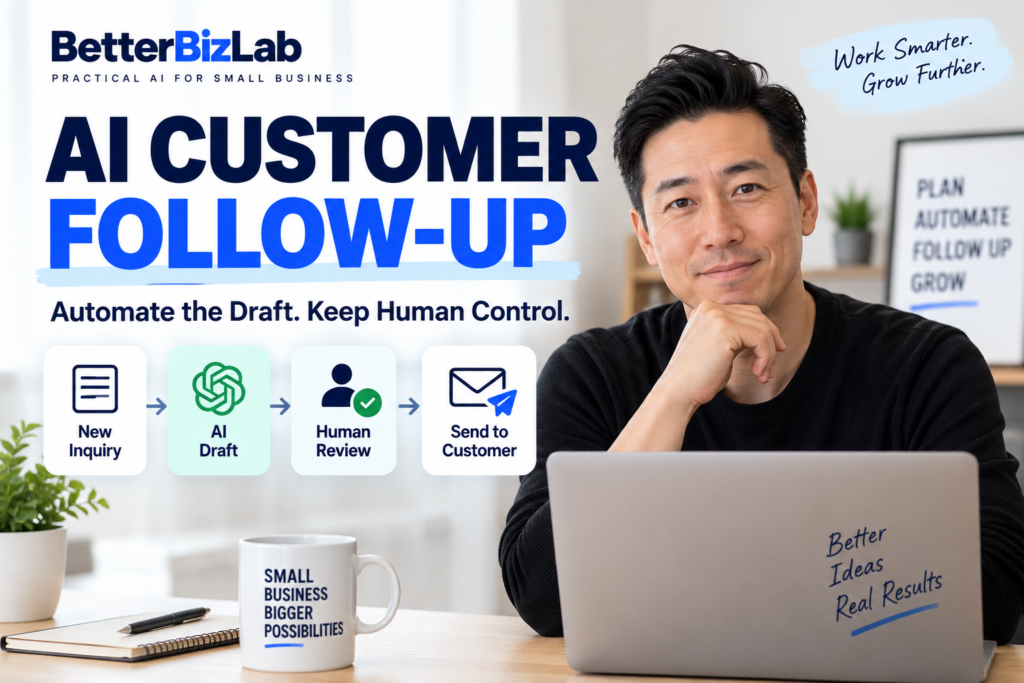
Website inquiry → Lead saved → Pricing sent → Wait three days → Check for reply → AI prepares draft → Employee reviews → Approved email is sent → Monitor response
Several parts of this process can be automated.
A website form can create a lead in a CRM or spreadsheet. The system can record when pricing was sent. An automation can check whether three days have passed without a response. AI can then use the stored customer information to prepare a personalized follow-up.
But there is one step we would deliberately keep human:
Approving the message before it reaches the customer.
That small control point can prevent an incorrect price, inappropriate tone, misunderstood customer problem, or AI-generated statement the business never intended to make.
What We Learned From Testing AI Follow-Ups
We started with a simple question:
How much customer information does AI actually need to write a useful follow-up?
Instead of assuming more automation would automatically produce better communication, we ran two versions of the same basic task.
Test 1: Giving AI Basic Customer Information
Our first test provided only a general scenario.
A potential customer had requested information about a service costing approximately $1,500. The business had sent pricing three days earlier, but the customer had not responded.
We asked AI to prepare a short, professional follow-up that did not pressure the customer.
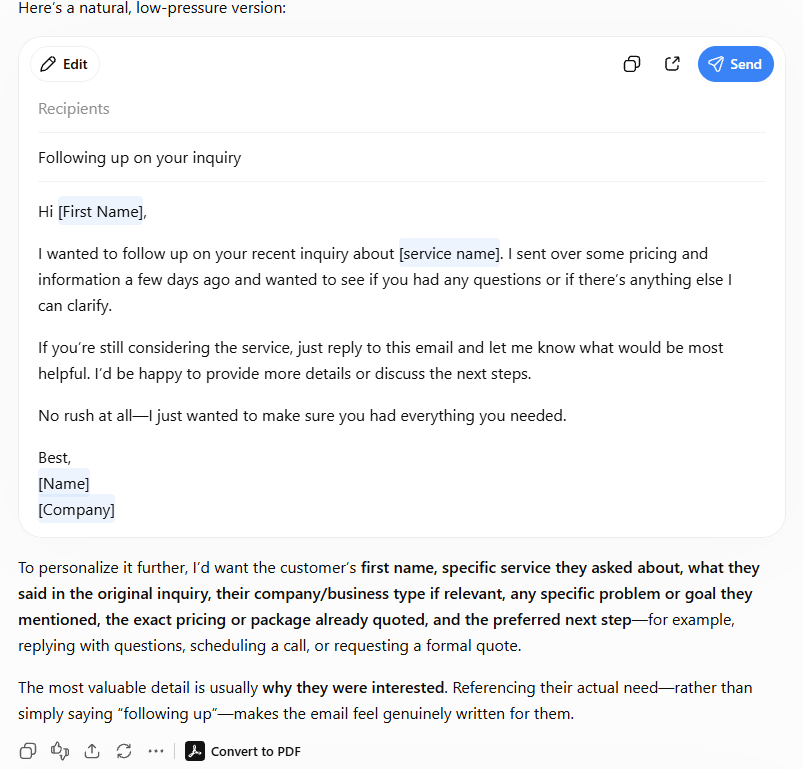
The result was usable.
The email was polite, concise, and gave the customer an opportunity to ask questions. It could easily serve as a starting template.
But it was still generic.
The draft relied on placeholders such as the customer’s first name and service name because the AI did not know much about the actual customer.
More interestingly, the AI identified what it was missing: the customer’s company, original inquiry, specific problem or goal, quoted package, and desired next step.
That gave us the direction for our second test.
Test 2: Adding Real Customer Context
For the second test, we kept the task similar but supplied much richer context.
Our hypothetical prospect was Sarah from Bright Dental Group.
She was interested in social media management because the dental practice wanted to attract more local families, but its staff did not have enough time to post consistently.
The quoted package was $1,500 per month, and the desired next step was a 20-minute call.
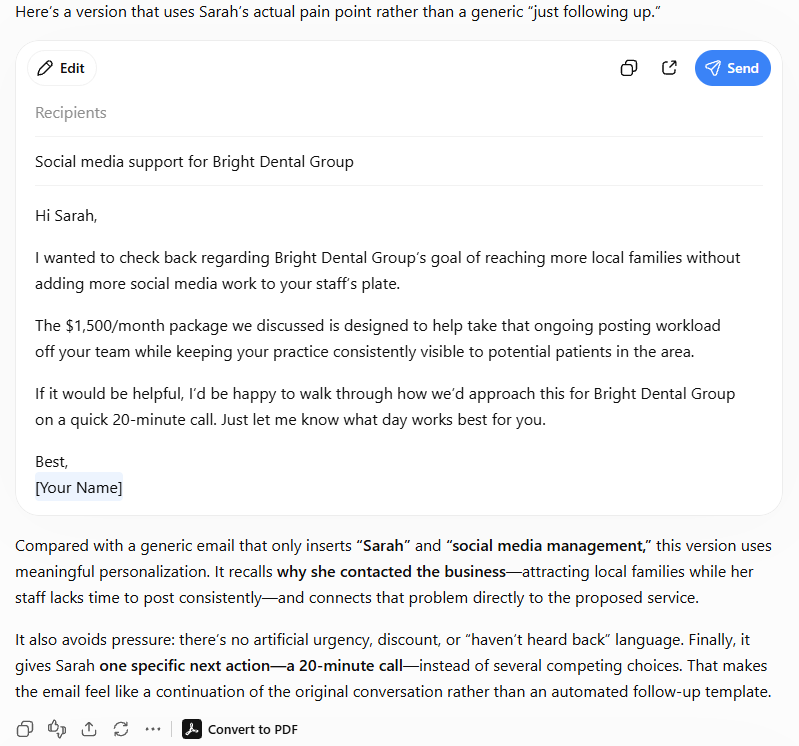
The difference was immediately noticeable.
Instead of simply saying, “I’m following up about social media management,” the draft referred to Bright Dental Group’s actual goal of reaching more local families without adding more work to its staff.
It also connected that problem to the proposed service and ended with one specific next step: a 20-minute call.
That led to one of the most useful findings from our test:
The biggest improvement didn’t come from a more complicated AI prompt. It came from giving the AI better customer context.
This matters for small businesses considering AI automation.
Before spending time building sophisticated prompts, make sure the automation has access to the right information.
The Customer Data AI Actually Needs
A first name alone is not meaningful personalization.
In our test, knowing why the customer contacted the business was more valuable than simply knowing what to call them.
For a practical follow-up workflow, we would try to make the following information available to the AI:
First name helps the message sound personal.
Company name gives the AI business context and helps avoid a generic template.
Service requested tells the system what the conversation is about.
Original inquiry provides details that may otherwise disappear after the first interaction.
Customer problem or goal helps AI write about what the prospect actually cares about.
Price or package quoted keeps the follow-up consistent with the previous conversation.
Date of last contact helps determine when a follow-up should be triggered.
Lead status prevents the system from following up with someone who has already replied, declined, or moved to another stage.
Preferred next step gives the email one clear call to action.
The important lesson is that personalization is not primarily about inserting someone’s name into a template.
It is about maintaining context from the original conversation.
A Practical AI Follow-Up Workflow for Small Businesses
Next, we tested how this could work as a complete process for a business with roughly 5–20 employees and no dedicated IT department.
We asked AI to design a workflow where tracking and drafting could be automated, but the AI was specifically prohibited from sending customer emails without human approval.
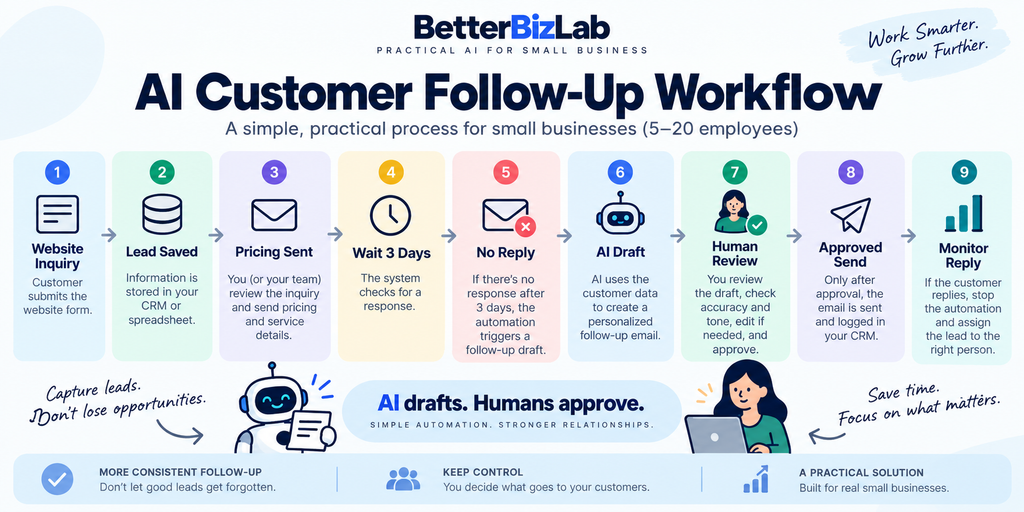
The resulting structure was practical:
1. Customer submits an inquiry.
The website form captures the lead.
2. Lead information is stored.
The CRM or spreadsheet records the customer’s name, company, requested service, inquiry, and problem or goal.
3. A person handles the initial response and pricing.
For many small businesses, we would not automatically hand pricing conversations entirely to AI.
4. The lead record is updated.
The system records the quoted package, date of contact, and a status such as Pricing Sent.
5. The system checks for a response.
If three days have passed and the customer has not replied, the automation triggers the next step.
6. AI prepares the follow-up.
It receives the stored customer context and creates a personalized draft.
7. A human reviews the draft.
The employee checks the facts, pricing, tone, promises, and next step.
8. The approved email is sent and logged.
Only after approval should the message go to the customer.
9. The system monitors for a reply.
If the customer responds, the automated follow-up sequence stops.
10. If there is still no response, the system can flag the lead again.
Rather than repeatedly emailing the prospect, the business can decide whether another follow-up makes sense.
This is intentionally not a complicated system.
A small business does not necessarily need custom software or an IT department to create the basic logic.
Why Human Review Still Matters
The most important design choice in this workflow is the approval step.
We would not recommend this logic:
Three days pass → AI writes email → AI automatically sends it
Instead:
Three days pass → AI writes draft → Employee reviews → Employee approves → System sends
AI can misunderstand an inquiry.
It can emphasize the wrong customer problem, use a tone that does not fit the relationship, include outdated information, or generate details that were never promised.
These risks matter more when the potential value of the customer is significant.
If a business is following up on a $1,500-per-month opportunity, saving a few seconds by removing human review may not justify the risk of sending a bad message.
The approval step is therefore not a failure of automation.
It is an intentional control point.
A useful way to think about the relationship is:
AI is the drafting assistant, not the decision-maker.
What Happens When the Customer Replies?
A good automation needs a stop condition.
Otherwise, a system can continue sending follow-ups after a prospect has already responded.
When the customer replies, the workflow should immediately change the lead status and stop future automated follow-up reminders for that sequence.
The lead can then return to the salesperson, owner, or appropriate employee.
AI can still help.
For example, it could summarize a long customer response or prepare another draft.
But the customer has now re-entered an active conversation, so human judgment becomes even more important.
A simple rule might be:
Customer replies → Stop follow-up automation → Update lead status → Assign employee
Knowing when to stop automating is just as important as knowing what to automate.
What If the Customer Still Doesn’t Reply?
One unanswered email should not trigger an endless sequence of AI-generated messages.
For example, after the first approved follow-up, a business might wait another five to seven days before flagging the lead again.
AI could prepare a shorter second draft, but a person should again decide whether sending it is appropriate.
After that, the lead might be moved into a status such as:
Nurture
Cold
or
Closed — No Response
The exact timing should depend on the business, sales cycle, customer relationship, and value of the opportunity.
The goal is not to maximize the number of emails sent.
It is to make sure legitimate opportunities do not disappear simply because someone forgot to follow up.
A Simple Rule Behind the Automation
The technical logic does not need to be complicated.
Conceptually, it could look like this:
IF Lead Status = Pricing Sent
AND Days Since Last Contact ≥ 3
AND Customer Has Not Replied
THEN Generate AI Draft + Notify Employee for Approval
That is the heart of the system.
You can add complexity later if the business actually needs it.
For a small team, starting with one reliable trigger is usually more useful than building a large automation system nobody understands.
Tools You Can Use to Build the Workflow
The workflow generally needs four components.
A CRM or spreadsheet stores the customer information and lead status.
An automation platform watches for the trigger and moves information between systems.
Platforms such as Zapier can connect forms, spreadsheets, CRMs, email tools, and AI services to build this type of workflow without custom software.
An AI model turns structured customer context into a draft.
An email platform handles the final approved communication.
You do not necessarily need the most advanced tool in each category.
A company handling a relatively small number of leads may be able to start with a spreadsheet and a simple automation. A business with multiple salespeople and hundreds of active leads may benefit from a proper CRM.
We have also compared broader options in our Best AI Automation Tools for Small Business guide, which can help you decide what level of automation fits your team.
If you are new to the overall concept, start with our broader guide to How to Automate Small Business With AI before building individual workflows.
Copy-Ready AI Customer Follow-Up Prompt
You do not need an elaborate prompt to start.
Here is a reusable version based on the structure we tested:
You are helping a small business follow up with a potential customer.
Customer: [FIRST NAME]
Company: [COMPANY]
Service requested: [SERVICE]
Original inquiry: [ORIGINAL INQUIRY]
Customer problem or goal: [PROBLEM OR GOAL]
Price/package quoted: [QUOTE]
Date of last contact: [DATE]
Lead status: [STATUS]
Preferred next step: [NEXT STEP]Write a professional follow-up email under 120 words.
Make it sound natural and human. Reference the customer’s actual problem or goal rather than simply saying “following up.” Do not pressure the customer. Do not invent facts, pricing, promises, or features that are not included above. Give the customer one clear next step.
Prepare the email as a draft for human review. Do not send or imply that it has been sent.
This can later become the prompt that your automation fills with information from your CRM or spreadsheet.
Common AI Follow-Up Automation Mistakes
Giving AI Too Little Context
A customer’s name and requested service are usually not enough.
The original problem, goal, and conversation history are what make a follow-up relevant.
Automatically Sending Every AI Draft
Automation can save time without removing human judgment.
For important prospects, keeping an approval step is a relatively small cost.
Forgetting the Stop Condition
If a customer replies, the follow-up sequence should stop.
This sounds obvious, but it needs to exist in the actual workflow logic.
Following Up Too Often
Automation makes sending emails easy.
That does not mean customers want more of them.
Define reasonable follow-up rules before turning the workflow on.
Allowing AI to Invent Details
Customer-facing AI should work from structured information.
A human reviewer should catch unsupported claims, incorrect prices, or promises the business cannot deliver.
Failing to Update Lead Status
Automation depends on accurate status information.
If the CRM still says Pricing Sent after a customer has replied, the workflow can make the wrong decision.
Is AI Follow-Up Automation Worth It for a Small Business?
It depends on the problem you are trying to solve.
If your business receives regular inquiries, sends quotes or proposals, and occasionally loses track of prospects because employees are busy, this type of workflow can be useful.
It does not require AI to replace your salesperson.
Customer follow-up is also one example of a repeatable workflow that can be packaged into an AI automation service for businesses. We cover that business model in our AI Automation Side Hustle guide.
Instead, AI handles one of the repetitive parts of the job: preparing a relevant draft at the right time.
But not every business needs a full automation.
If you only receive a few leads each month, manually asking AI to help draft follow-ups may be easier than building a workflow.
Likewise, highly complex or sensitive sales conversations may require more human involvement than the system described here.
The best automation is not necessarily the one with the fewest humans involved.
For a small business, it is the one that reduces repetitive work without giving up appropriate control.
Our testing pointed to a simple model:
Store useful customer context → Detect when follow-up is needed → Let AI prepare the draft → Let a person make the final decision.
That is enough automation to solve a real problem without turning a straightforward sales process into an unnecessary IT project.