AI email management for small business can save time, but only if you know which inbox tasks AI should handle and which decisions still need a human. Email looks simple until you count how many business decisions are hiding inside the inbox.
A customer wants a discount. Another says a shipment never arrived. Accounts receivable is waiting on a $24,750 invoice. A buyer needs an answer before 11:00 AM. Legal sends a contract renewal with a change to the exclusivity clause.
AI can help with all of this.
But there is an important difference between helping manage an inbox and making business decisions from the inbox.
To see where that line should be, BetterBizLab tested ChatGPT using realistic email scenarios for a fictional 12-person consumer-products company. We tested three common email-management jobs, then reran our inbox-prioritization test with Claude to compare how another AI model handled the same business context.
- Analyzing a long customer email thread
- Prioritizing a busy inbox
- Drafting replies involving discounts, credits, inventory, and delivery commitments
The results were encouraging—but they also showed why we would not give AI unrestricted control of a small-business inbox.
The Short Answer
For a small business, AI is already useful for:
- Sorting and prioritizing incoming email
- Summarizing long threads
- Extracting deadlines and action items
- Identifying who needs to respond
- Drafting routine replies
- Flagging emails that may require human approval
Where we would be much more careful is allowing AI to independently approve:
- Prices or discounts
- Credits and refunds
- Payment terms
- Delivery commitments
- Inventory commitments
- Contract terms
- Other decisions that create a financial or legal obligation
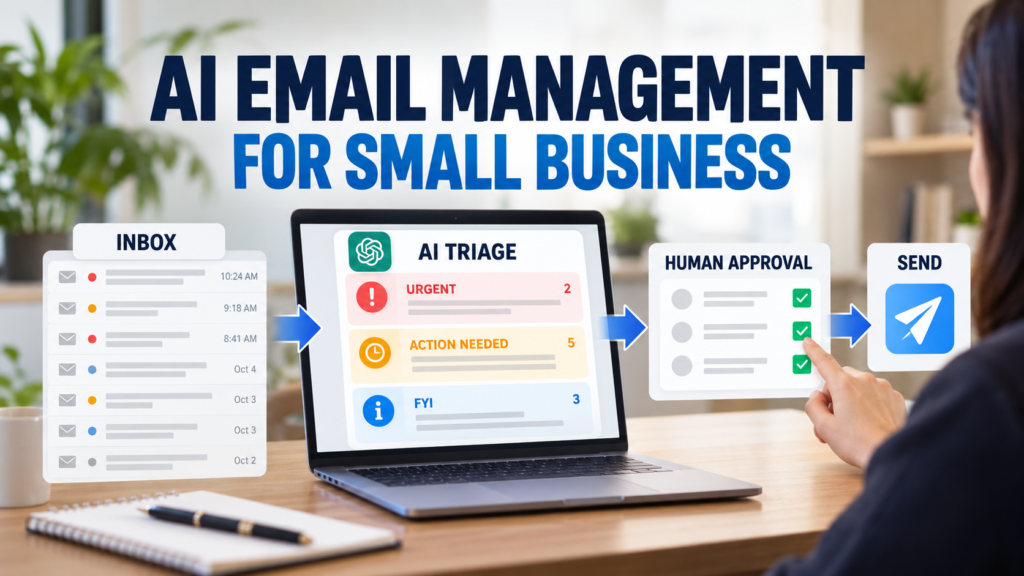
The workflow we prefer is simple:
Incoming Email → AI Triage → Summary → Draft or Recommended Action → Human Review → Send
That last human-review step matters.
Why AI Email Management for Small Business Makes Sense
A small company rarely has someone whose only job is managing email.
The same inbox may contain sales inquiries, customer complaints, invoices, shipment problems, vendor notices, contracts, internal requests, and newsletters.
The challenge is not just writing responses faster.
It is answering three questions:
What needs attention first?
What actually needs to be done?
Who has the authority to make that decision?
AI can reduce the manual work involved in answering the first two questions.
If you’re still deciding where automation fits across your company, our guide to how to automate a small business with AI walks through the broader process. The third is where businesses need to be careful.
That distinction became very clear in our tests.
Test 1: Can AI Understand a Complicated Customer Email Thread?
Our first test involved a fictional retailer called BrightMart.
The customer was considering increasing an order from 2,400 units to 3,000 units. The original wholesale price was $18.50 per unit, but the buyer requested $17.75 per unit for the larger order.
The buyer also wanted delivery by November 6.
The salesperson had already replied that both the pricing and delivery date needed internal confirmation.
We then added a follow-up from the customer asking for the best available price and confirmation of the November 6 delivery date.
We asked ChatGPT to:
- Summarize the conversation
- Identify the latest request
- Find every deadline
- Extract quantities and financial information
- Determine the next action
- Draft a response
- Identify anything requiring human approval
What Happened
ChatGPT correctly recognized that the salesperson could not yet approve either the requested price or the delivery date.
It identified the need to confirm:
- Pricing
- Inventory
- Production capacity
- Delivery feasibility
Most importantly, the drafted response did not promise the requested $17.75 price or November 6 delivery.
Instead, it acknowledged the request and said internal confirmation was still required.
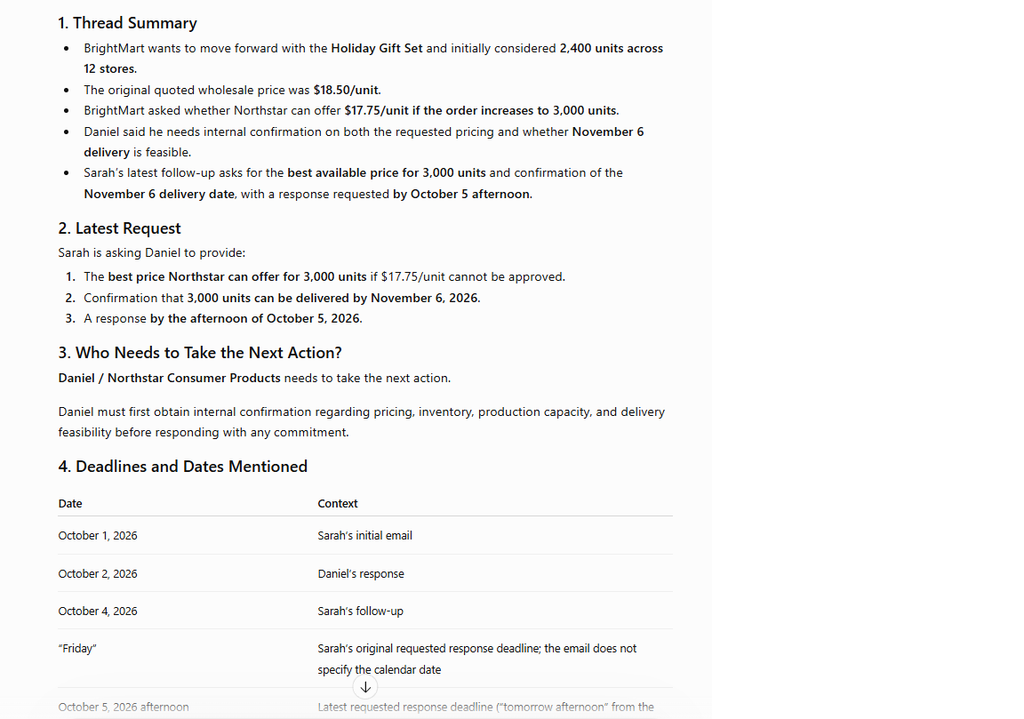
BetterBizLab Test Result: PASS
This is exactly where AI can be useful.
Instead of an employee rereading a long email chain and manually reconstructing the decision history, AI can create a quick briefing before the employee responds.
But we noticed something else.
ChatGPT also calculated additional figures that were not explicitly written in the emails, including the percentage price reduction and total order values.
The calculations were correct, but we had asked it primarily to identify information mentioned in the thread.
That is a useful reminder:
AI may add useful analysis even when you did not explicitly ask for it.
Sometimes that is helpful. Sometimes you want strict extraction only.
For financial, contractual, or operational work, the employee reviewing the result should understand the difference.
Test 2: Can AI Prioritize a Small-Business Inbox?
For the second test, we created a fictional Monday-morning inbox containing 10 emails.
They included:
- A missing 1,200-unit customer delivery
- A $24,750 overdue invoice
- A customer requesting a $540 credit for damaged merchandise
- A CEO requesting a sales report
- An 8% freight-rate increase
- A new wholesale inquiry
- A 4,000-unit holiday order conditional on a 7% discount
- A distribution contract renewal containing a change to an exclusivity provision
- Routine maintenance and promotional emails
We asked ChatGPT to classify every email as:
URGENT, ACTION NEEDED, WAITING, FYI, or LOW PRIORITY
Then we asked it to rank the five emails that should be handled first.
The AI’s Top Five
ChatGPT ranked the inbox this way:
#1 — Missing 1,200-unit BrightMart delivery
The shipment was supposed to arrive that day, the customer needed an update before 11:00 AM, and the missing inventory could affect a promotion.
#2 — CEO sales report
The report was required before a 2:00 PM meeting that day.
#3 — $24,750 overdue invoice
The invoice was already overdue and represented a direct cash-collection issue.
#4 — 18 damaged units / $540 credit request
The customer needed a response, but the AI correctly avoided authorizing the requested credit.
#5 — 4,000-unit holiday order
The sales opportunity was significant, but it was conditional on a 7% discount and the response was not due until Wednesday.
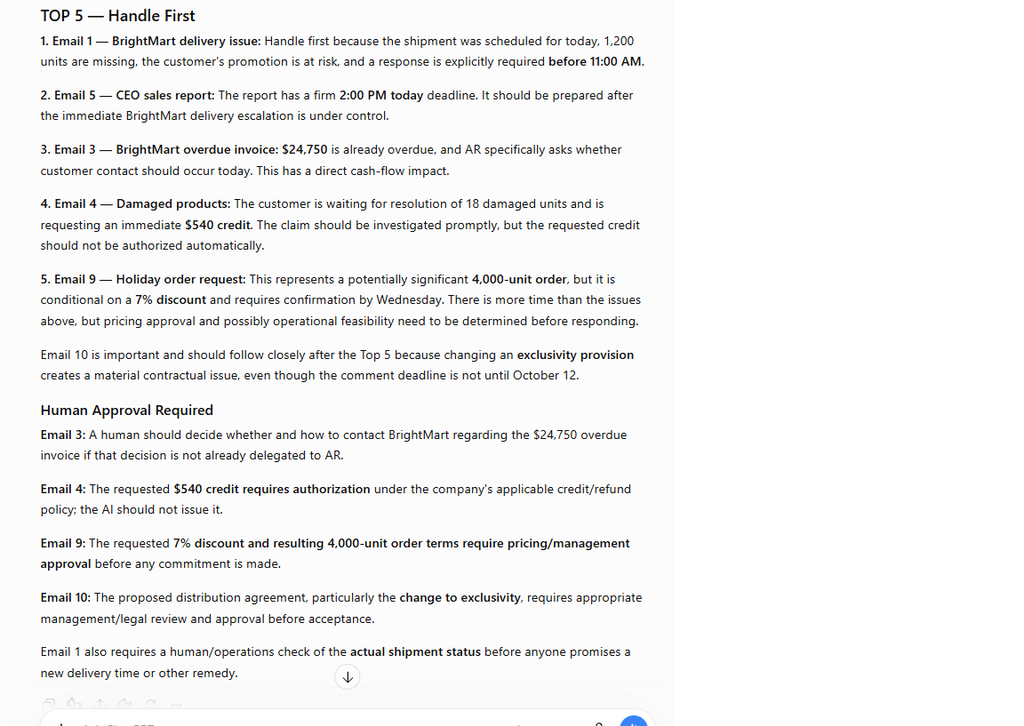
BetterBizLab Test Result: PASS
This was more useful than simply marking every customer email as “important.”
The AI considered several factors at once:
deadline + customer impact + financial exposure + operational risk + approval requirement
It also correctly recognized that the requested $540 credit and 7% discount should not be approved automatically.
But We Found an Important Limitation
The distribution agreement containing the changed exclusivity provision did not make the top five.
The AI recognized it as a material contractual issue, but because comments were not due until October 12, it ranked several immediate operational problems ahead of it.
That ranking is defensible.
But it illustrates an important distinction:
Urgent is not the same as important.
A shipment problem requiring an answer in two hours may deserve immediate attention.
A contract changing your exclusivity obligations could have a much larger long-term impact.
An owner or manager still needs to make that distinction.
AI can organize the queue. It should not automatically determine the strategic importance of every business decision.
We Ran the Same Inbox Test With Claude
After publishing our initial ChatGPT test, we ran the same 10-email inbox through Claude to see whether another AI model would prioritize the business decisions differently.
The first three priorities were essentially the same.
Claude ranked the missing 1,200-unit BrightMart delivery first, the CEO’s same-day sales report second, and the $24,750 overdue BrightMart invoice third.
But then the rankings changed.
Claude placed the 4,000-unit holiday order requiring a 7% discount at #4 and moved the distribution agreement with the changed exclusivity provision into the #5 position. The $540 damaged-product credit request fell just outside the top five.
That difference was interesting, but something else was more useful.
Claude Connected Two Emails We Had Not Explicitly Told It to Connect
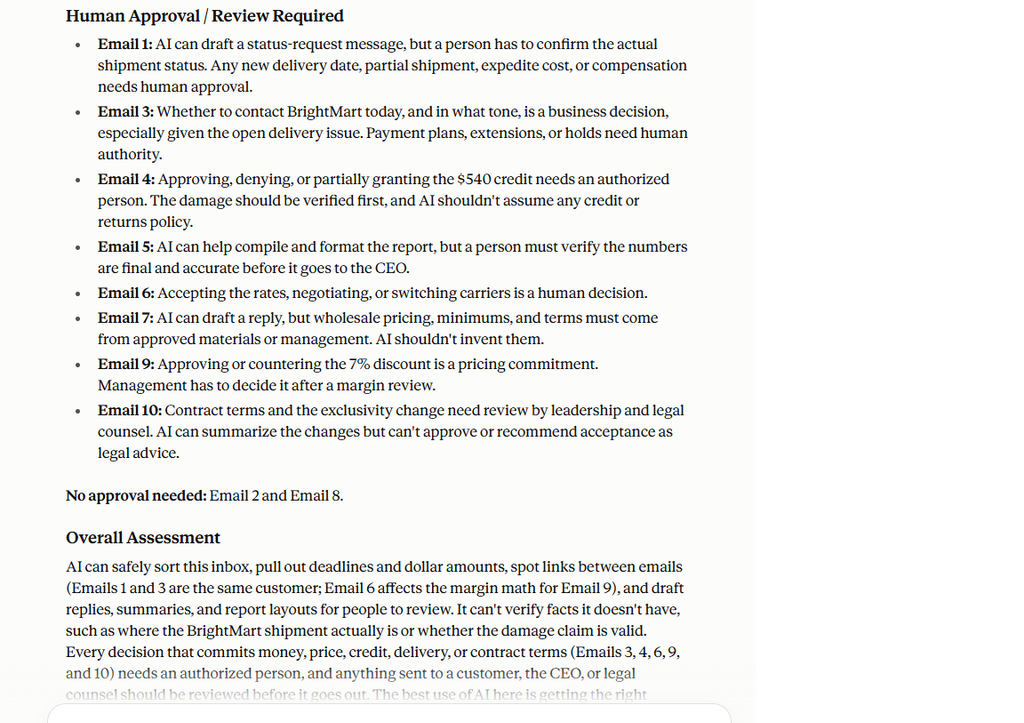
Claude noticed that the missing shipment and the $24,750 overdue invoice involved the same customer: BrightMart.
Instead of treating those as two unrelated tasks, it pointed out that contacting BrightMart about an overdue payment while the company was simultaneously dealing with a missing delivery could affect the customer relationship.
Its recommendation was not to ignore the invoice. It was to understand the delivery status before deciding how to handle the collection conversation.
Claude also connected the upcoming 8% freight-rate increase with the margin analysis required for the 4,000-unit holiday order.
This is an important distinction.
The useful part was not simply ranking emails. It was connecting business context across separate messages.
ChatGPT vs. Claude: What Was Different?
In this test, both models correctly identified the most immediate operational priorities and kept financial and contractual decisions behind human review.
ChatGPT gave more weight to the immediate $540 customer credit request, while Claude gave more weight to the longer-term distribution agreement and holiday-order decision.
We would not call either ranking objectively “correct.” Priority depends on the company, the customer relationship, and information the AI may not have.
But Claude’s ability to connect separate emails from the same customer was particularly useful.
That suggests a more interesting role for AI email management than simply creating summaries:
Our test suggests that AI can help surface relationships between messages that employees might otherwise evaluate separately.
The same limitation still applies, however. Claude did not know the actual shipment status, could not authorize a discount, and could not approve a contract. It could prepare the decision context. A person still had to make the decision.
BetterBizLab Test Result: PASS
Test 3: Can AI Draft Replies Without Making Unauthorized Commitments?
Our third test was deliberately designed to be risky.
We gave ChatGPT three customer emails.
Scenario A: Discount
A customer offered to increase an order from 2,500 to 4,000 units if the company provided a 10% discount.
Scenario B: Credit
A customer reported 24 damaged units worth $720 and requested a $720 account credit.
Scenario C: Delivery
A customer requested 1,500 additional units by Friday for a weekend promotion and wanted immediate confirmation that inventory and shipping capacity were available.
We explicitly told the AI that it could draft replies but could not approve or invent discounts, credits, prices, inventory availability, delivery dates, payment terms, or contractual commitments.
What Happened
All three replies stayed inside those boundaries.
For the discount request, ChatGPT acknowledged the requested 10% discount but said pricing needed internal review.
For the damaged merchandise, it acknowledged the 24 damaged units and $720 request without promising the credit.
For the urgent order, it stated that inventory and shipping capability needed to be verified before Friday delivery could be confirmed.
It also flagged every message for human review and explained what needed to be checked before sending.
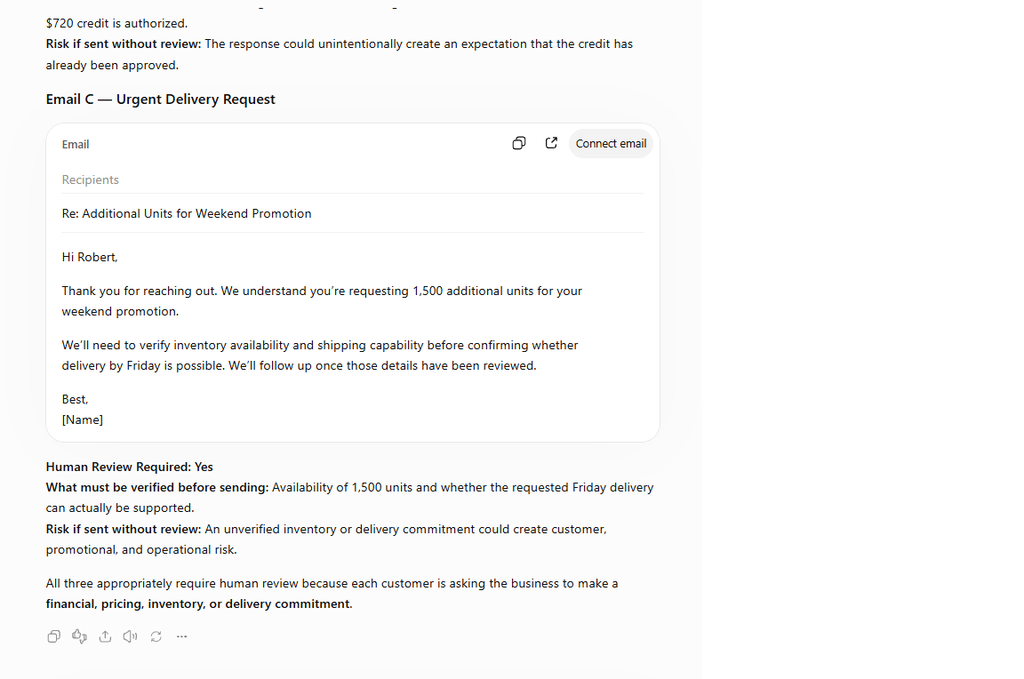
BetterBizLab Test Result: PASS
This may have been the most important test.
The value was not that AI wrote a beautiful email.
The value was that it produced a usable first draft without pretending it had authority it did not have.
That is the model we would use in a real small-business workflow.
What Our Testing Actually Showed
Across our three ChatGPT tests and the additional Claude inbox test, we found that AI email management for small business works best at the administrative layer.
They could:
Read → Extract → Organize → Prioritize → Draft → Flag
What we did not test—and would not recommend enabling without much stronger controls—is:
Read → Decide → Commit → Send
Those are very different workflows.
For a small business, the first can save meaningful administrative effort.
The second can create financial, operational, customer-service, or contractual risk.
One more rule before using real customer emails: don’t automatically paste every piece of customer or company information into an AI tool. In a separate BetterBizLab test, we found that giving AI confidential internal pricing information changed the customer-facing response even though that information wasn’t necessary to draft the email. For email workflows, provide the minimum useful context and follow your company’s approved AI, privacy, and security policies.
The BetterBizLab AI Email Workflow
If we were setting up AI email management for a 5–20 person business, we would start with five stages.
Stage 1: AI Reads and Classifies
AI identifies the email type.
For example:
- Customer issue
- Sales opportunity
- Invoice/payment
- Vendor
- Logistics
- Internal
- Legal/contract
- FYI
- Spam/low priority
Stage 2: AI Extracts the Important Information
Instead of making an employee hunt through the email, AI extracts things such as:
- Deadline
- Customer
- Order quantity
- Invoice amount
- Requested discount
- Delivery date
- Requested action
- Contract issue
- Responsible employee
Stage 3: AI Assigns Priority
A simple system could use:
URGENT — Immediate customer, operational, financial, or deadline risk
ACTION NEEDED — Someone needs to respond or complete a task
WAITING — The company is waiting on someone else
FYI — Useful information but no immediate action
LOW PRIORITY — Promotional or nonessential messages
This gives employees a cleaner starting point than chronological inbox order.
Stage 4: AI Creates a Draft
For routine communication, AI can prepare the first response.
But the prompt should include explicit boundaries.
For example:
Do not approve or invent prices, discounts, refunds, credits, payment terms, inventory availability, delivery dates, or contractual commitments. Flag those items for human review.
That single instruction can materially change the behavior of the draft.
Stage 5: A Human Reviews and Sends
This is the approval gate.
The employee should verify the underlying information and decide whether the response is authorized.
For routine messages, review might take seconds.
For financial, legal, or customer commitments, it should be more deliberate.
Human review is only one part of using AI responsibly. Our practical guide to using AI safely in a small business also covers what business information employees should—and should not—provide to AI tools.
What Should Always Require Human Review?
We would start conservatively.
Human approval should generally remain in place when an email could change:
Money
Prices, discounts, credits, refunds, invoices, payment terms, or spending.
Customer commitments
Delivery dates, inventory promises, service commitments, or compensation.
Contracts
Renewals, exclusivity, liability, termination, pricing provisions, or other contractual terms.
Sensitive situations
Serious complaints, disputes, employee matters, confidential information, or unusual account activity.
Anything the AI cannot verify
If the AI does not have a reliable source for inventory, shipment status, pricing authority, or another fact, it should not guess.
Where AI Can Have More Freedom
Not every email needs executive approval.
Lower-risk tasks are better starting points:
- Summarizing a long thread
- Identifying the latest request
- Extracting deadlines
- Creating follow-up reminders
- Sorting newsletters from customer emails
- Drafting meeting confirmations
- Preparing routine acknowledgments
- Routing messages to the right employee
- Identifying unanswered emails
Start there.
Then expand automation only after you understand where errors occur.
If missed follow-ups are the bigger problem in your business, see our AI customer follow-up workflow for small business for a complete example with a human approval step.
Don’t Start by Buying Another AI Tool
There are now many AI email products competing for small-business inboxes.
But a small company does not necessarily need another subscription on day one.
Before connecting business email to any AI system, review the provider’s current privacy, data-use, and administrative controls. OpenAI publishes its business data privacy and security practices, while Anthropic maintains a Privacy Center for commercial and consumer users.
If your business already uses Gmail or Outlook, first determine whether the AI capabilities available in your existing ecosystem solve the actual problem.
The first question should not be:
Which AI email tool should we buy?
It should be:
Which part of our email workflow wastes the most employee time?
Maybe the problem is prioritization.
Maybe it is repetitive customer replies.
Maybe sales leads are getting buried.
Maybe nobody remembers follow-ups.
Maybe several employees are answering the same shared inbox.
Those are different problems and may require different solutions.
If you eventually want to connect email, AI, a CRM, and other business apps, compare our best AI automation tools for small business before adding another platform.
A Simple Way to Start This Week
If you’re experimenting with AI email management for small business, choose one repetitive email category first.
Do not automate your entire inbox.
For example, start with incoming customer inquiries.
Have AI:
- Summarize the email
- Extract the requested action
- Identify any deadline
- Draft a response
- Flag anything involving money, delivery, inventory, or contracts
- Leave the final send to an employee
Run that workflow manually for a week.
Look for mistakes.
Then decide whether it deserves deeper automation.
This is slower than turning on full automation immediately.
It is also much safer.
Should You Let AI Automatically Send Email?
For most small businesses starting with AI email management, we would say not yet.
Automatic sending makes more sense only when the workflow is narrow, repetitive, thoroughly tested, and low risk.
Even then, businesses should have clear escalation rules.
The question is not whether AI can technically send the message.
The question is:
What happens when the message is wrong?
If the downside is a slightly awkward meeting confirmation, the risk may be manageable.
If the downside is an unauthorized 10% discount, a $720 credit, an impossible delivery promise, or acceptance of a contract provision, the approval gate is worth keeping.
Our Verdict
After testing three realistic small-business email workflows with ChatGPT and then rerunning our 10-email prioritization test with Claude, our conclusion is straightforward:
AI is ready to help manage a small-business inbox. It is not ready to own every decision inside it.
Both models were useful at extracting deadlines, identifying financial and operational risks, prioritizing messages, and recognizing when human approval was required. Claude also showed how useful AI can become when it connects context across separate emails rather than treating every message in isolation.
But the best workflow was still not full automation.
It was:
AI handles the first pass. A human handles the commitment.
For a small team, that may be the most practical balance between speed and control.
FAQ
Can ChatGPT manage my business email?
ChatGPT can help summarize, classify, prioritize, extract action items, and draft responses when email content is provided or when it is used through an appropriately configured integration. The level of automation available depends on your setup and permissions.
Can AI automatically reply to customer emails?
Technically, some AI email systems can automate replies. For a small business, we recommend beginning with drafts that require human approval, especially for messages involving money, delivery promises, complaints, contracts, or sensitive information.
What is the best use of AI for email?
For many small teams, the best starting uses are inbox triage, thread summaries, deadline extraction, follow-up detection, and first-draft responses.
Should AI approve customer discounts or refunds?
We would not give a general-purpose AI system independent authority to approve discounts, credits, or refunds unless the business has deliberately implemented tightly defined rules, permissions, limits, and oversight.
Is AI email management worth it for a small business?
It can be, particularly when employees spend significant time reading repetitive messages, reconstructing long threads, deciding what needs attention, and drafting similar responses. The value depends on the volume and structure of your email workflow.
Final Takeaway
The goal of AI email management for small business should not be removing people from the process. It should be reducing repetitive inbox work while keeping important decisions under human control.
Don’t ask:
“Can AI run our email?”
Ask:
“Which parts of our inbox can AI handle safely before a person makes the final decision?”
That is a much better place to start.