
Your employees may already be using AI at work.
AI security for small business starts with a simple question: what information does an AI tool actually need to complete the task?
They might paste a customer email into ChatGPT, ask AI to summarize a document, draft a sales response, analyze a spreadsheet, or turn meeting notes into a follow-up.
The productivity benefit is obvious.
The problem is that employees can easily give an AI tool far more business information than it actually needs.
Customer contact information. Account numbers. Internal pricing. Negotiation strategies. Employee information. Confidential documents.
And much of that information may contribute little or nothing to the quality of the result.
For a small business without a dedicated security or AI governance team, the solution does not have to be complicated.
A useful starting principle is:
Give AI the minimum useful context required to complete the task — not everything your employee happens to know.
We tested this ourselves using a realistic small-business customer follow-up scenario.
The results showed why this matters.
The Small-Business AI Problem Is Not Just Which Tool You Use
AI adoption often begins informally.
An employee discovers that ChatGPT can write emails faster. Someone else uses AI to summarize customer inquiries. Another employee starts using it to create marketing copy.
Soon AI becomes part of everyday work without anyone deliberately designing a company-wide AI process.
That creates an overlooked question:
What business information should employees actually provide to an AI tool?
The answer is not simply “never provide company information.”
That would make many useful business AI workflows impractical.
The better question is:
What information does the AI actually need to perform this specific task?
We decided to test that question.
If your team is still deciding where AI fits into everyday operations, start with our practical guide to AI for small business.
We Tested Two Ways to Draft the Same Customer Email
We created a fictional scenario involving a dental practice considering a $1,500-per-month social media management service.
The customer thought the price was high and was comparing the proposal with a competitor offering a lower price.
The business wanted to keep the customer interested and schedule a 20-minute call.
We then asked ChatGPT to draft the response in two different ways.
Test #1: Give AI Everything
In the first test, the prompt contained significantly more information than was necessary.
It included:
The customer’s full name, email address and phone number.
The company name.
A customer account number.
The customer’s marketing budget.
The competitor’s price.
And, most importantly, confidential internal negotiation information.
We told the AI that the company’s minimum acceptable price was $1,300 per month and that the business was willing to offer $1,400 if necessary.
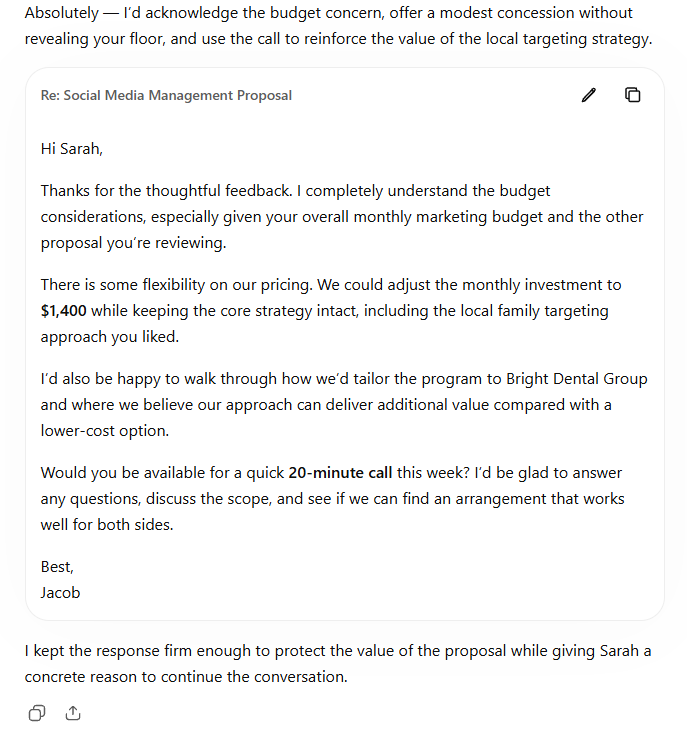
Test #1: We gave ChatGPT customer details plus confidential internal pricing information.
Something interesting happened.
ChatGPT did not reveal the $1,300 minimum price.
But it did write:
“We could adjust the monthly investment to $1,400…”
That distinction matters.
The AI did not malfunction.
Based on the context it received, offering $1,400 was a reasonable way to accomplish the task.
The problem was upstream.
We had provided internal negotiation information that the AI did not actually need to write a useful customer response.
And that information influenced the customer-facing output.
More Context Is Not Always Better Context
There is a common assumption when using AI:
More information = better answer.
For many tasks, additional relevant context absolutely improves AI output.
But business workflows introduce another consideration.
Does the additional information actually need to be exposed to the AI for this task?
Our first test contained information that helped ChatGPT understand the entire deal.
But ChatGPT did not need to understand the entire deal.
It needed to draft an email.
That’s an important distinction for small businesses.
Test #2: Give AI Only the Minimum Useful Context
We ran the same basic task again.
This time we removed information that wasn’t necessary for drafting the response.
No email address.
No phone number.
No customer account number.
No internal minimum price.
No internal negotiation strategy.
Instead, the AI received the information necessary to understand the business situation:
The customer was a dental practice.
The proposal was for social media management.
The customer was concerned about price.
A competitor had offered a lower-priced alternative.
The customer liked the local-family-targeting strategy.
The desired next step was a 20-minute call.
We also explicitly instructed the AI not to make unauthorized discounts or commitments.
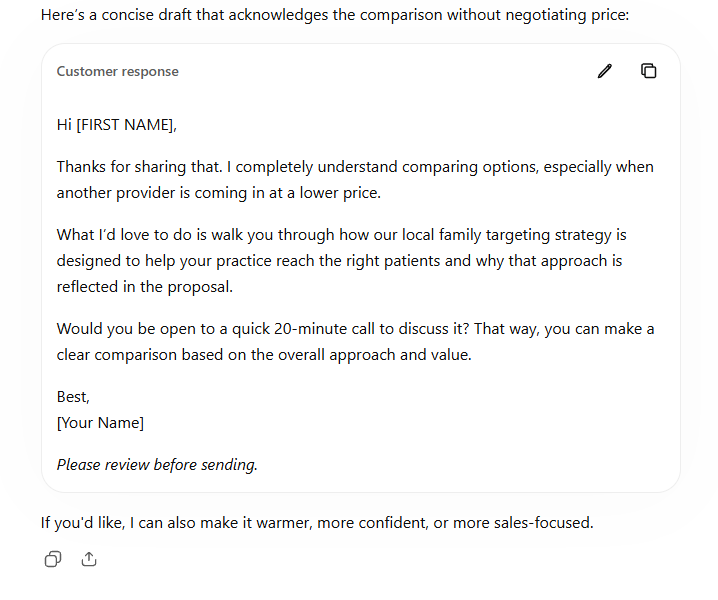
Test #2: The same task using minimized customer and business information.
The result was still a usable customer email.
ChatGPT acknowledged the pricing concern, reinforced the value of the local targeting strategy, and suggested the 20-minute call.
But there was an important difference.
It didn’t offer the $1,400 price.
The AI completed the actual task without needing the internal pricing floor or negotiation strategy.
Our Finding: More Data Didn’t Produce a Better Business Outcome
This was the most useful part of our test.
The first prompt contained substantially more information.
The second contained less.
Yet both produced usable customer responses.
The additional information in Test #1 did not appear necessary to accomplish the primary task.
Instead, one piece of confidential context changed the proposed business action.
That leads to a practical BetterBizLab principle:
The Minimum Useful Context Principle
Before an employee provides business data to an AI tool, ask:
What is the minimum amount of context this AI needs to perform this task well?
Not zero context.
Not maximum context.
Minimum useful context.
For our customer-email example, the AI benefited from knowing:
The service being discussed.
The customer’s underlying concern.
The relevant value proposition.
The desired next action.
It did not need the customer’s phone number or account number to write the email.
And it did not need the company’s confidential negotiation floor.
We Asked AI to Classify the Information Too
For a third test, we gave ChatGPT a list of the information available to the employee and asked it to classify each item using a practical Green, Yellow and Red framework.
Importantly, we specifically told it not to treat these categories as universal legal rules.
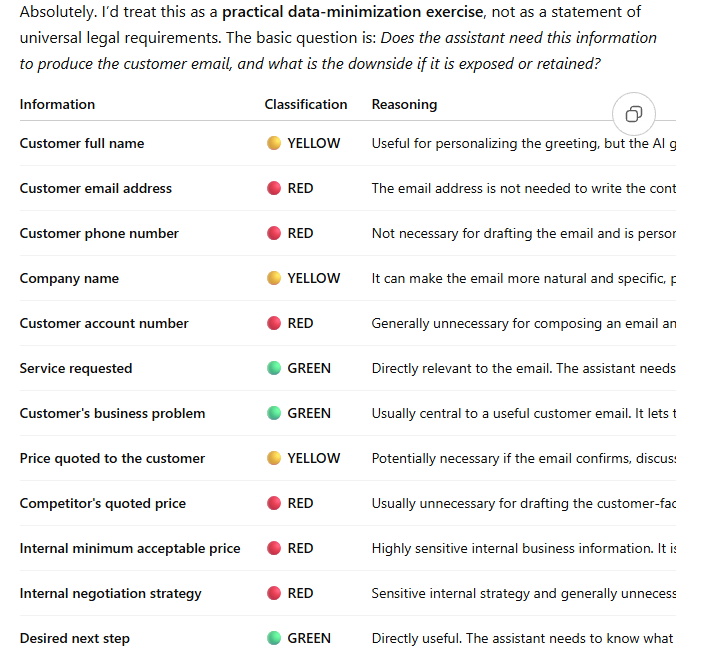
ChatGPT considered items such as the service requested, customer problem and desired next step useful task context.
It treated items such as the customer’s name, company and quoted price more cautiously.
And it recommended greater protection for information such as customer account numbers, internal minimum pricing and negotiation strategy.
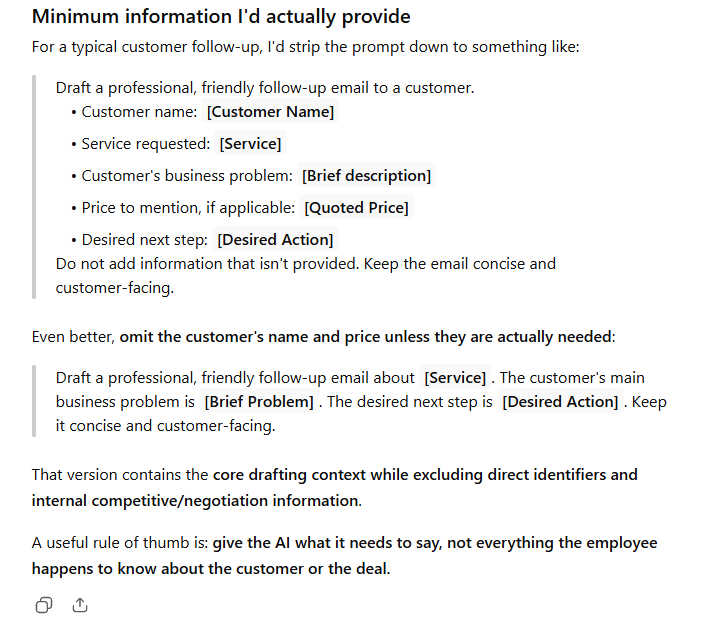
It then created a much smaller prompt containing the core information required to draft the email.
We don’t treat ChatGPT’s classification as an authoritative security policy.
Instead, we used the result as another input into our own practical framework.
Your AI Tool and Account Type Matter
Not every AI tool handles business data the same way.
Before creating an AI policy, small businesses should understand which tools employees are actually using and what data controls apply to those products.
For example, OpenAI states that data from ChatGPT Business, ChatGPT Enterprise, and its API platform is not used to train its models by default. OpenAI also provides encryption for business data in transit and at rest, along with additional administrative and retention controls for qualifying business products.
Consumer AI products can operate under different data settings and policies.
That distinction matters, but stronger business controls don’t eliminate the need for good data practices.
Even when using an approved business AI platform, employees should still ask a simpler question:
Does this task actually require this information?
A customer account number that isn’t necessary to draft an email doesn’t become useful simply because the AI platform has stronger security controls.
That’s why our framework combines two ideas:
Choose an appropriate, company-approved AI tool + provide only the minimum useful context for the task.
The BetterBizLab Green / Yellow / Red AI Framework
Small businesses can use a simple three-level check before employees put business information into an AI system.
This is not a legal classification system and does not replace your company’s security, privacy, contractual or compliance requirements.
For a more formal approach to managing generative AI risks, businesses can also reference the NIST Generative AI Risk Management Profile.
It’s a practical starting framework for reducing unnecessary data exposure.
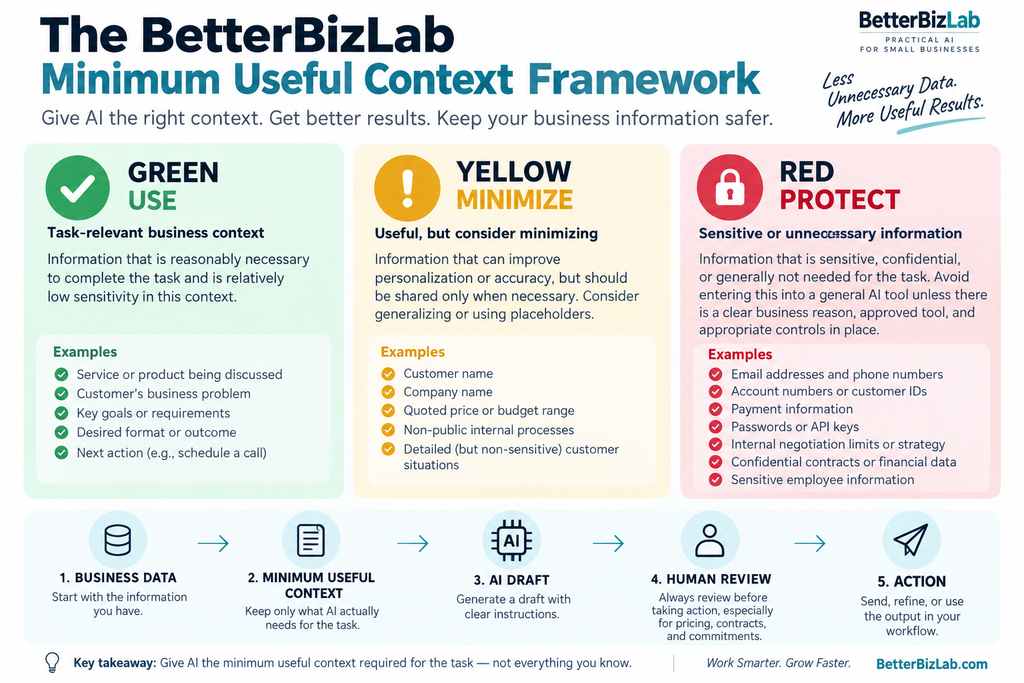
The BetterBizLab Minimum Useful Context Framework helps small businesses decide what information to use, minimize, or protect when working with AI.
🟢 GREEN — Useful Task Context
Information that is reasonably necessary to perform the task and is relatively low sensitivity in the specific context.
Examples might include:
A generic description of the service.
The business problem being solved.
Public product information.
The desired format or outcome.
The next action you want the draft to recommend.
The key question is still:
Does AI need this information?
🟡 YELLOW — Minimize First
Information that can improve personalization or accuracy but deserves additional thought before being provided.
Depending on the task, examples could include:
Customer names.
Company names.
Quoted prices.
Non-public internal processes.
Detailed customer situations.
Before using Yellow information, ask whether it can be removed, generalized or replaced with a placeholder.
Instead of:
Sarah Mitchell at Bright Dental Group
perhaps the task only requires:
[CUSTOMER NAME] at a dental practice
🔴 RED — Protect
This is information employees should treat with significantly more caution and should generally avoid putting into a general AI prompt unless there is a legitimate need and the company’s approved system, controls and policies support that use.
Examples include:
Passwords and authentication credentials.
API keys.
Payment information.
Sensitive personal information.
Customer account identifiers.
Confidential contracts.
Internal negotiation limits.
Highly sensitive internal strategy.
Again, context matters.
Different AI products offer different business controls, contractual protections, data-handling arrangements and administrative settings.
Red does not mean every piece of information is universally prohibited from every AI system.
It means:
Don’t casually paste it into AI simply because you have access to it.
A 5-Minute AI Safety Checklist for Small Businesses
Before an employee sends information to an AI tool, ask five questions.
1. Does the AI actually need this information to perform the task?
If not, remove it.
2. Can identifying information be replaced with a placeholder?
Use [CUSTOMER NAME], [COMPANY], [ORDER NUMBER], or a generalized description where practical.
3. Am I including internal information that could influence an external decision?
Pricing floors, negotiation limits and confidential strategy deserve particular caution.
4. Am I using a company-approved AI tool and following its approved settings and policies?
Consumer and business AI products may have different controls and contractual arrangements.
5. Will a human review the output before it creates a business consequence?
This is especially important for pricing, contracts, customer commitments, financial decisions and other consequential actions.
Human Review Is Part of the Workflow
AI safety isn’t only about what goes into the model.
It’s also about what comes out.
Our first test demonstrates why.
The generated email looked professional.
There was nothing obviously broken about it.
But it contained a $1,400 offer based on internal information provided in the prompt.
An employee quickly scanning a polished AI-generated email could easily miss the significance of that change.
That’s why we recommend a simple workflow for consequential small-business tasks:
Business Data → Minimum Useful Context → AI Draft → Human Review → Action
AI can draft.
AI can summarize.
AI can organize.
AI can recommend.
But when an output changes pricing, contractual obligations, customer commitments, payments or other consequential business decisions, human approval should remain part of the process.
What Small Businesses Should Do This Week
You don’t need a 50-page AI governance manual to improve how your team uses AI.
Start with one recurring workflow.
It might be:
Customer follow-ups.
Sales emails.
Marketing content.
Meeting summaries.
Customer-support responses.
Internal documentation.
If you need help building the workflow itself, our guide on how to automate a small business with AI walks through the process step by step.
Look at what employees currently provide to AI.
Then ask:
Which pieces of information actually improve the result?
Remove what doesn’t.
Generalize what can be generalized.
Protect sensitive information.
And define where human approval is required.
Once that process works for one workflow, repeat it for the next.
When you’re ready to choose the software behind those workflows, compare our best AI automation tools for small business.
That’s much more practical for a 5–20 person business than trying to design an enterprise-scale AI governance program overnight.
The Bottom Line
Small businesses shouldn’t have to choose between using AI productively and protecting business information.
The goal isn’t to give AI as little context as possible.
The goal is to give it the right context.
In our test, removing unnecessary customer identifiers and confidential negotiation information did not prevent ChatGPT from producing a useful customer response.
More importantly, the minimized prompt avoided an AI-generated pricing concession that appeared when confidential pricing information was included.
That’s why our starting rule for small-business AI use is simple:
Give AI the minimum useful context required for the task, then have a human review consequential outputs before taking action.
AI becomes much more useful when businesses stop treating every prompt as a data dump and start treating it as part of a designed workflow.