Winning a new customer is exciting. Onboarding them is where the operational work begins.
For many small businesses, the handoff from sales to delivery still involves copying information between emails, spreadsheets, CRM records, project management tools, and internal messages.
Someone has to review the sales notes. Someone has to figure out what information is missing. Someone creates the project, assigns tasks, requests account access, drafts the welcome email, and schedules the kickoff.
With AI and simple workflow automation, much of that administrative work can be reduced.
But there is an important distinction:
AI can prepare the onboarding process. It should not make commitments to your customer.
For a small business with 5–20 employees, the goal should not be fully autonomous onboarding. A better approach is to automate repetitive coordination while keeping a person responsible for reviewing customer-facing information, pricing, scope, deadlines, and promises.
This guide shows how to build that workflow.
What Is AI Customer Onboarding?
AI customer onboarding combines artificial intelligence with workflow automation to help move a new customer from a completed sale to an organized kickoff.
Instead of manually reviewing sales notes and creating every onboarding task, AI can help:
- Summarize customer requirements
- Identify missing information
- Prepare an internal onboarding brief
- Draft customer communications
- Suggest internal tasks
- Organize information for the delivery team
Traditional automation can then handle predictable actions such as creating projects, updating records, assigning tasks, and triggering reminders.
The important part is knowing where automation should stop.
AI should not independently decide what your company promised, change the customer’s scope, interpret unclear pricing, or send important customer communications without appropriate review.
What Should You Actually Automate?
Not every onboarding task requires the same level of automation.
A practical small-business system might look like this:
| Onboarding Task | Recommended Approach |
|---|---|
| Capture customer information | Automate |
| Update CRM or spreadsheet | Automate |
| Create onboarding project | Automate |
| Assign standard internal tasks | Automate |
| Summarize customer requirements | AI-assisted |
| Identify missing information | AI-assisted |
| Prepare onboarding brief | AI-assisted |
| Draft welcome email | AI-assisted |
| Confirm pricing and scope | Human review |
| Confirm promises and deadlines | Human review |
| Handle unusual requests | Human review |
| Send important customer communication | Human approval |
This distinction matters.
The best small-business AI workflow is often not:
AI does everything.
It is:
Automation handles predictable work → AI prepares judgment-heavy work → a person reviews important decisions.
A 7-Step AI Customer Onboarding Workflow
Here is a practical workflow that a small business can implement without an IT department.
Step 1: Trigger the Workflow When the Customer Is Ready
The onboarding process needs a clear starting point.
Depending on your business, that might happen when:
- A CRM opportunity changes to “Closed Won”
- A customer signs a contract
- A payment is received
- An employee changes a customer status to “Ready for Onboarding”
Avoid vague triggers.
Your team should know exactly what event officially moves a customer from sales into onboarding.
Step 2: Collect the Customer Information in One Place
Before asking AI to do anything, organize the source information.
For example:
- Customer name
- Company
- Contact information
- Service or package purchased
- Customer’s primary goal
- Sales notes
- Pricing
- Important requirements
- Promised deliverables
- Target dates
- Information already received
- Information still needed
This could live in your CRM, spreadsheet, form, or another system your team already uses.
The quality of the AI output depends heavily on the quality of this information.
If your sales notes are incomplete, AI cannot reliably reconstruct what happened during the sales process.
Step 3: Have AI Create an Onboarding Brief
Once the information is organized, AI can convert it into a structured internal brief.
For example, the brief might contain:
Customer: Bright Dental Group
Service: Digital Marketing Growth Package
Primary goal: Increase new-patient appointments from local families
Key problem: Limited staff time for consistent marketing
Missing information: Google Ads access, Google Business Profile access, brand assets
Next action: Send onboarding request and prepare for kickoff
Instead of requiring an account manager to read a long sales email thread, the delivery team receives a structured summary.
The original source information should still remain available for verification.
Step 4: Automatically Create the Internal Onboarding Tasks
Once a customer reaches the correct stage, standard administrative tasks can be created automatically.
For a marketing agency, for example, the workflow might:
- Create an Asana or ClickUp project.
- Assign the account manager.
- Create standard onboarding tasks.
- Create a shared customer folder.
- Notify the delivery team.
- Add relevant deadlines.
- Attach or link the AI-generated onboarding brief.
You do not necessarily need AI for this part.
Traditional rule-based automation is often better for predictable actions.
If every new customer needs the same six setup tasks, a workflow tool can create those tasks consistently without asking an AI model to decide what should happen each time.
Step 5: Let AI Draft the Welcome Email — But Don’t Automatically Send It
This is where AI becomes particularly useful.
Instead of using the same generic email for every customer, AI can use the onboarding information to prepare a more relevant message.
For example, it can reference:
- The service purchased
- The customer’s stated goal
- Information still needed
- The appropriate next step
But the draft should go to an employee for approval before it reaches the customer.
Human Review Checkpoint
Before approving the email, verify:
- Is the service scope correct?
- Is the pricing correct?
- Are the dates accurate?
- Did the AI add any promises?
- Did it assume something that was never agreed upon?
- Is sensitive information handled appropriately?
- Does the message accurately reflect the sales conversation?
This review does not need to take long.
The goal is for AI to reduce a 10-minute writing and information-gathering task to perhaps a one- or two-minute review—not to remove accountability.
Step 6: Collect Missing Information and Follow Up
The customer receives the onboarding request and provides the necessary information.
Depending on the business, that could include:
- Account access
- Documents
- Brand assets
- Business information
- Technical requirements
- Scheduling availability
The workflow can track what has and has not been received.
If required information is still missing after a defined period, the system can prepare a reminder.
For important customer communications, the same principle applies: let automation identify the need for follow-up and let AI prepare the message, while a person retains control where appropriate.
Step 7: Create a Kickoff Brief
Once the required information has been received, AI can prepare a second internal summary for the kickoff.
Instead of entering the meeting with information spread across forms, emails, and sales notes, the team can receive one structured briefing containing:
- Customer goal
- Scope
- Key contacts
- Requirements
- Received assets
- Outstanding questions
- Important sales notes
- Initial tasks
- Items requiring confirmation
The kickoff meeting can then focus on the customer rather than administrative information gathering.
Example: A 12-Person Marketing Agency
Consider a small marketing agency onboarding a new dental-practice customer.
The customer operates three locations and purchases a $2,500-per-month digital marketing package covering Google Ads management, local SEO, social media management, and monthly reporting.
During the sales process, the customer explains that the practice wants more new-patient appointments from local families. The staff does not have enough time to post consistently, and previous Google Ads performance has been inconsistent.
Once the deal is marked as ready for onboarding, the workflow could operate like this:
Closed Won
↓
Customer and sales information enters the onboarding workflow.
↓
AI prepares an onboarding brief and identifies missing access and assets.
↓
The project management system creates standard internal tasks.
↓
AI drafts the welcome and access-request email.
↓
Account manager reviews the draft.
↓
Customer receives the approved onboarding request.
↓
Missing information is collected and tracked.
↓
AI prepares the internal kickoff brief.
This is automation without giving AI control over the customer relationship.
We Tested This Workflow With Google Gemini
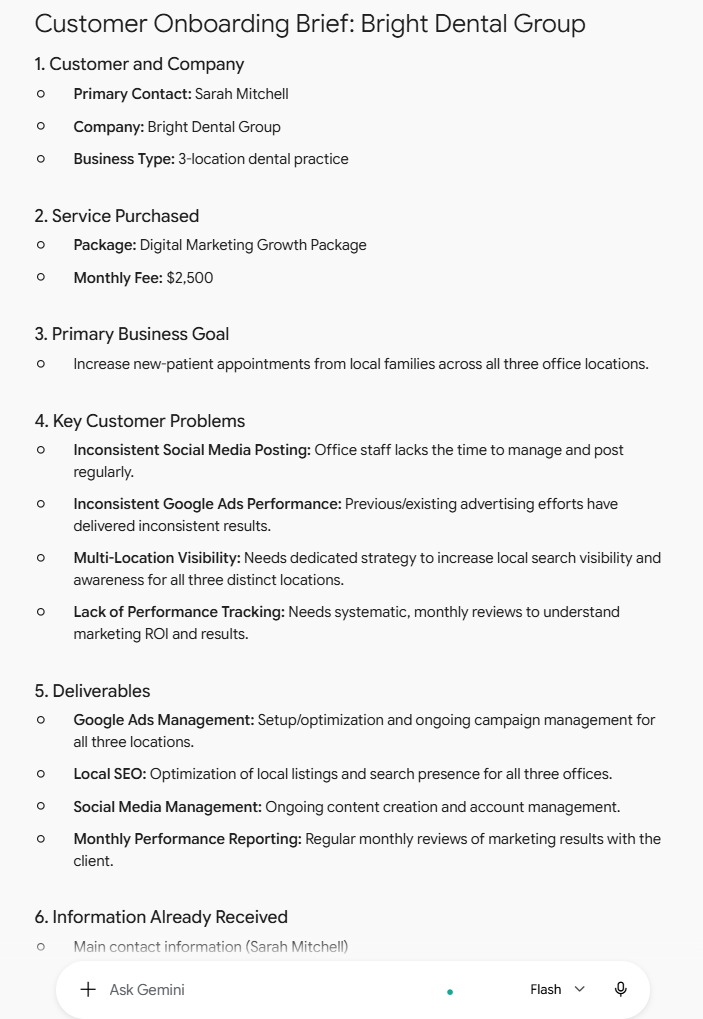
To see how this works in practice, BetterBizLab tested an onboarding prompt using Google Gemini and a fictional three-location dental practice.
We provided Gemini with structured customer information including the service purchased, monthly fee, business goals, sales notes, deliverables, information already received, and information still missing.
We specifically instructed the model not to invent missing information or make promises that were not included in the sales notes.
What Gemini Did Well
Gemini produced a well-organized onboarding brief and correctly identified several useful operational items.
It successfully separated:
- Customer information
- Business goals
- Customer problems
- Deliverables
- Information already received
- Missing information
- Internal tasks
- Recommended next action
- Items requiring human review
It also correctly recognized missing Google Ads access, Google Business Profile access, brand assets, previous marketing reports, and kickoff availability.
For an account manager receiving a new customer from sales, this type of summary could reduce the amount of information that needs to be manually reorganized.
Where Gemini Still Needed Human Review
The test also showed why businesses should not treat AI-generated onboarding information as automatically correct.
Gemini introduced some reasonable—but unconfirmed—assumptions.
For example, it suggested confirming how Google Ads spending should be allocated relative to the $2,500 monthly package, even though the source information never explained whether advertising spend was included or separate.
It also expanded “Google Ads management” into setup, optimization, and ongoing campaign management.
Those might be perfectly reasonable questions or activities, but they were not explicitly established by the information we provided.
That distinction matters.
An AI system can turn incomplete information into something that sounds operationally convincing. A reasonable assumption can easily look like an agreed fact when presented inside a polished onboarding document.
Our takeaway from the test was simple:
AI can prepare the onboarding brief. It should not define the customer agreement.
Pricing, scope, commitments, budgets, deadlines, and unusual customer requirements should be verified against the actual contract, proposal, CRM record, or sales conversation.
There is another practical consideration when using real customer information: data privacy. Our test used a fictional customer rather than real customer data. Businesses should review the data-handling policies of the AI service and account type they use before entering confidential or sensitive customer information.
Copy-Ready AI Customer Onboarding Prompt
You can adapt the following prompt to your own business:
You are helping a small business prepare a new customer for onboarding.
Review the customer information below and create a practical onboarding brief.
CUSTOMER INFORMATION:
[PASTE CUSTOMER INFORMATION]
Create an onboarding brief containing:
- Customer and company
- Service or package purchased
- Primary business goal
- Key customer problems or requirements
- Deliverables explicitly included in the source information
- Information already received
- Missing information
- Internal tasks required before kickoff
- Recommended next step
- Items requiring human review
IMPORTANT:
Do not invent missing information.
Do not expand the service scope beyond what is explicitly provided.
Do not create new pricing, deadlines, deliverables, guarantees, or promises.
Separate facts from recommendations.
Clearly label assumptions and anything requiring human confirmation.
Notice that the prompt explicitly tells the model to separate facts from recommendations.
Our Gemini test suggests that instruction is worth including.
Tools You Can Use to Build the Workflow
You do not need an expensive technology stack to start.
A simple system could combine:
| Purpose | Example Tools |
|---|---|
| Customer records | HubSpot or your existing CRM |
| AI analysis and drafting | Gemini, ChatGPT, or Claude |
| Workflow automation | Zapier or Make |
| Project management | Asana or ClickUp |
| Customer intake | Google Forms or Typeform |
| File storage | Google Drive |
You do not need all of these tools.
Start with the software your team already uses.
A company already managing customers in a spreadsheet and tasks in Asana does not necessarily need to migrate to a complex CRM before testing this workflow.
Start with one repetitive onboarding bottleneck and automate from there.
Common AI Onboarding Mistakes
Automating a Broken Process
AI does not fix an unclear onboarding process.
Before automating, define what should happen when a new customer signs, who owns each step, and what information is required.
Letting AI Interpret the Contract
Do not ask AI to decide what your company owes the customer.
Use the contract, proposal, or approved sales record as the source of truth.
Automatically Sending Every AI-Generated Email
Some routine reminders may eventually be appropriate for automatic sending.
But important onboarding communications deserve more caution, especially when they contain scope, timelines, access instructions, pricing, or commitments.
Giving AI Incomplete Context
If the sales team records poor notes, the onboarding output will also be incomplete.
Better automation starts with better source data.
Building Too Much at Once
A small business does not need a sophisticated autonomous AI agent on day one.
Start with:
Customer data → AI onboarding brief → human review
Once that works reliably, add project creation, reminders, and other automation.
A Simple Way to Start This Week
If your business currently handles onboarding manually, choose one recently completed customer and document exactly what happened between the sale and kickoff.
Identify the repetitive tasks.
Then choose one of them to improve.
For many businesses, the easiest first experiment is having AI convert existing customer and sales information into a standardized onboarding brief.
Run several past customers through the process and compare the AI output with what actually happened.
Look specifically for assumptions, missing information, incorrect scope, and invented commitments.
Only after the output becomes predictable should you connect it to additional automation.
The Complete Workflow
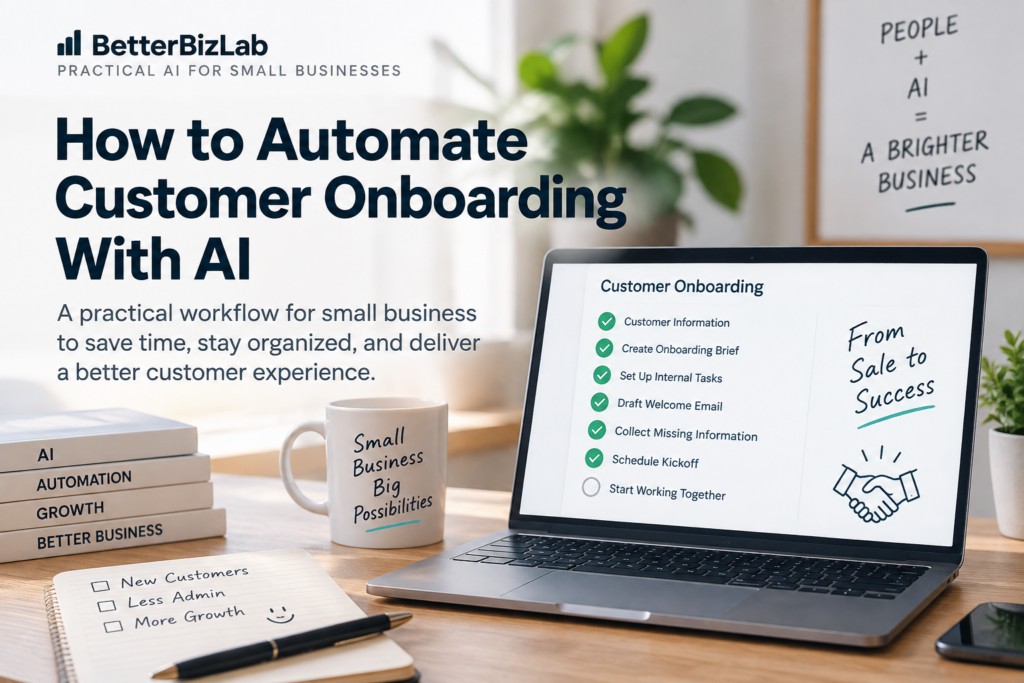
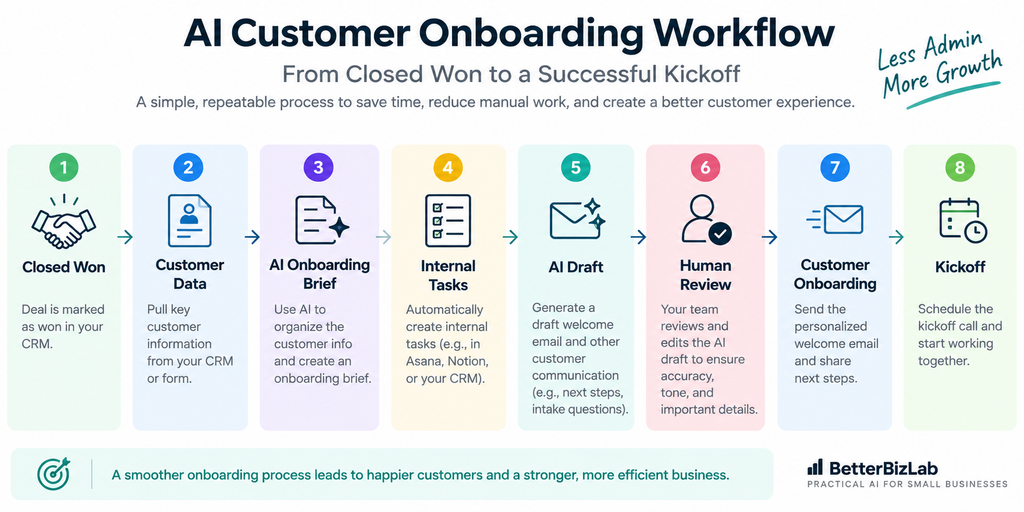
Closed Won → Collect Customer Data → AI Creates Onboarding Brief → Create Internal Tasks → AI Drafts Customer Communication → Human Review → Send Approved Onboarding → Collect Missing Information → AI Creates Kickoff Brief → Human-Led Kickoff
Final Thoughts
AI customer onboarding does not need to mean removing people from the onboarding experience.
For a small business, the more useful goal is to remove the repetitive administrative work surrounding that experience.
Let automation move information.
Let AI organize information and prepare drafts.
Let people verify commitments and manage the relationship.
That combination can make onboarding faster and more consistent without handing important customer decisions to an AI system.