Claude is moving beyond the chat window.
On September 15, 2026, Anthropic expanded Claude for Small Business to 43 ready-to-run workflows and announced 27 new integrations with business tools including Shopify, Salesforce, TikTok Ads, Zoom, Xero, Gusto, Square, Stripe, and Zapier.
The bigger story, however, is not the number of integrations.
It is what happens when Claude can actually work with the tools and context a small business already uses.
This is part of a broader shift toward AI automation for small businesses, where AI moves from generating content to helping execute repeatable business workflows.
So We installed the Small Business plugin and tested it with a real business workspace. Instead of asking Claude to summarize a document or write another email, We gave it a practical operations problem: build a complete onboarding workflow for a newly signed client.
The result was much closer to an operations assistant than a typical chatbot.
Claude inspected the connected workspace, recognized existing project structures, identified available team members, and proposed a 22-task onboarding system with built-in approval checkpoints—without making the changes before I approved them.
Here is what happened, what worked, and where small-business owners still need to stay involved.
Table of Contents
What Is Claude for Small Business?
Claude for Small Business is a collection of pre-built workflows and connectors that runs through Claude Cowork.
Instead of manually copying information between your AI chatbot and business software, Claude can work with supported tools you already use.
Anthropic says the current version includes 43 ready-to-run workflows spanning tasks such as sales follow-up, proposals, marketing, finance, reporting, and operations. The September expansion also added 27 integrations, while Anthropic currently lists 37 partner connectors that can work with the Small Business workflows.
Some supported tools include:
Shopify, Salesforce, HubSpot, QuickBooks, Microsoft 365, Google Workspace, Canva, DocuSign, Stripe, Square, Xero, Gusto, TikTok Ads, Slack, Notion, Zoom, Zapier, and others.
The important distinction is that Claude is not simply answering questions about these applications.
With the right permissions and connections, it can use business context from them to prepare and execute multi-step workflows.
What Changed in September 2026?
The September update significantly expanded the original product.
The initial version focused heavily on back-office tasks such as bookkeeping, invoices, payroll planning, and basic marketing operations.
The expanded version adds more workflows aimed at actually growing the business—including responding to leads, creating proposals, managing marketing activity, and connecting Claude with a much broader software stack.
That distinction matters for small businesses.
Many companies already use AI for isolated tasks: writing an email, summarizing a meeting, generating social content, or analyzing a spreadsheet.
Claude for Small Business is trying to connect those individual tasks into repeatable workflows.
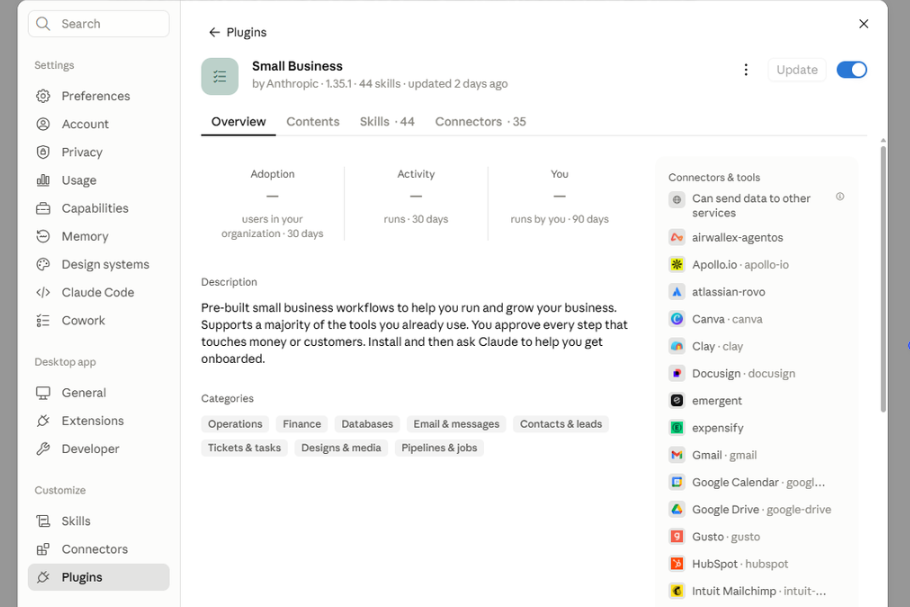
One interesting detail from our test: the live Claude interface displayed 44 skills and 35 connectors in our account.
That is not necessarily a contradiction with Anthropic’s announcement of 43 workflows and 27 new integrations. “Skills,” “workflows,” “new integrations,” and the connectors visible to a particular account are not necessarily equivalent metrics.
For that reason, we would not use those numbers interchangeably.
Our Hands-On Test: Building a Client Onboarding Workflow
We wanted to see whether Claude could handle something more useful than a generic productivity demo.
Testing note: BetterBizLab independently tested Claude for Small Business using a real business workspace and a hypothetical client-onboarding scenario. No actual client project was created, and employee names shown in screenshots have been obscured for privacy.
So we gave it a hypothetical but realistic scenario:
A 10-person small business has just signed a new $5,000 client.
If you want to build this process independently of Claude, our AI customer onboarding guide breaks down the full workflow step by step.
Claude was asked to design the process from signed agreement through kickoff.
We also gave it an important restriction: do not send messages, create records, or make changes without approval.
The workspace had Asana and Microsoft 365 available.
Claude first produced an eight-stage onboarding plan covering contract intake, internal setup, billing, client communication, scheduling, kickoff preparation, the meeting itself, and post-kickoff follow-up.
But the second part of the test was more interesting.
We asked Claude to turn that plan into an Asana onboarding structure—but to show me exactly what it intended to create before changing anything.
Claude then used the connected workspace to examine how existing projects were organized.
It recognized an existing sales-project structure, referenced a similar setup project, identified available team members, and proposed owners based on the business context it could access.
It didn’t just give me another generic checklist.
It produced a project structure with:
6 sections.
22 tasks.
Relative due-date logic.
Named task owners.
Multiple human approval checkpoints.
It also proposed using Asana Approval-type tasks so important actions would be visually separated from normal tasks.
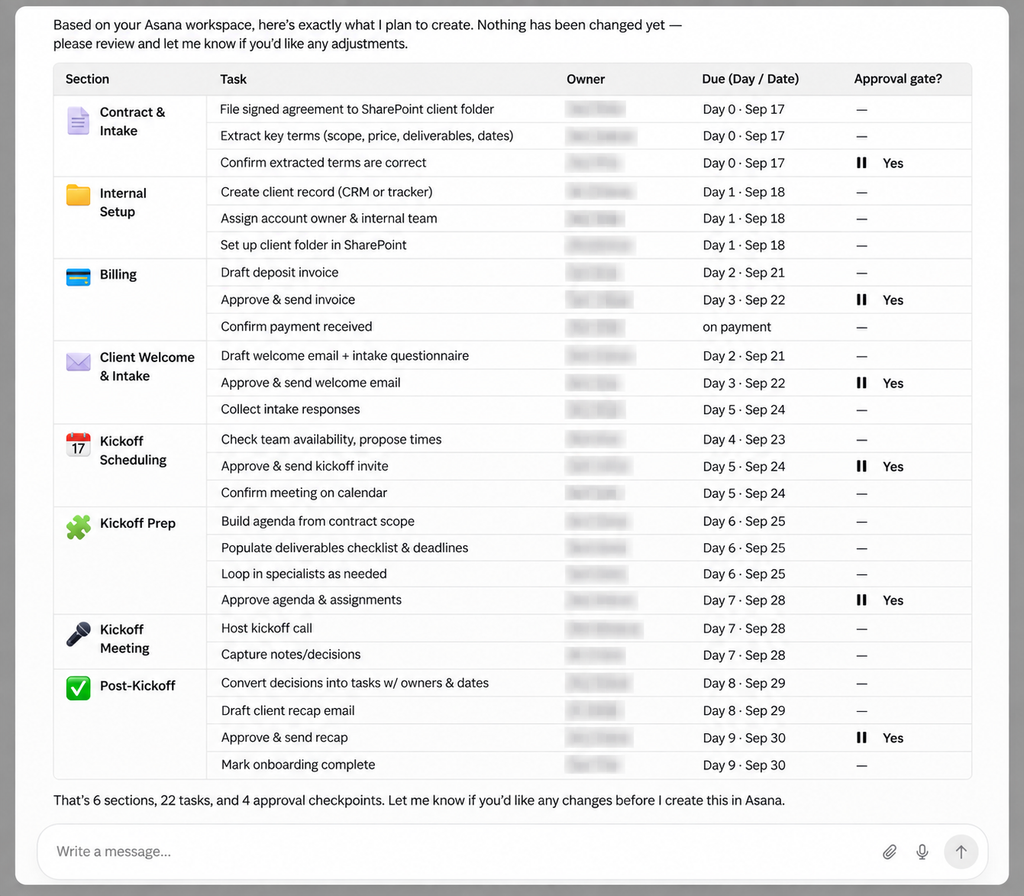
This is where Claude for Small Business started to feel meaningfully different from using a normal AI chat.
What Claude Got Right
The strongest part of the test wasn’t that Claude knew what a client onboarding process should contain.
Any capable AI model can generate an onboarding checklist.
The stronger result was its ability to use existing business context.
Claude looked at the connected workspace rather than pretending every company operates the same way. It adapted its proposal to existing project organization and available team members.
It also created practical sequencing.
For example, contract review came before billing, the welcome process preceded kickoff, and post-meeting decisions were converted into assigned tasks.
More importantly, Claude knew when information was missing.
It did not invent the client’s name or pretend to know the actual contract date.
Before executing the workflow, it asked for several pieces of information, including the real client name, contract-signing date, account lead, project location, and whether the workflow should become a reusable template.
That behavior matters.
A useful business AI should not fill operational gaps with confident guesses.
The Approval System May Be More Important Than the Automation
One of the most promising parts of the system is that automation does not automatically mean giving Claude unrestricted control.
Anthropic’s documentation says Small Business workflows begin in approval mode. Claude can draft, propose, and stage work while the user remains responsible for approving actions before something sends, posts, or pays. Existing permissions in connected applications also continue to apply.
Our test reflected that philosophy.
The workflow deliberately separated normal preparation tasks from actions that deserved human review.
An invoice could be drafted, for example, but sending it required approval.
A welcome email could be prepared, but client-facing communication remained behind an approval checkpoint.
The same principle applied to scheduling and other consequential actions.
For a small business, this is a better model than trying to automate everything.
The goal should not be removing humans from every process.
It should be removing repetitive work while keeping humans responsible for decisions involving customers, money, commitments, and judgment.
Where Claude Still Has Limitations
The test also exposed an important limitation.
Claude is only as operationally useful as the systems it can access.
Our workspace had Asana and Microsoft 365 available, so Claude could build a workflow around project management, files, email, and scheduling.
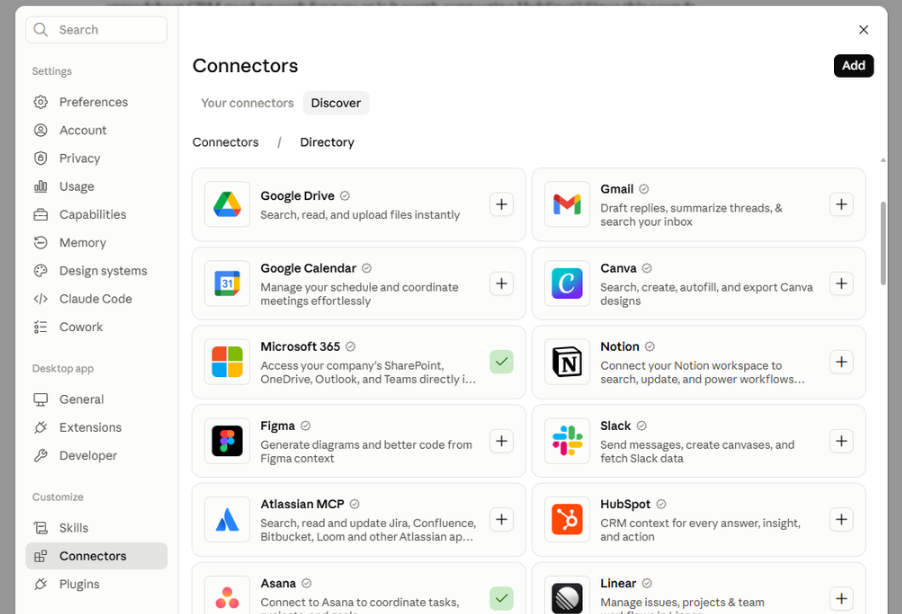
But if your CRM, accounting system, payment platform, or another critical application isn’t connected, the workflow develops gaps.
Claude recognized this during the test.
Without a connected CRM, for example, it suggested either maintaining a lightweight tracker or connecting a proper CRM.
That is an important distinction between AI assistance and real automation.
Claude can design an excellent process, but it cannot magically perform actions inside systems it cannot access.
There is another limitation: setup quality matters.
If your project management system is disorganized, permissions are poorly configured, or employees use inconsistent processes, connecting AI does not automatically fix those problems.
In some cases, it may expose them.
Setup Difficulty
Installing the Small Business plugin itself was straightforward in our test.
The more meaningful work begins afterward: deciding which applications Claude should access and what it should be allowed to do.
For a small company, I would start narrowly.
Connect one or two systems, choose one repetitive workflow, and keep approval requirements enabled while you evaluate the results.
A client onboarding workflow is a good example because it contains both repetitive administrative work and obvious human decision points.
Once the workflow consistently produces good results, then consider expanding the scope.
Anthropic similarly describes the system as one where the owner delegates the job in plain English while retaining judgment over consequential decisions.
Who Should Consider Claude for Small Business?
Claude for Small Business makes the most sense for companies that already run much of their business digitally.
If your team uses tools for CRM, project management, email, calendars, accounting, ecommerce, payments, or marketing, connecting those systems gives Claude more context to work with.
We think the strongest opportunity is for small teams where employees currently spend significant time moving information between systems.
Consider a typical customer onboarding process.
Someone reads the agreement.
Someone creates the project.
Someone creates tasks.
Someone assigns employees.
Someone drafts the welcome email.
Someone schedules the kickoff.
Someone updates the CRM.
Someone follows up after the meeting.
None of those jobs individually looks enormous.
Together, they consume a surprising amount of administrative time.
That is exactly the type of workflow where this approach becomes interesting.
Who Probably Doesn’t Need It Yet?
Not every small business needs an agentic workflow system.
If most of your operations still happen offline, your processes change constantly, or you don’t have clearly defined workflows, a conventional AI assistant may deliver more immediate value.
Likewise, a three-person company using only email and a basic accounting system may not need dozens of integrations.
Start with the problem, not the AI.
If there is no repetitive process worth improving, adding another automation platform will not create one.
Claude for Small Business vs. Regular Claude
The easiest way to understand the difference is this:
Regular Claude helps you think about the work.
Claude for Small Business is increasingly designed to help you perform the work across the systems where that work already happens.
That does not mean the system is autonomous.
And based on my test, I don’t think small-business owners should want full autonomy yet.
The more useful model is AI preparation + connected context + controlled execution + human approval.
That combination can remove a lot of administrative work without handing consequential business decisions entirely to an AI system.
If you’re deciding between the two major AI assistants more broadly, our ChatGPT vs. Claude for Small Business comparison looks at which platform makes more sense for different small-business tasks.
Is Claude for Small Business Worth Trying?
After testing the new Small Business plugin, the most interesting part wasn’t the number of workflows or integrations.
It was context.
Claude didn’t simply tell me how a hypothetical company could onboard a client.
It looked at an existing business workspace and constructed a workflow around what was already there.
The final proposal contained 22 tasks across six sections, with owners, deadlines, and approval points—and it stopped before creating anything because I had explicitly required approval.
That’s much closer to useful business automation than asking a chatbot to write another checklist.
But the value will vary dramatically depending on your software stack, how organized your processes already are, and how carefully you define approval boundaries.
For small businesses experimenting with AI automation, I would not start by asking Claude to run the entire company.
Start with one repetitive process.
Connect the systems required for that process.
Keep human approval at the important boundaries.
Then measure whether the workflow actually saves time.
That is a much more practical test of AI automation than counting how many tasks an AI claims it can perform.
FAQ
How many workflows does Claude for Small Business have?
As of Anthropic’s September 15, 2026 announcement, Claude for Small Business includes 43 ready-to-run workflows. Anthropic also announced 27 new integrations in the same update.
What apps work with Claude for Small Business?
Anthropic currently lists 37 partner connectors for the Small Business workflows, including Microsoft 365, Google Workspace, HubSpot, QuickBooks, Shopify, Salesforce, Stripe, Square, Xero, TikTok Ads, Slack, Notion, Zoom, Zapier, and others.
Can Claude send emails or make payments automatically?
Claude can prepare actions through connected systems, but Anthropic says Small Business workflows start in approval mode so nothing sends, posts, or pays until the user approves it. Workflows can later be given more autonomy when the owner trusts the process.
Does Claude ignore my existing app permissions?
No. Anthropic says existing permissions remain in effect. If an employee cannot access something through the underlying connected application, Claude does not give that employee new access to it.
Is Claude for Small Business fully autonomous?
It can perform increasingly complex multi-step work, but that doesn’t mean every business process should run without human supervision. In our test, approval checkpoints were particularly valuable around client communication, billing, and other consequential actions.