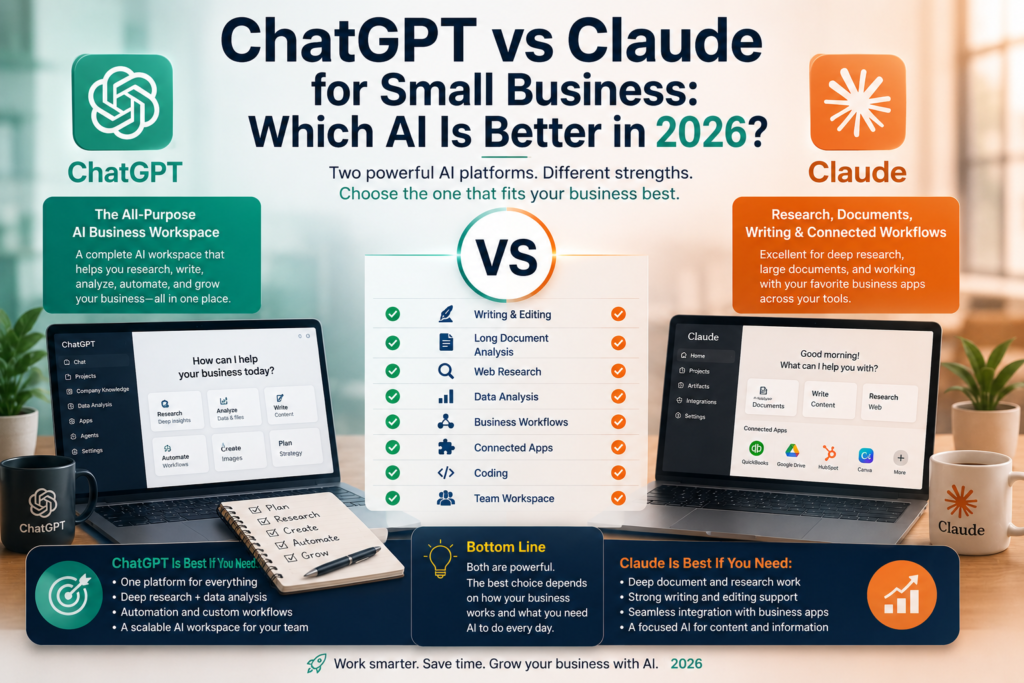
Small business owners are using AI for much more than writing emails or generating social media captions. AI tools can now help research competitors, analyze documents, organize business information, create marketing content, summarize meetings, and automate repetitive work.
Two of the strongest options are ChatGPT and Claude. But if you run a small business, you probably don’t want to pay for multiple AI subscriptions unless they provide different value.
This guide doesn’t try to crown a winner. It compares the two for the work a 5–20 person business actually does, using current plan information from OpenAI and Anthropic (checked September 24, 2026) and four small side-by-side BetterBizLab tests.
If you’ve already chosen ChatGPT and want to set it up well, see our guide to how to use ChatGPT for small business.
Quick Answer
Neither tool is better at everything. In our tests, the differences were small and depended on the task. Choose based on the workflows you run most:
- Consider ChatGPT if you want one assistant across many kinds of work — writing, spreadsheets, research, and connected apps — or your team works heavily in Excel or Google Sheets.
- Consider Claude if much of your work is reading and drafting from long documents, or your business runs on tools that Claude for Small Business connects to, such as QuickBooks, HubSpot, or Google Workspace.
- Most small businesses need only one. Start with the free plan of whichever fits your main workflow and test it on your own tasks before paying.
Quick Comparison: What Differs for a Small Business
| Topic | ChatGPT | Claude |
|---|---|---|
| Free plan | Free access, with limits on uploads, file analysis, and advanced features | Free access with usage limits; includes web search and up to five Projects |
| Paid individual plan | Go: $8/month (may include ads). Plus: $20/month | Pro: $20/month, or $17/month billed annually |
| Team plan | Business: $20 per user/month billed annually or $25 monthly; 2-user minimum | Team: standard seats $20 per seat/month billed annually or $25 monthly; 2-seat minimum |
| Reusable context | Projects with files and instructions | Projects with a knowledge base and instructions |
| Office and business apps | Excel, Word, PowerPoint and Google Sheets extensions; connectors on Business | Google Workspace on Pro; Microsoft 365 on Team; Claude for Small Business connectors |
| Business data | Business workspace data isn’t used for training by default | Team and Enterprise data isn’t used for training by default |
| API access | Billed separately from any ChatGPT plan | Billed separately, based on usage |
| Better fit if | You want one broad workspace for writing, data, and research | Your work centers on documents and writing, or on Claude’s business connectors |
Plan details come from OpenAI’s and Anthropic’s official pricing pages, checked September 24, 2026. They change often, so confirm them before you subscribe.
ChatGPT and Claude in Brief
ChatGPT
ChatGPT has grown well beyond a chatbot. For a small business, the relevant pieces are Projects for recurring work, file and spreadsheet analysis, web search and deep research, and — on the Business plan — a shared workspace with admin controls, connected apps, and workspace agents. OpenAI also offers ChatGPT Work for longer, multi-step tasks across files and apps.
Our guide to how to use ChatGPT for small business covers plan choice, setup, and three ChatGPT-only tests in detail.
Claude
Claude, developed by Anthropic, covers the same core ground: writing, analysis of documents and images, web search, and Projects for ongoing work. Anthropic has also built Claude for Small Business, launched in May 2026 — connectors and ready-made workflows that link Claude to tools such as QuickBooks, PayPal, HubSpot, Canva, Docusign, Google Workspace, and Microsoft 365, with approval required before anything sends, posts, or pays.
We tested it on a client-onboarding workflow, including its later expansion, in our Claude for Small Business review.
BetterBizLab Hands-On Tests
How We Tested
Feature lists only tell part of the story, so we ran four small side-by-side tests built to resemble everyday small-business work. In each one, ChatGPT and Claude received the same prompt and the same input, and we compared their first responses without regenerating them.
These are practical checks, not scientific benchmarks. AI output varies between runs and changes as models are updated, so treat the results as examples of how each tool behaved on a specific task — not as proof that one is better overall. We don’t list model versions because we can’t verify which were used in every test.
Tests 1–3 used fictional small-business scenarios and looked beyond writing style: instruction following, handling of missing information, unsupported assumptions, and prioritization. Test 4 used a synthetic contract, a predefined answer key, and a scoring rubric.
Test 1: Responding to an Unhappy Customer
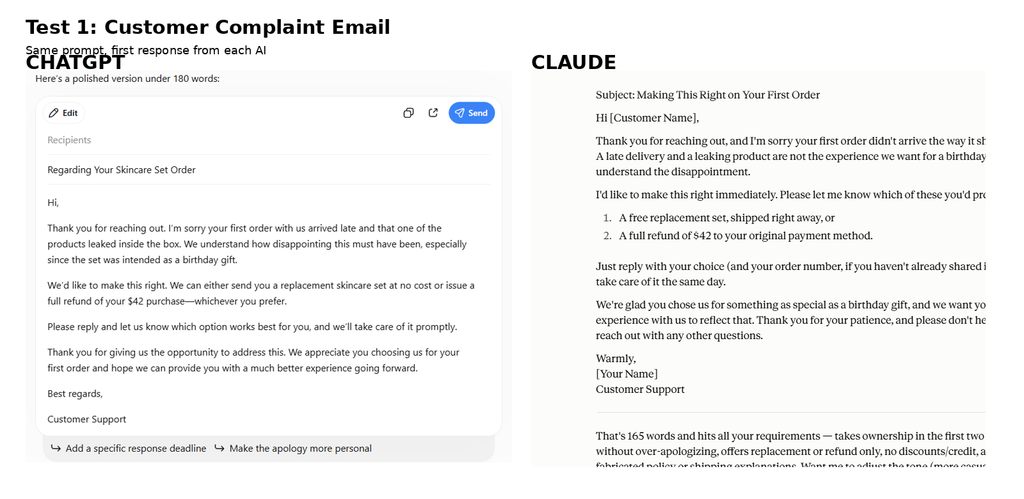
We asked both tools to respond to a customer whose $42 skincare order arrived late and damaged. The instructions required a warm, professional response offering either a free replacement or a full refund, while specifically prohibiting invented shipping details or company policies.
Both responses were good. Claude’s email read slightly warmer to us, but ChatGPT followed the operational constraints more carefully. Claude promised that a replacement could be “shipped right away” and that the issue would be handled “the same day.” Those timelines had not been provided in the prompt.
ChatGPT avoided making a specific fulfillment-time promise. For a real business, we preferred that restraint: a polished customer-service email can create an operational commitment if the wording goes beyond what the company can actually guarantee.
Test 1 result: Slight edge to ChatGPT for constraint following; slight edge to Claude for warmth.
Test 2: Turning Messy Business Notes Into a Management Report
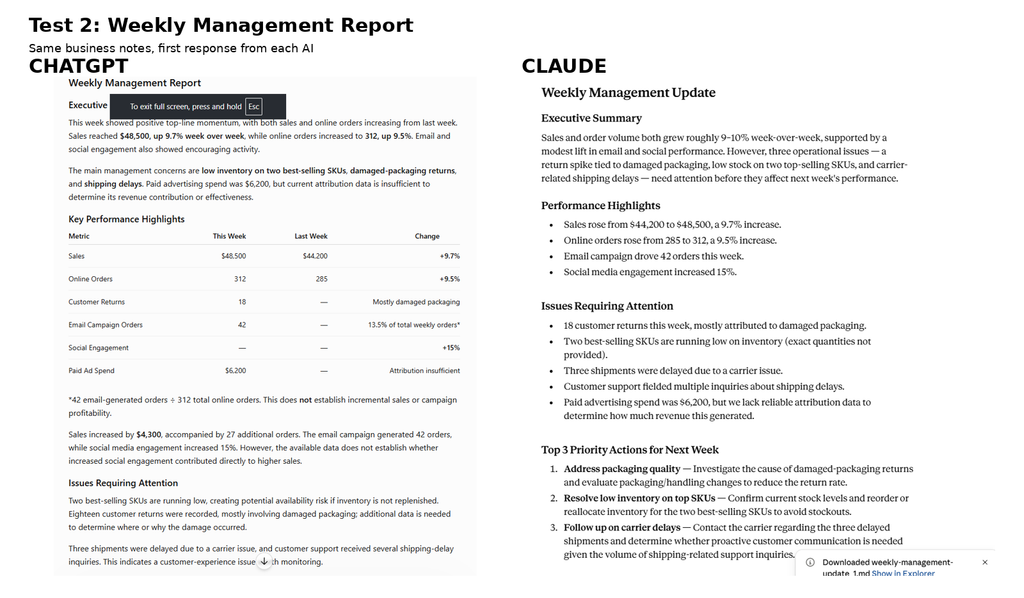
We gave both tools the same set of weekly business notes covering sales, orders, returns, inventory, email marketing, social engagement, shipping delays, and paid advertising.
Both correctly calculated week-over-week sales growth at approximately 9.7% and order growth at approximately 9.5%. Both also recognized low inventory, damaged-packaging returns, and shipping delays as issues requiring management attention.
ChatGPT stood out slightly in how it handled uncertain data. For example, it calculated that 42 email-generated orders represented about 13.5% of the week’s 312 online orders, but immediately clarified that this did not prove incremental sales or campaign profitability. It also avoided treating the 15% increase in social engagement as proof that social media caused the sales increase.
Claude was also disciplined about missing information and created a useful Data Gaps section covering paid-ad attribution, inventory quantities, and unresolved causes of the packaging and shipping problems.
Test 2 result: Slight edge to ChatGPT for data-interpretation discipline, although both performed well.
Test 3: Allocating an Extra $20,000
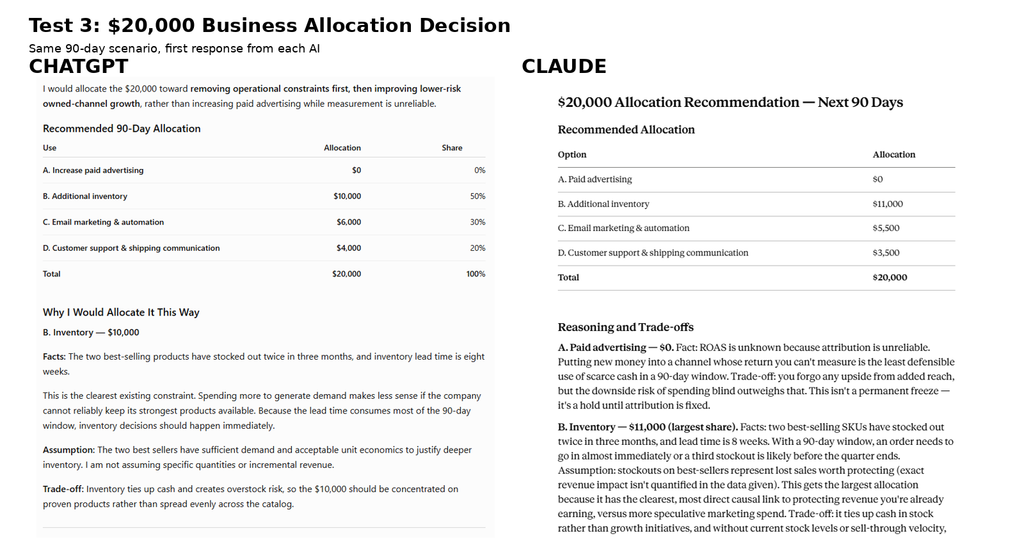
The third test asked both tools to advise a fictional ecommerce business on how to allocate an extra $20,000 over 90 days across paid advertising, inventory, email marketing, and customer support.
Both reached almost the same strategic conclusion: don’t increase paid advertising while attribution is unreliable, put the largest share into inventory because two best-selling products had repeatedly stocked out, and invest the remainder in email and customer-support improvements.
ChatGPT recommended $10,000 for inventory, $6,000 for email, $4,000 for customer support, and $0 in additional paid advertising. Claude recommended $11,000 for inventory, $5,500 for email, $3,500 for customer support, and $0 in additional paid advertising.
Claude had the slight edge for us in this test because it connected the eight-week inventory lead time particularly clearly to the 90-day decision window. It treated inventory timing as the binding constraint and made the immediate management priority unusually clear.
ChatGPT, however, was slightly more explicit about some of its assumptions and made an important distinction: recommending $0 in additional advertising did not mean the business should automatically stop its existing advertising spend.
Test 3 result: Slight edge to Claude for strategic prioritization and trade-off reasoning.
Test 4: Long-Document Accuracy Test
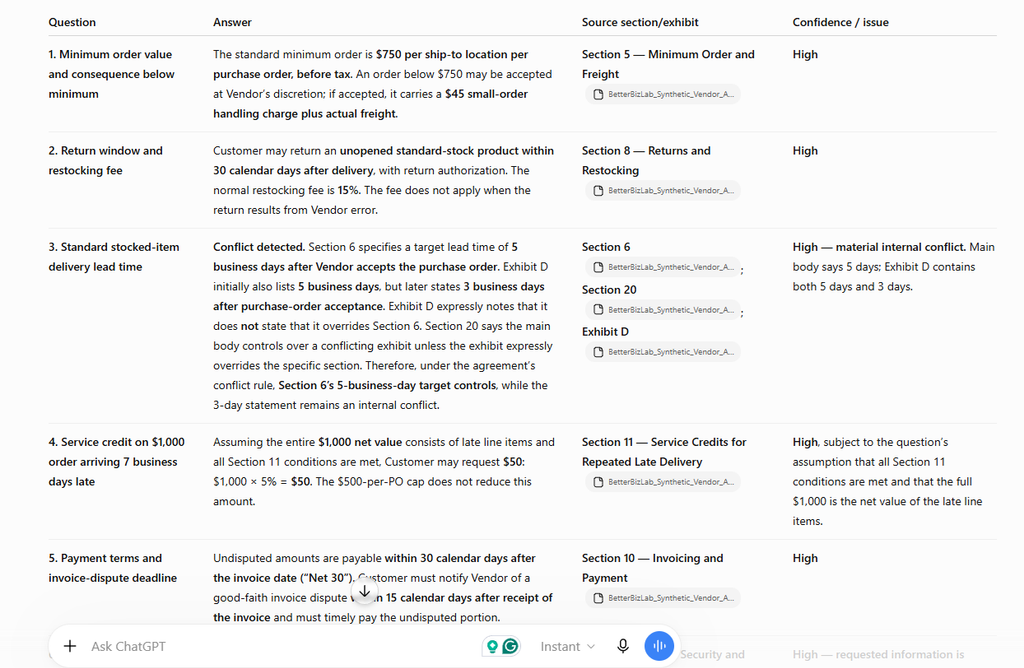
For the fourth test, we created a synthetic Vendor Supply and Services Agreement: Sections 1–20, Exhibits A–D, and Appendices 1–3, written in normal business terms. We planted one material internal conflict and included two questions whose requested information was not in the agreement.
Both tools received the same PDF and the same eight-question prompt in fresh chats. The prompt told them to use only the attached agreement, cite the exact section or exhibit, not assume missing facts, and identify any conflicts. We scored each tool’s first response, without regeneration, against a predefined answer key and a 26-point rubric. The ChatGPT account was a paid ChatGPT Plus account.
| Metric | ChatGPT | Claude |
|---|---|---|
| Question accuracy | 8/8 | 8/8 |
| Source accuracy | 8/8 | 8/8 |
| Missing information discipline | 4/4 | 4/4 |
| Conflict detection | 4/4 | 4/4 |
| Instruction following | 2/2 | 2/2 |
| Total | 26/26 | 26/26 |
Both tools found the $750 minimum order, the 30-day return window and 15% restocking fee, the $50 service credit, and the Net 30 payment terms with a 15-day dispute deadline. Both correctly refused to invent answers for the two questions (Q6 and Q7) whose information wasn’t in the agreement. Both found the planted conflict between the 5-business-day term in Section 6 and the 3-day term in Exhibit D, and both applied Section 20 correctly to explain why the main-body 5-business-day term controls.
Claude also noted a minor wording tension that wasn’t part of our scoring key: Section 11 is titled “Repeated Late Delivery,” but its operative language can be triggered by a single qualifying late order. Because that observation was outside the rubric, it didn’t change the score or the $50 answer.
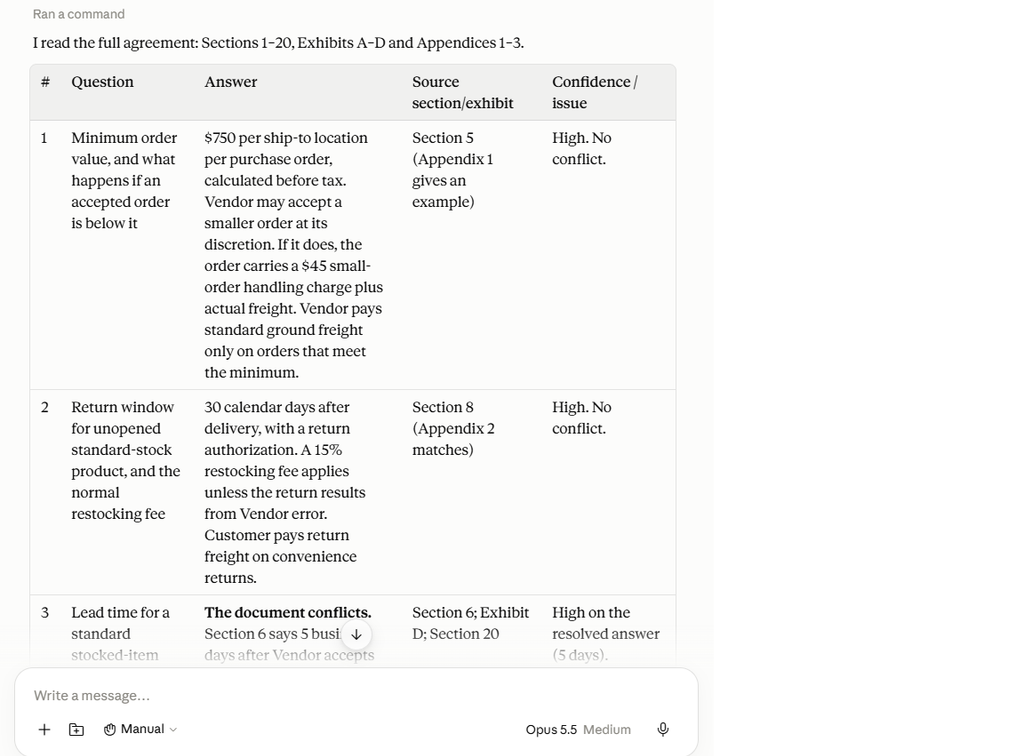
Test 4 result: Both tools performed perfectly under our predefined 26-point rubric in this controlled test. Claude surfaced one additional minor wording observation outside the scoring criteria. No overall winner can reasonably be drawn from one small test — if document review matters to your business, try both on a document of your own.
What We Learned From the Tests
We wouldn’t read these four tests as proof that one tool is universally better. They are a small practical sample.
What stood out was how they differed. In Tests 1 and 2, ChatGPT was slightly more disciplined when instructions contained operational constraints or when the data didn’t support a confident conclusion. Claude stood out for natural writing and, in the allocation exercise, particularly clear prioritization. In the long-document test, both were flawless on our rubric.
The practical lesson: the better tool can change with the task. Choose based on the workflows you actually run, and keep a human review step either way.
Writing
Both tools handle everyday small-business writing well: customer emails, blog posts, product descriptions, social posts, sales proposals, SOPs, internal documents, and meeting summaries.
The deciding factor is usually which output your team has to edit less. In our Test 1, Claude’s reply read warmer, while ChatGPT was more careful about operational promises — something to check in any customer-facing draft, whichever tool you use. ChatGPT’s breadth also helps when writing is one step in a larger job, such as research, then a draft, then repurposing into other formats.
Better fit: whichever style your team prefers. Try the same brief in both before deciding.
Research
Both tools can search the web and cite sources. ChatGPT offers deep research; Claude offers Research on paid plans, and Claude Pro includes a Google Workspace integration.
Useful research tasks include comparing competitors or software, researching suppliers, following market and industry trends, and preparing for customer meetings.
AI research should not replace verification. Financial, legal, tax, medical, or other high-impact business decisions should still be checked against reliable primary sources or qualified professionals.
Better fit: either. The more important choice is building verification into your process.
Documents and Files
Small businesses constantly deal with PDFs, proposals, contracts, reports, spreadsheets, meeting notes, and policies. Both tools accept uploaded files and offer Projects that keep reference documents and instructions together. Claude’s Projects are available on the Free plan (up to five), with expanded capacity on paid plans. OpenAI lists Projects across its signed-in ChatGPT plans, with file limits that vary by plan.
In our long-document test, both tools answered all eight contract questions correctly, cited the right sections, refused to invent missing facts, and caught the planted conflict. Anthropic lists context windows of up to 1 million tokens on its paid plans, depending on the model, which can matter for very long documents. For a typical business contract, our test didn’t show a difference.
Better fit: test with your own documents. In our view, ChatGPT suits jobs where a document is one input to a multi-step task, such as turning a report into a spreadsheet or presentation; Claude suits work that is mainly reading, comparing, and drafting from long text.
Data and Spreadsheets
Both tools can analyze uploaded spreadsheets and CSV files, explain trends, and help clean data. One concrete difference: OpenAI offers ChatGPT extensions for Excel, Word, PowerPoint, and Google Sheets, which is worth trying first if your team lives in spreadsheets.
In Test 2, both calculated the week-over-week figures correctly, and ChatGPT was slightly more careful about what the data couldn’t prove. Whichever tool you use, recheck key totals against your own system.
Better fit: ChatGPT for spreadsheet-heavy teams that want AI inside Excel or Google Sheets; otherwise, either.
Business Workflows and Integrations
The two companies are taking different routes. OpenAI is building ChatGPT into an all-purpose workspace — on the Business plan, that includes connected apps, company knowledge, workspace agents, and scheduled tasks, and ChatGPT Work handles longer tasks across files and apps.
Anthropic’s Claude for Small Business focuses on connecting Claude to the software a small business already uses and running ready-made workflows, with human approval before anything consequential happens.
Better fit: ChatGPT if you want one broad workspace; Claude if its connectors match your software stack. Either way, the systems you connect determine how useful the tool is, and consequential actions should stay behind human approval. Our guide on how to automate a small business with AI covers when to move from chat to automation.
Plans and Pricing
Pricing changes frequently. These figures are from OpenAI’s and Anthropic’s official pricing pages, checked September 24, 2026.
- ChatGPT: Free; Go at $8/month (OpenAI notes it may include ads); Plus at $20/month; Business at $20 per user/month billed annually or $25 billed monthly, with a 2-user minimum.
- Claude: Free; Pro at $20/month, or $17/month billed annually ($200 up front); Max from $100/month; Team standard seats at $20 per seat/month billed annually or $25 monthly (premium seats $100 or $125), with a 2-seat minimum.
For a solo owner, the entry paid plans cost about the same. For a team, standard seat prices and 2-seat minimums are now closely matched too, so the decision comes down to features and fit rather than price.
Neither subscription includes API access. Connecting either model to other software through its API — for example, in an automation tool — requires a separate account with usage-based billing.
Don’t choose on price alone. Run the same few real tasks through both free plans and see which one leaves your team less to fix.
Privacy and Business Data
Before staff paste customer or company information into either tool, check the plan’s data settings:
- ChatGPT: OpenAI says it doesn’t train on ChatGPT Business workspace data by default. On individual plans, conversations can be used to improve its models unless you turn off “Improve the model for everyone” in Data controls.
- Claude: Anthropic says Team and Enterprise data isn’t used for training by default. For Free, Pro, and Max, it says chats are used to improve its models only if you allow it in your privacy settings, or in limited cases such as safety reviews.
- For a team: a business plan also adds admin controls and keeps company work out of personal accounts.
Neither setting replaces your own rules about what should never be pasted into an AI tool. Our guide to using AI safely in a small business covers how to set those rules.
When ChatGPT May Be the Better Fit
- You want one AI platform for many kinds of work — marketing, research, spreadsheets, operations, writing, and planning.
- Your team works heavily in Excel or Google Sheets and wants AI inside those tools.
- You want to move gradually from simple chats toward agents and automated workflows in one workspace.
- Customer-facing drafts must stay within operational limits — ChatGPT was slightly more careful about this in our Test 1.
When Claude May Be the Better Fit
- Much of your work is reading, writing, and reviewing long documents or detailed drafts.
- Your business runs on tools Claude for Small Business connects to, such as QuickBooks, HubSpot, Google Workspace, or Microsoft 365.
- Your team prefers its writing style — its customer email read warmer in our Test 1.
- You want trade-offs laid out clearly — Claude had the edge in our budget-allocation test.
When Using Both Can Make Sense
Most small businesses don’t need both. One well-configured tool, used consistently with a review step, beats two subscriptions nobody has set up properly. Using both makes sense in a few specific situations:
- Different workflows, different tools. For example, ChatGPT for spreadsheet analysis and day-to-day operations, and Claude for long documents or connected small-business workflows — but only if each tool clearly earns its place.
- A second opinion on high-value work. Draft a contract summary, proposal, or policy in one tool, then ask the other to review it independently against the source document. Where they disagree is exactly where a person needs to look.
- Before committing a team. Run the same real tasks through both free plans for a week or two, then pay for one.
If you can’t name a specific workflow that each tool handles better for your business, pick one.
Which Should Your Small Business Choose?
There’s no overall winner, and our tests didn’t show large gaps. The differences that matter are practical: which tools your business already uses, whether your work is document-heavy or spreadsheet-heavy, and which tool’s output your team has to edit less.
Start with one. Pick the tool that fits your most frequent workflow, try it on the free plan with three real weekly tasks, and upgrade only once it’s saving time. Keep a person reviewing anything that reaches a customer or informs a decision.
Final Thoughts
Both platforms are improving quickly, and that competition is good for small businesses: AI tools are becoming easier to connect to real business information and more capable of completing multi-step work.
Identify three repetitive tasks you perform every week, test whether AI can make them faster without sacrificing quality, and expand from there. The best use of AI is often simple: removing repetitive work so you can spend more time on customers, strategy, and growth.
For more, see our 15 best ChatGPT prompts for small business owners and our guide to the best AI tools for small business.