AI agents are suddenly everywhere.
AI agents for small business are getting more attention in 2026, but that does not mean every small business needs one.
Software companies are adding “agents” to their products. AI platforms promise digital workers that can answer customers, update CRMs, research leads, schedule meetings, review documents, and complete multi-step tasks with less human involvement.
For a small business, however, the more useful question is not:
“How do I get an AI agent?”
It is:
“Do I actually need one?”
That distinction matters.
Many small businesses do not need a fully autonomous AI agent. In plenty of cases, ChatGPT, a simple automation, or an AI-assisted workflow with human approval can solve the same problem with less complexity and lower risk.
The goal should not be to use the most advanced AI available.
It should be to use the least complicated system that reliably solves the business problem.
In this guide, we’ll explain what AI agents actually are, how they differ from ChatGPT and traditional automation, when they make sense for a small business, when they do not, and what we learned from a BetterBizLab inbox-triage test.
What Is an AI Agent?
An AI agent is a system that can work toward a goal, decide what steps to take, use connected tools or software, evaluate what happened, and continue the workflow until the task is completed or requires human intervention.
That is different from simply asking ChatGPT to write an email.
For example, imagine you run a small service business.
A normal AI assistant might help you write a follow-up email when you ask for one.
An AI agent could potentially:
- Notice that a lead has not replied.
- Open the CRM and review the lead history.
- Read the original inquiry.
- Check which service and price were quoted.
- Decide what kind of follow-up is appropriate.
- Draft the message.
- Ask an employee to approve it.
- Update the CRM after the message is sent.
- Check later to see whether the customer replied.
The important difference is not that the agent writes better emails.
The difference is that it can manage parts of the workflow around the email.
OpenAI describes agents as systems that can independently carry out tasks on a user’s behalf, using a model to manage workflow execution and tools to interact with outside systems. OpenAI also notes that agents are most useful where deterministic, rules-based automation starts to struggle with ambiguity or complex decisions.
AI Agent vs. ChatGPT vs. Traditional Automation
One of the biggest problems with the term “AI agent” is that companies now use it to describe almost anything involving AI.
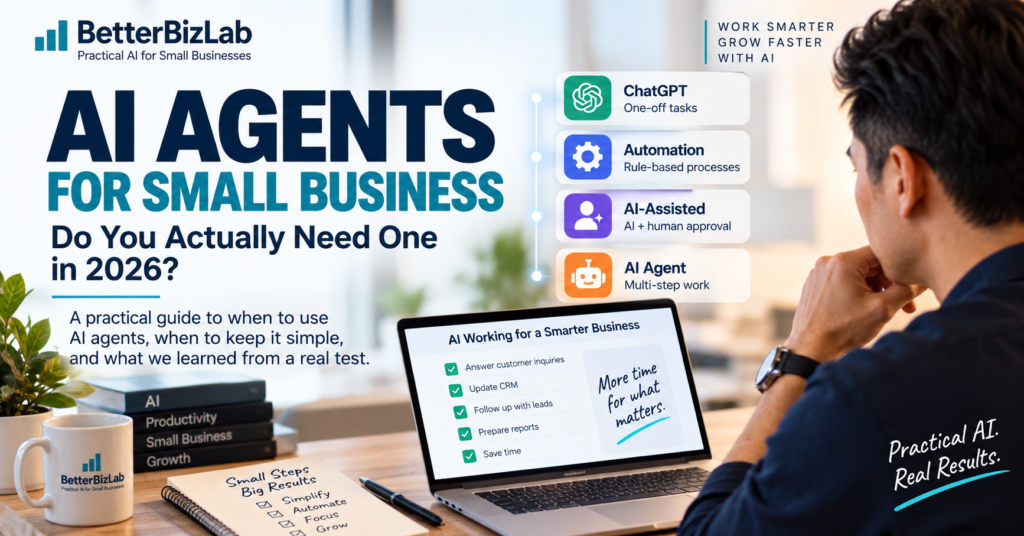
For a small business owner, it is more useful to separate four levels.
| Approach | Best For | Example |
|---|---|---|
| AI assistant | One-off thinking, writing, or analysis | Ask ChatGPT to draft a customer email |
| Traditional automation | Predictable rule-based processes | When a form is submitted, add the lead to a CRM |
| AI-assisted workflow | AI judgment with human approval | AI drafts a personalized follow-up and an employee approves it |
| AI agent | Multi-step work involving changing decisions and connected systems | AI reviews a lead, checks CRM context, chooses the next action, uses tools, and escalates when needed |
Traditional automation usually follows a predictable structure:
If X happens → do Y.
An AI agent may instead need to determine:
Given what happened, what should I do next?
That flexibility can be valuable.
It also creates more opportunities for errors, unnecessary complexity, and actions that should have required human approval.
Anthropic makes a similar point in its guidance on agent systems: start with simple approaches and only add more complex agentic systems when simpler solutions fall short.
The BetterBizLab AI Agent Decision Test
Before paying for or building an AI agent, run the business process through these five questions.
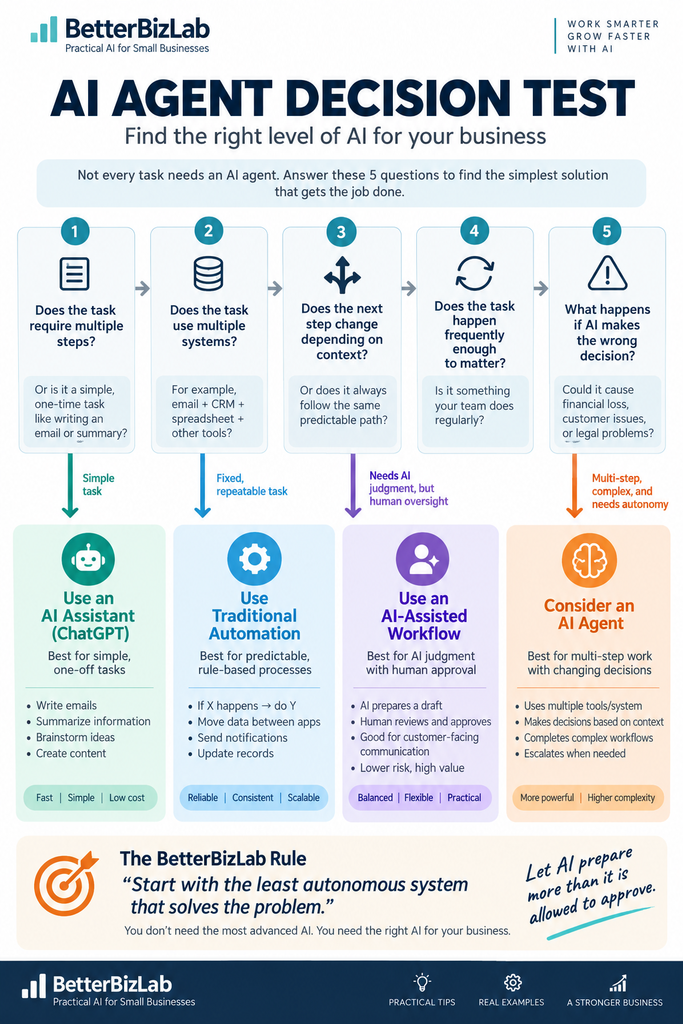
1. Does the task require multiple steps?
If the task is simply:
“Summarize this document.”
“Write this email.”
“Create five social media captions.”
you probably need an AI assistant—not an agent.
Agents become more useful when completing the job requires several connected steps.
2. Does the task require information from multiple systems?
Suppose an employee has to:
Open an email.
Check the CRM.
Look at an order.
Review a spreadsheet.
Then decide what should happen next.
That is much more agent-friendly than a task that happens entirely inside one application.
3. Does the next step change depending on context?
This is one of the strongest signals.
If the process always follows exactly the same path, traditional automation may be enough.
But imagine a customer-support workflow where:
A billing question should go to accounting.
A technical issue should go to support.
A cancellation request should be escalated to a manager.
A simple FAQ might only need a prepared response.
Now the system has to interpret context before choosing the next step.
That is where AI-driven decision-making starts to provide more value.
4. Does the task happen frequently enough to matter?
Do not build an AI agent just because something can be automated.
Look for repetitive work that consumes meaningful employee time.
A task performed 100 times a week is a much stronger candidate than one performed twice a month.
5. What happens if the AI makes the wrong decision?
This is the question that should determine how much autonomy the system gets.
If the mistake creates a draft that an employee can correct, the downside is relatively small.
If the mistake:
Issues a refund.
Changes pricing.
Cancels a service.
Makes a payment.
Commits the company to a contract.
Sends a sensitive customer message.
the risk becomes much higher.
OpenAI specifically recommends human intervention for high-risk actions and for cases where an agent exceeds defined failure thresholds.
The Decision
After those five questions, choose the simplest level that works.
Simple task → AI assistant
Fixed, repetitive process → Traditional automation
Context matters but a person should approve the result → AI-assisted workflow
Multi-step process + changing decisions + multiple systems → Consider an AI agent
This distinction can keep a small business from buying an expensive “agent” when a much simpler workflow would solve the same problem.
BetterBizLab Test: Can AI Triage a Small-Business Inbox?
To test where AI appears useful—and where human judgment still matters—we created a fictional shared inbox for a 12-person small business.
The test included five emails:
A new sales inquiry.
An urgent shipping complaint.
An overdue $8,750 vendor invoice.
A cancellation request combined with a $1,200 refund request.
An obvious SEO spam message.
We asked the AI to:
Identify the intent.
Assign a priority.
Route the message to the appropriate team.
Recommend the next action.
Decide whether the next step could be automated.
Flag situations where human approval should be required.
The goal was not to prove that AI could sort email.
We wanted to see where it would draw the line between preparation and autonomous business action.
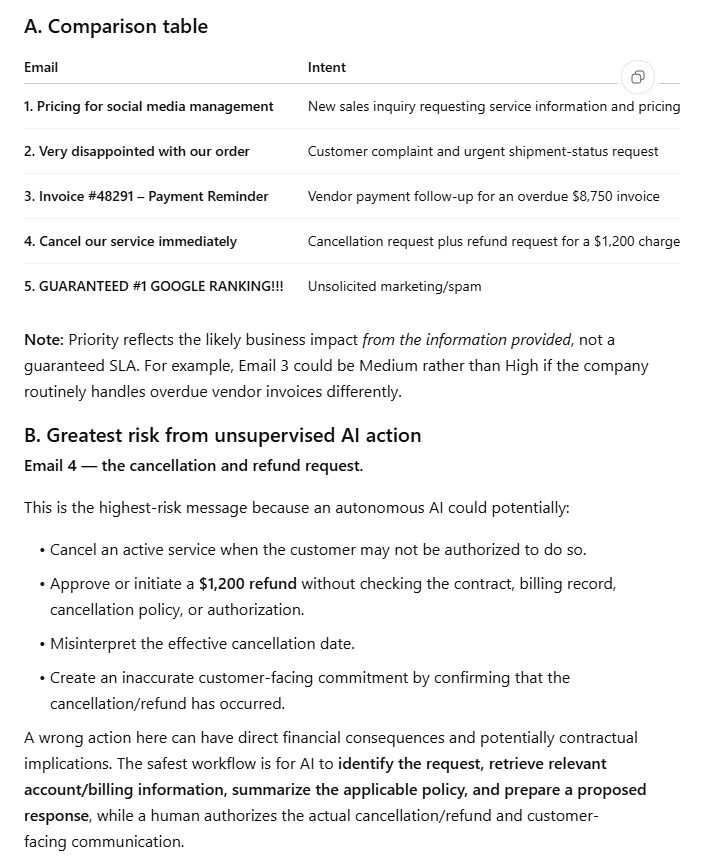
BetterBizLab AI Inbox Triage Test Results
What the AI Got Right
The AI handled first-pass inbox work reasonably well.
It was able to identify different types of messages, extract useful facts, recommend routing, and separate obvious spam from legitimate business communication.
More importantly, it recognized that not every correctly classified email should be acted on automatically.
The clearest example was the cancellation and refund request.
The customer asked to cancel service immediately and requested a $1,200 refund.
The AI identified this as the highest-risk message for unsupervised action.
Instead of recommending an automatic refund or cancellation, it suggested that AI could:
Retrieve relevant billing and account information.
Summarize the applicable policy.
Prepare a proposed response.
Then leave the actual cancellation, refund decision, and customer-facing commitment to a human.
That distinction matters.
AI can often prepare a business decision without being authorized to make the decision.
The Safest Email to Automate
At the opposite end of the test was the obvious SEO spam message.
The AI classified it as unsolicited marketing and identified it as the safest candidate for greater automation.
That is reasonable because there was no active customer relationship, financial transaction, cancellation, contract issue, or significant operational request involved.
Even here, the AI noted that the exact filtering or blocking behavior should still follow the company’s email-retention and spam policies.
The Middle Ground Was More Interesting
The other three emails showed why small-business automation is rarely all-or-nothing.
The sales inquiry could be classified and routed automatically.
AI could even prepare a response.
But actual pricing commitments may still depend on the company’s sales process.
The shipping complaint clearly required quick attention because the customer had an event the next day.
But any promise involving replacement products, refunds, expedited shipping, or compensation could require human approval.
The $8,750 overdue invoice could be routed to accounting and summarized automatically.
But the system should not independently promise a payment date without checking cash flow, approval authority, or the company’s vendor-payment process.
The test showed a pattern:
AI was easier to trust with classification, extraction, routing, and preparation than with actions that could move money, commit the business, alter a customer relationship, or create a significant promise.
Company Policy Still Matters
One of the strongest parts of the test was that the AI did not treat every classification as universally correct.
It explicitly acknowledged that some decisions depended on company policy.
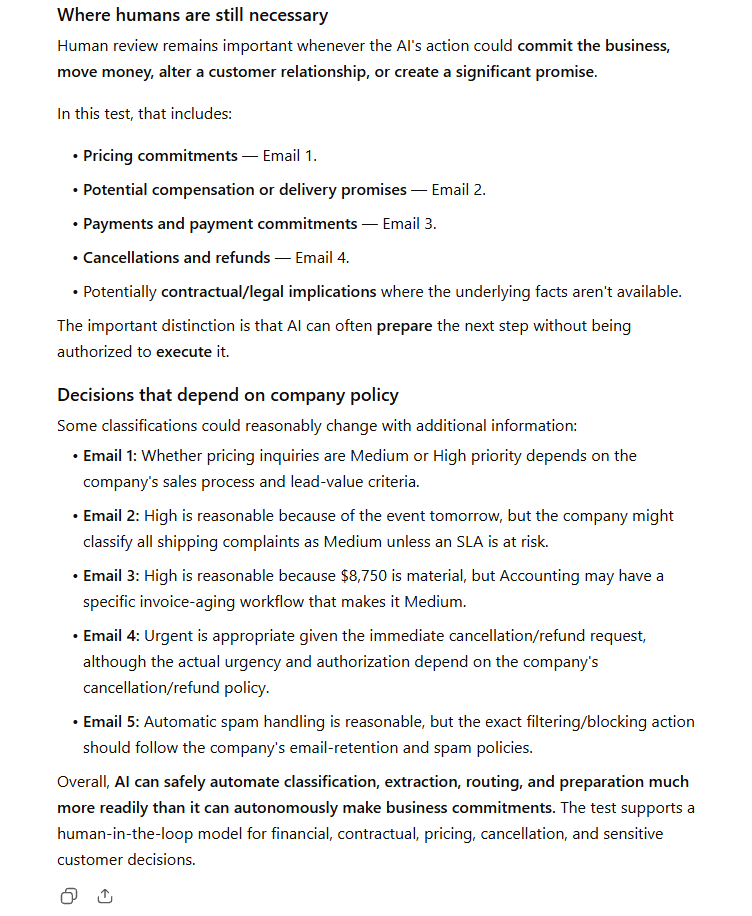
Human Approval Findings From BetterBizLab AI Test
For example:
The sales inquiry might be Medium or High priority depending on lead-value criteria.
The shipping complaint might be High priority because of the next-day event, but another company could classify complaints differently based on SLA rules.
The $8,750 invoice might be High priority, but an accounting department with a formal invoice-aging workflow might classify it differently.
The cancellation request was clearly serious, but exact urgency and authorization would still depend on the company’s cancellation and refund policies.
That matters because an AI system cannot reliably follow policies that the business itself has never defined.
Our Takeaway From the Test
The test reinforced a simple principle:
Let AI prepare more than it is allowed to approve.
For a small business, that may be one of the safest ways to introduce AI into real operational workflows.
AI can often:
Read.
Classify.
Extract.
Summarize.
Route.
Draft.
Recommend.
But the business can reserve specific actions for people.
Those actions may include:
Refunds.
Pricing commitments.
Payments.
Cancellations.
Contract decisions.
Sensitive customer responses.
Major promises.
This creates useful automation without requiring the company to give AI unrestricted authority.
Three Practical Small-Business Examples
Example 1: Customer Follow-Ups
A potential customer submits an inquiry.
Your business sends pricing.
Three days pass without a response.
AI can review the customer’s original inquiry, quoted package, business goal, and communication history, then prepare a personalized follow-up.
An employee reviews the draft before it is sent.
This is a good example of an AI-assisted workflow, not necessarily a fully autonomous AI agent.
We already tested this process separately at BetterBizLab.
For the complete process, see our guide to automating customer follow-ups with AI.
Example 2: Inbox Triage
The inbox test above moves closer to agent-like behavior.
The system may need to:
Read the message.
Identify intent.
Determine priority.
Check customer or vendor context.
Select the correct team.
Prepare the next action.
Escalate risky situations.
The correct path changes depending on the message.
That makes it more suitable for AI-driven decision-making than a simple rule-based automation.
Example 3: Weekly Operations Reporting
Imagine a business owner spends every Monday gathering information from several systems.
Sales data comes from one platform.
Advertising performance comes from another.
Customer-support metrics live somewhere else.
Inventory may be tracked separately.
An AI agent could potentially collect the data, identify unusual changes, prepare a weekly summary, and highlight issues that deserve attention.
But the agent should not automatically make major strategic decisions based on that report.
The goal is to reduce the work required to find and organize information, while keeping high-impact business decisions with the owner or manager.
When an AI Agent Makes Sense
An AI agent becomes more attractive when several conditions appear together.
The workflow happens frequently.
It involves multiple steps.
Information is spread across several tools.
The correct next step changes depending on context.
Employees spend substantial time moving information between systems.
The business has clear policies.
There is a measurable way to determine whether automation is working.
And most importantly:
The business can clearly define where the agent is allowed to act and where a human must take over.
A good agent should have a narrow job.
“Help run my company” is not a good agent assignment.
A better assignment is:
“Review incoming sales inquiries, classify them, retrieve relevant CRM context, prepare the recommended next action, and escalate uncertain cases to a salesperson.”
That is much easier to supervise, evaluate, and improve.
When You Should NOT Use an AI Agent
AI agents are not automatically better than simple automation.
In many small-business workflows, they are unnecessary.
The Process Is Completely Predictable
If every website inquiry simply needs to be added to a spreadsheet, use automation.
You do not need an agent.
The Task Is Rare
If a process happens once every few weeks, maintaining an agent may require more effort than simply doing the task manually.
The Mistake Would Be Expensive
Be careful about giving AI unrestricted authority over:
Large refunds.
Payments.
Contract commitments.
Pricing changes.
Employee decisions.
Service cancellations.
Sensitive customer communications.
These are exactly the kinds of actions where approval gates matter most.
You Cannot Clearly Explain the Workflow
If your team cannot describe how the process currently works, automating it can simply automate confusion.
Document the process first.
Then decide what should be automated.
A Simple Automation Already Solves the Problem
This is one of the most important checks.
If a low-cost automation reliably solves the problem, replacing it with an AI agent may add complexity without producing meaningful extra value.
Anthropic’s guidance aligns with this principle: use more complex agent systems only when simpler approaches fail to deliver the needed outcome.
Human Approval Is a Feature, Not a Failure
There is a common assumption that a “real” AI agent should operate completely on its own.
For most small businesses, that is the wrong goal.
Consider this workflow:
Customer request → AI reads context → AI prepares action → Employee reviews → Action happens → System records result
The AI can still remove a significant amount of repetitive work.
But the company keeps control of the highest-risk decision.
As the workflow proves reliable, some low-risk steps can gradually receive more autonomy.
This is safer than starting with maximum autonomy and trying to add controls after something goes wrong.
How to Start With AI Agents Without an IT Department
Small businesses do not need to build an autonomous digital workforce on day one.
Start with one process.
If you are still deciding what to automate first, our guide on how to automate a small business with AI explains how to identify practical opportunities before moving to more advanced AI agents.
Step 1: Find the Repetitive Work
Look for tasks employees repeatedly complain about.
Examples include:
Copying information between systems.
Sorting inquiries.
Preparing routine responses.
Updating records.
Creating recurring reports.
Checking missing information.
For more ideas, see these small business tasks you can automate with AI before deciding whether you need a more advanced agent.
Step 2: Document the Current Process
Before adding AI, write down what a person currently does.
What starts the process?
What information is checked?
What decisions are made?
Which systems are used?
What happens when something unusual occurs?
Those answers become the foundation for automation.
Step 3: Automate Predictable Steps First
Do not use AI simply because AI is available.
Traditional automation is usually better for highly predictable steps.
Use AI where interpretation, language, or contextual judgment actually adds value.
Step 4: Add Human Checkpoints
Identify actions that require approval.
A useful rule is:
The harder an action is to reverse, the more likely it should require human review.
Step 5: Measure the Business Result
Do not measure success by how many agents your company has.
Measure outcomes.
Examples:
Time saved.
Response time.
Errors.
Escalations.
Conversion rate.
Employee workload.
Customer satisfaction.
If the workflow does not improve an actual business problem, adding more AI will not fix it.
A Simple Rule for AI Agents for Small Business
AI agents will continue becoming easier to deploy.
That does not mean every workflow should become autonomous.
For most small businesses, a better strategy is:
Start with the least autonomous system that solves the problem.
If ChatGPT handles the task, use ChatGPT.
If a simple automation handles it, use automation.
If you need help choosing the right platform, compare our best AI automation tools for small business before moving to a more complex agent setup.
If AI judgment adds value but the final action carries risk, use an AI-assisted workflow with human approval.
Move to an AI agent when the process genuinely requires:
Multiple steps.
Changing decisions.
Connected tools.
Contextual judgment.
Enough repetition to justify the additional complexity.
The goal is not to build the most advanced AI system.
The goal is to build a business that works better.