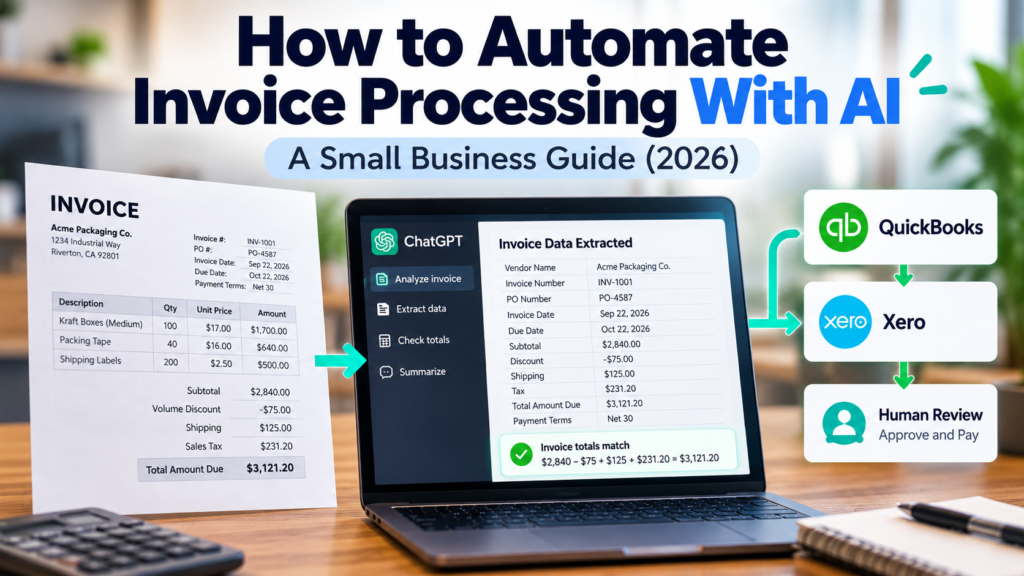
Learning how to automate invoice processing with AI sounds simple: give AI a PDF, let it read the numbers, and send the data into your accounting system.
But there’s a big difference between reading an invoice and deciding that an invoice is safe to pay.
To see where that line actually sits, BetterBizLab created a synthetic vendor invoice and ran it through a controlled ChatGPT test.
We asked ChatGPT to extract 11 accounting fields, check the invoice math, flag missing or ambiguous information, and determine whether human approval was still needed.
The result surprised us less because of what ChatGPT got right—and more because of what it didn’t pretend to know.
What AI Invoice Processing Actually Means
AI invoice processing can take repetitive accounts-payable work and turn it into a structured workflow.
Instead of an employee opening every PDF and manually entering the vendor, invoice number, dates, subtotal, tax, shipping, discount, and total, an AI system can extract that information and prepare it for review.
A practical workflow might look like this:
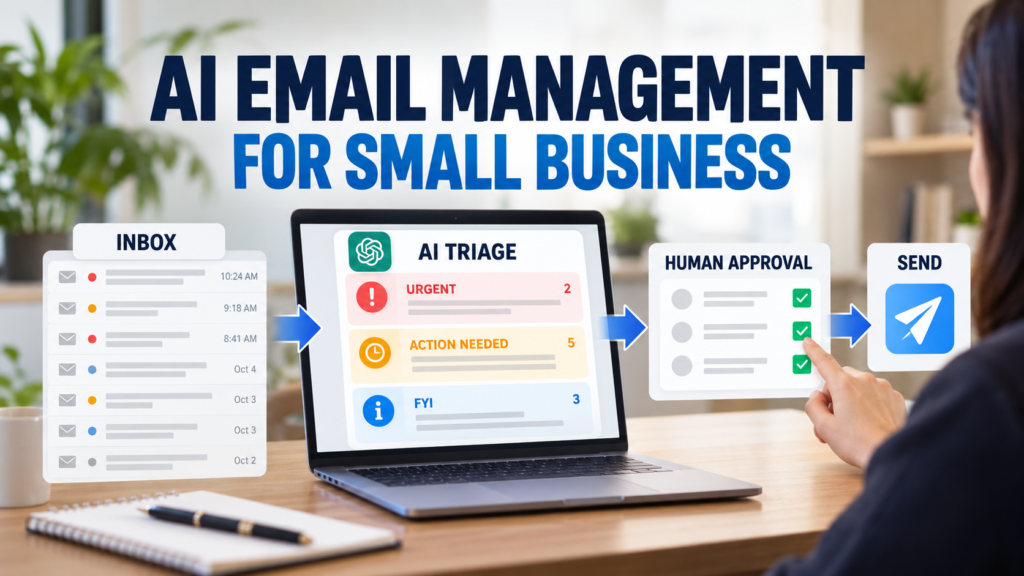
Vendor Email → Invoice PDF → AI Extraction → Validation → Exception Check → Human Approval → Accounting System
More advanced systems can also compare invoices against vendor records, purchase orders, or receiving data before routing them for approval. Current invoice-automation architectures generally separate extraction from validation and exception handling rather than treating AI output itself as approval.
For a small business, that’s an important distinction.
The goal doesn’t have to be removing people from accounts payable.
A better first goal is removing the repetitive typing while keeping people in control of the financial decision.
We Tested ChatGPT With a Synthetic Vendor Invoice
Rather than simply describing what AI should be able to do, we tested it.
BetterBizLab created a synthetic invoice from a fictional packaging supplier. No real vendor, bank account, customer, or transaction information was used.
The invoice included:
Vendor information, an invoice number, PO number, invoice and due dates, three line items, payment terms, shipping, sales tax, and a volume discount.
We deliberately included the discount because we wanted to see whether ChatGPT would treat it correctly when reconciling the final amount.
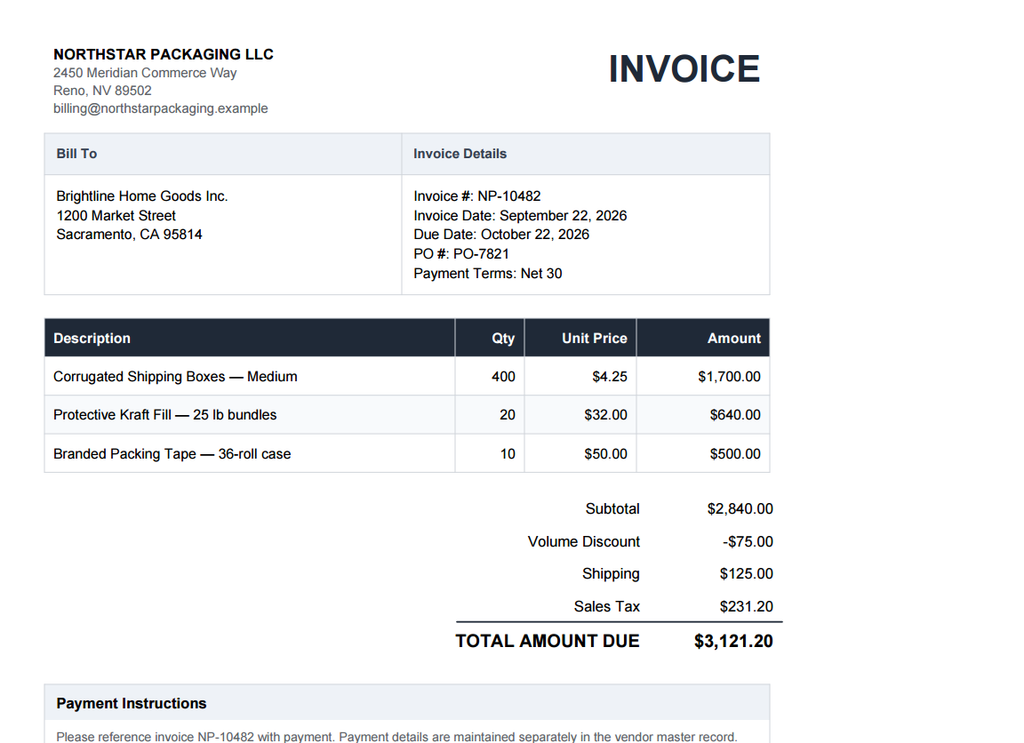
Caption: BetterBizLab’s synthetic vendor invoice used for this controlled AI invoice-processing test.
The invoice showed:
Subtotal: $2,840.00
Volume Discount: -$75.00
Shipping: $125.00
Sales Tax: $231.20
Total Amount Due: $3,121.20
Then we uploaded the PDF to ChatGPT.
If you’re newer to using ChatGPT at work, our guide to using ChatGPT for small business covers several other practical workflows beyond invoice processing.
ChatGPT supports PDF uploads and can extract specific information from uploaded documents.
The Prompt We Used
We didn’t simply ask ChatGPT to “read this invoice.”
We gave it a specific accounts-payable task:
You work as an accounts payable assistant for a small business.
Analyze the attached vendor invoice.
Extract the Vendor Name, Invoice Number, PO Number, Invoice Date, Due Date, Subtotal, Discount, Shipping, Tax, Total Amount Due, and Payment Terms exactly as they appear in the document.
Verify whether the subtotal, discount, shipping, tax, and final total mathematically reconcile.
Flag any missing, ambiguous, inconsistent, or unusual information.
Do not infer or invent information that is not shown on the invoice.
Do not approve or authorize payment.
That last instruction matters.
We wanted the model to help prepare an invoice for review—not make the financial decision.
What Happened in Our Test
ChatGPT extracted all 11 requested fields correctly.
| Test | Result |
|---|---|
| Requested fields | 11 |
| Correctly extracted | 11/11 |
| Field extraction in this test | 100% |
| Line-item subtotal | Correct |
| Discount handling | Correct |
| Final total reconciliation | Correct |
| Unsupported information invented | None observed |
| Tax limitation identified | Yes |
| Human approval retained | Yes |
This does not mean ChatGPT has 100% invoice-processing accuracy.
It means that on this one controlled synthetic invoice, all 11 fields we checked matched the source document.
A real evaluation would need many invoices across different vendors, layouts, scan qualities, currencies, tax structures, and edge cases. That’s why we’re treating this as one controlled test—not evidence of universal ChatGPT invoice accuracy.
ChatGPT Also Checked the Math
The model didn’t just copy the final amount.
First, it checked the three line items:
$1,700 + $640 + $500 = $2,840
That matched the stated subtotal.
Then it checked:
$2,840 − $75 + $125 + $231.20 = $3,121.20
Again, that matched the invoice’s stated total.
It also noticed that the September 22 invoice date and October 22 due date were internally consistent with the stated Net 30 payment terms.
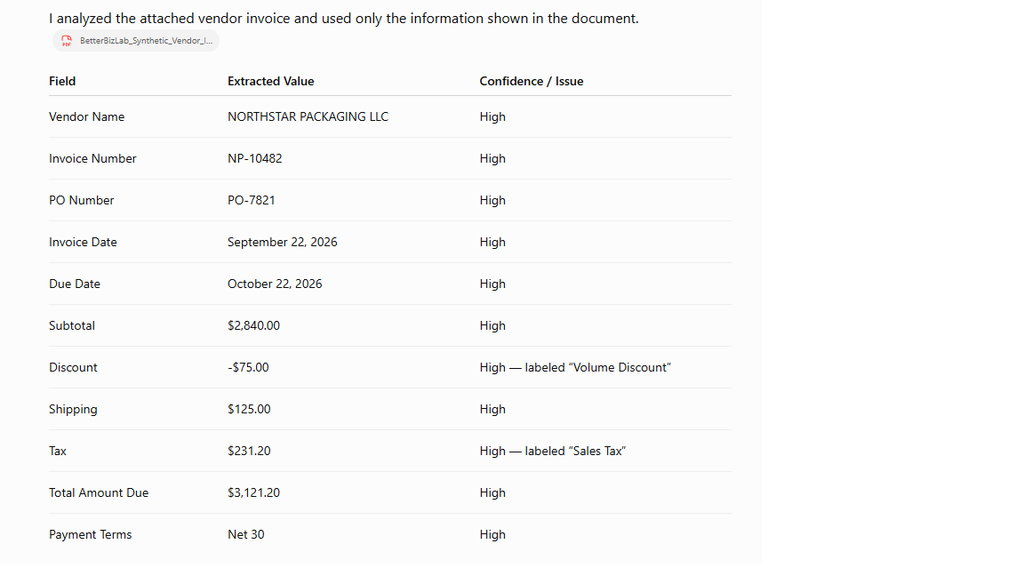
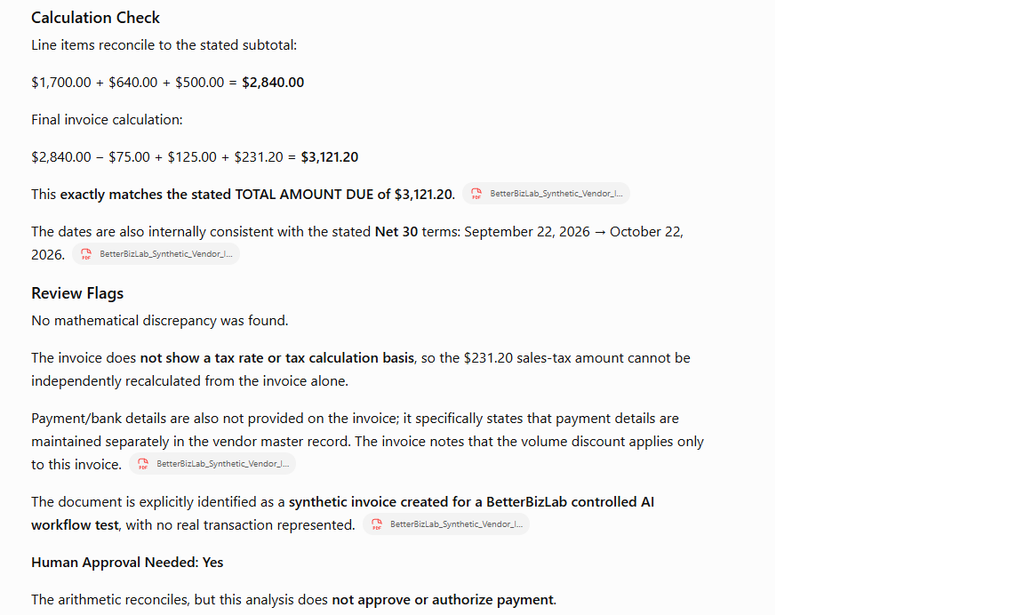
Caption: ChatGPT correctly extracted the requested invoice fields and reconciled the invoice arithmetic in our controlled test.
But this is where the experiment became more useful.
The Most Important Result Was What AI Couldn’t Verify
The invoice listed:
Sales Tax: $231.20
ChatGPT extracted that number correctly.
But the invoice did not provide the tax rate or explain the taxable basis used to calculate it.
ChatGPT therefore flagged that the $231.20 amount could not be independently verified from the invoice alone.
That’s exactly the kind of distinction businesses need to understand.
An AI model may be able to tell you:
The invoice says the tax is $231.20.
That does not automatically mean it can tell you:
$231.20 is the correct tax for this transaction.
Those are different tasks.
The same issue applies to vendor legitimacy, banking changes, purchase-order matching, receiving discrepancies, duplicate invoices, unusual payment instructions, and approval authority.
That leads to a simple framework:
Extraction ≠ Validation ≠ Approval
Extraction asks:
What information is on this invoice?
Validation asks:
Does that information agree with our other records and business rules?
Approval asks:
Should the company actually accept and pay this invoice?
AI can assist heavily with the first two.
The third should follow your company’s financial controls and approval policy.
Where Human Review Still Matters
Imagine an invoice says $12,400 is due.
AI extracts $12,400 perfectly.
That proves the document was read correctly.
It doesn’t prove your company actually owes $12,400.
Someone—or another controlled system—may still need to verify the purchase order, goods received, agreed pricing, vendor identity, duplicate status, tax treatment, and approval threshold.
This is why human-in-the-loop workflows remain important in practical AP automation. Exception queues are commonly used for low-confidence extraction, failed validation rules, unusual vendors, or other cases that shouldn’t move forward automatically.
For many small businesses, that’s actually where AI becomes most useful.
You don’t need AI to replace your accounting controls.
You need it to reduce the amount of manual work required before a person needs to make a decision.
A Practical Small-Business AI Invoice Workflow
You don’t need to build a fully autonomous accounts-payable agent on day one.
This follows the same approach we recommend in our broader guide to AI automation for small business: start with a repeatable workflow before trying to automate everything.
Start smaller.
Phase 1: AI Extracts, Human Reviews
Invoices arrive through your normal process.
Upload the invoice to your AI tool and have it extract standardized fields.
For example:
Vendor Name
Invoice Number
PO Number
Invoice Date
Due Date
Subtotal
Discount
Shipping
Tax
Total
Payment Terms
A person compares the structured output against the invoice before anything enters the accounting system.
This is the easiest place to test whether AI actually saves your team time.
Phase 2: Add Automated Validation
Once extraction is reliable enough for your workflow, add deterministic checks.
For example:
Does the line-item total equal the subtotal?
Does subtotal minus discounts plus shipping and tax equal the final amount?
Is the invoice number already in the system?
Does the PO exist?
Is the vendor recognized?
Is the invoice above an approval threshold?
Instead of asking AI to make every decision, use rules wherever the answer should be deterministic.
Phase 3: Review Exceptions Instead of Every Field
Now the workflow becomes more useful.
Clean invoices can move forward while questionable invoices go into a review queue.
For example:
Invoice received
↓
AI extracts fields
↓
Validation rules run
↓
Everything matches?
YES → Prepare for accounting entry
NO → Human review
This is essentially the pattern used in more mature invoice-processing architectures: AI handles document understanding while rules, review thresholds, and human exception handling provide controls.
Phase 4: Connect Your Accounting System
Once the earlier stages are reliable, approved invoice data can be pushed into the accounting platform your business already uses.
Workflow automation tools can connect invoice intake, AI extraction, approval routing, and accounting records.
Depending on your stack, this could involve QuickBooks, Xero, Microsoft Dynamics, NetSuite, or another accounting/ERP system.
The important word here is approved.
Don’t start your AI invoice project by automating the final payment step.
Start by automating the work that prepares the invoice for approval.
What Tools Can You Use?
There isn’t one required AI invoice stack.
For a small business experimenting with the concept, you can start with a document-capable AI tool to test extraction and validation before investing in a larger AP automation system.
Workflow automation platforms can then connect email, document processing, approval steps, and downstream business applications.
More specialized systems can add OCR, invoice-specific extraction, vendor matching, three-way matching, exception management, and accounting integrations.
The right stack depends heavily on your invoice volume and existing accounting workflow.
A company processing 20 relatively simple invoices each month has a very different automation problem from one processing 2,000 invoices across dozens of vendors.
Don’t Automate a Broken Process
Before connecting five AI tools together, map what your team actually does today.
Ask:
Where do invoices arrive?
Who checks them?
What information gets manually entered?
What causes an invoice to be rejected?
Who has approval authority?
Where is the final accounting record stored?
What happens when something doesn’t match?
If those answers aren’t clear, adding AI may simply automate confusion.
Start with one repeatable workflow and measure whether it works.
That principle applies well beyond invoices.
If you’re looking for other practical ways to reduce repetitive work, see our guide to how small businesses can use AI to save time and work smarter.
What We Would Test Next
Our first BetterBizLab test used one clean synthetic PDF.
That’s intentionally limited.
A stronger second test would introduce harder cases:
a scanned invoice,
a missing PO number,
an incorrect total,
a duplicate invoice number,
a changed vendor payment instruction,
or a line item that doesn’t match the purchase order.
Those tests would tell us much more about whether an AI workflow can reliably identify exceptions, not just read a clean document.
And that’s ultimately the more important capability for a real business.
BetterBizLab’s Take
Our controlled test showed that ChatGPT can be useful at the front of an invoice-processing workflow.
It extracted all 11 fields correctly, handled the discount properly, reconciled the arithmetic, identified information it couldn’t independently verify, and left final approval to a human.
That’s promising.
But we wouldn’t turn that one successful test into an autonomous payment system.
For a small business, the more practical progression is:
AI extraction → validation rules → exception handling → human approval → accounting integration
Automate the repetitive work first.
Keep control over the decision that moves money.
FAQ
Can ChatGPT read invoices?
Yes, ChatGPT can analyze supported invoice documents and extract structured information from them. Accuracy can vary depending on document quality, layout, complexity, and the specific fields being extracted, so businesses should test it against their own invoices before relying on the output.
Can AI automatically enter invoices into QuickBooks?
AI extraction can be combined with workflow automation and accounting integrations to move approved invoice data into accounting software. The exact setup depends on the tools and accounting system being used.
Should AI automatically approve invoices?
For a small business starting with invoice automation, keeping human approval for financial decisions is a safer and easier-to-audit approach. AI can handle extraction, validation assistance, and exception detection before that approval step.
What’s the easiest way to start?
Take a small set of representative invoices and define exactly which fields you currently enter manually.
Test AI extraction against known correct answers.
Then measure the errors and exceptions before connecting the workflow to your accounting system.