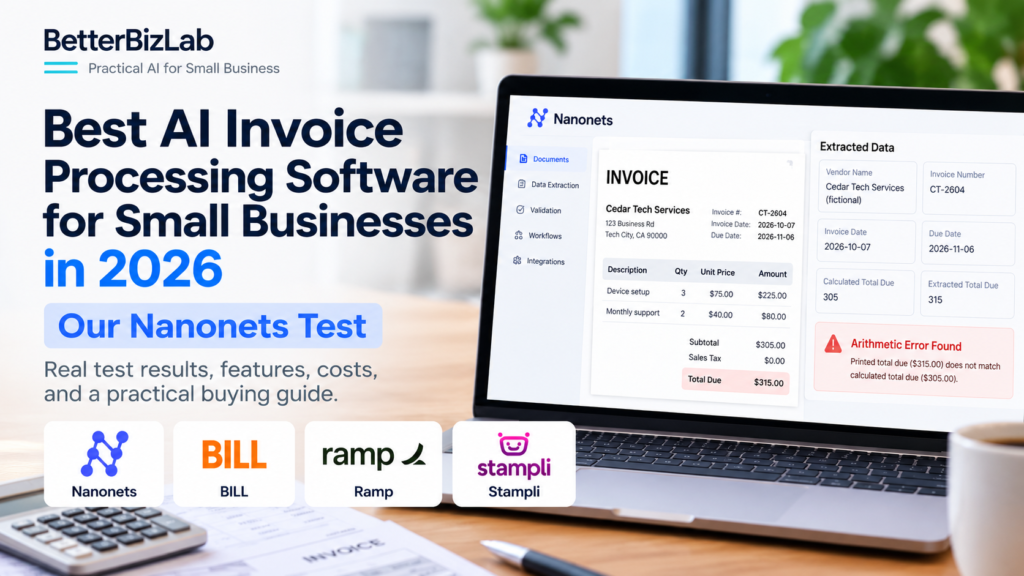
Updated October 26, 2026 | BetterBizLab Research & Testing
If your business receives 100 supplier invoices a month, the problem probably isn’t reading the invoice. It’s checking whether the numbers are right, identifying duplicates, routing approvals, and making sure the correct amount reaches your accounting system.
AI invoice processing software promises to reduce that work. But different products solve very different problems.
Some extract information from PDFs. Others manage approvals, accounting integrations, vendor payments, and purchase order matching. Buying the wrong category of software can leave your team doing almost as much manual work as before.
At BetterBizLab, we tested Nanonets using five synthetic supplier invoices containing normal transactions and deliberately introduced problems. We also researched the published capabilities and pricing of BILL, Ramp, and Stampli.
Our main finding: Nanonets handled the document extraction and arithmetic checks well in our small test, but one missing-field validation result showed why human review and workflow configuration still matter.
This guide explains what we observed, what we did not test, and how a small business with 5–20 employees can choose an appropriate solution.
Quick Verdict: Which AI Invoice Processing Software Should You Consider?
| Software | Best fit | Pricing approach | BetterBizLab evidence |
|---|---|---|---|
| Nanonets | Document extraction and configurable processing | Usage-based credits | Five-invoice hands-on test |
| BILL | Businesses seeking a conventional AP and payment workflow | From $49 per user/month | Vendor documentation |
| Ramp | Teams combining AP with cards and expense management | Free tier; Plus from $15/user/month plus platform fee | Vendor documentation |
| Stampli | AP teams managing approvals, PO matching, and exceptions | Custom quote | Vendor documentation |
These are conditional recommendations, not a ranking based on identical hands-on testing.
We directly tested Nanonets. We did not independently test BILL, Ramp, or Stampli in this review.
What Should AI Invoice Processing Software Actually Do?
Before choosing a product, separate five capabilities that are often grouped together under the term AI invoice automation.
1. Document extraction
The software reads a PDF, scanned invoice, or emailed document and identifies fields such as vendor name, invoice number, dates, quantities, tax, and total.
2. Data validation
The system checks whether extracted information makes sense. For example, it might recalculate totals, identify missing information, or compare invoice numbers.
3. Approval management
Invoices are assigned to the appropriate employee or manager based on spending limits, departments, or other business rules.
4. Accounting integration
Approved invoices are synchronized with accounting software, ideally without duplicate entries or inconsistent vendor records.
5. Payment execution and reconciliation
The business pays the supplier and records the payment accurately.
A product that performs the first two tasks well is not necessarily a complete accounts payable platform.
That distinction is especially important for small businesses with limited administrative staff.
Our Hands-On Nanonets Test: Five Synthetic Supplier Invoices
We wanted to answer a practical question:
Can an AI document-processing tool identify the kinds of invoice problems that a small business employee might otherwise need to check manually?
Test Methodology
We prepared five fictional supplier invoices as PDF documents.
Each represented a different validation scenario. We uploaded the files to the Nanonets AI Agent interface and requested structured extraction, independent arithmetic checks, and identification of missing or duplicate information.
We reviewed the responses and exported spreadsheet results.
All supplier names, transactions, and invoice data were synthetic. No real business invoices or confidential supplier records were used.
This was one exploratory test, not a statistically representative accuracy benchmark.
Test Results
| Scenario | Observed outcome | Interpretation |
|---|---|---|
| Standard invoice | Reported total of $298 | Basic extraction and calculation succeeded |
| Adjusted invoice | Reported total of $248.04 | Discounts, shipping, and tax were processed |
| Duplicate invoice | Repeated invoice identifier extracted; agent reported a duplicate | Detection reported, but automatic blocking not verified |
| Arithmetic discrepancy | Printed $315 versus calculated $305 | $10 discrepancy identified |
| Missing due date | Due date extracted as NOT PROVIDED | Missing information recognized, but structured validation flag was inconsistent |
These observations are from our synthetic test and should not be interpreted as general accuracy rates.
Finding 1: Basic Extraction Worked Well
The standard invoice was processed with the expected total of $298.
The adjusted invoice also produced the expected $248.04 total, including its additional adjustments.
This is encouraging for a small business that currently enters invoice information manually.
However, successful extraction from two straightforward examples does not establish performance on poor-quality scans, handwritten invoices, unusual layouts, or high-volume workflows.
Finding 2: Nanonets Identified a $10 Arithmetic Discrepancy
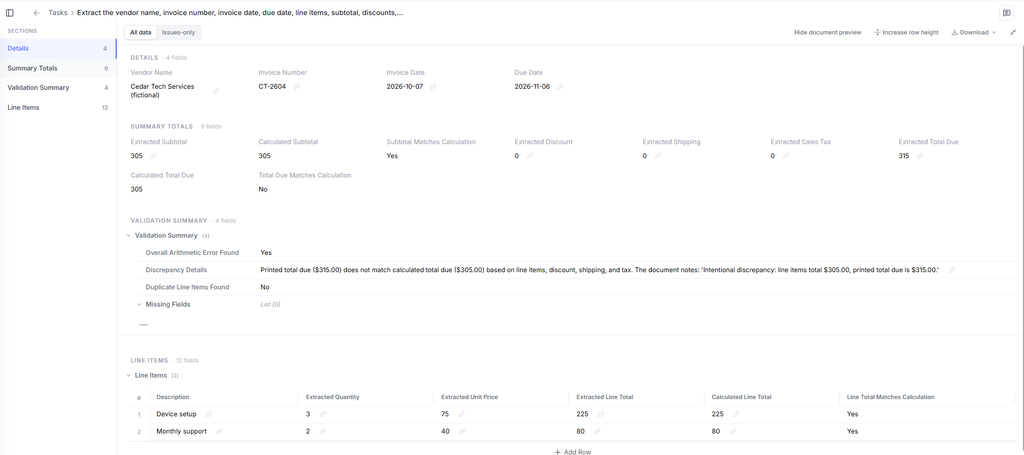
Our fourth invoice contained an intentionally inconsistent total.
The document showed $315, while the calculated amount was $305.
Nanonets reported the $10 difference and flagged the arithmetic problem.
That is useful because a system that merely copies the printed total may preserve an invoice error instead of identifying it.
There is an important limitation to this observation: our synthetic test document included an indication that the arithmetic was intentionally incorrect.
We therefore cannot claim that Nanonets independently discovered an unmarked error under blind-test conditions.
A stronger future test would remove those hints and use a larger set of previously unseen invoices.
Finding 3: Missing Information Was Recognized but Not Consistently Flagged
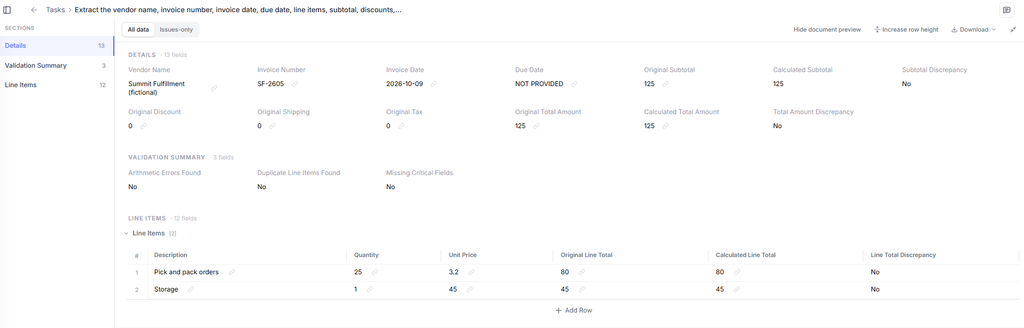
Our fifth invoice deliberately omitted the payment due date.
Nanonets extracted the value as:
Due Date: NOT PROVIDED
That was the correct response. It did not invent a date.
However, the exported validation result showed:
Missing Critical Fields: false
This was the most interesting inconsistency in the test.
The system recognized that the due date was absent, but its structured validation output did not classify the invoice as missing a critical field.
One possible explanation is that the due date was not configured as mandatory in the workflow. We did not verify that configuration.
The practical lesson is that accurate extraction and reliable business validation are separate requirements.
If a missing due date should stop an invoice from being approved, the business must confirm that the workflow actually enforces that rule.
Finding 4: Duplicate Identification Is Not the Same as Duplicate Prevention
Our third invoice was designed to duplicate another invoice.
Nanonets reported a duplicate in its overall response, and the repeated invoice identifier was extracted.
That demonstrates some ability to compare information across the submitted documents.
But we did not verify whether a production AP workflow would automatically block the duplicate from being approved, posted, or paid.
For a small business, that distinction matters more than whether an AI assistant can mention the duplication in a summary.
What We Did Not Test
We did not test real supplier payments, accounting-system synchronization, approval routing, user permissions, production security settings, or large invoice batches.
We also did not conduct repeated trials to measure error rates.
BetterBizLab’s assessment: Nanonets demonstrated useful extraction and validation capabilities in this limited test. Its suitability as a complete accounts payable solution requires additional workflow and integration testing.
Nanonets: Best to Evaluate for Document Extraction and Custom Workflows
Nanonets offers AI-powered document processing with configurable extraction and related workflow capabilities.
Its published documentation describes credit-based charges for different processing actions and integrations.
That structure may appeal to businesses that want to automate a particular document-heavy process rather than replace their entire accounts payable operation.
Where It Looks Promising
Nanonets is worth evaluating when invoices arrive in multiple formats, staff spend significant time copying information, or the business needs structured data for another system.
Our test supports further evaluation of its extraction and validation functionality.
Where You Should Be Careful
Do not assume that identifying a missing field automatically creates a mandatory approval exception.
Ask how required fields are configured, how confidence thresholds work, how duplicates are checked across historical records, and what happens when the AI cannot determine a value.
Also confirm the total monthly cost for extraction, post-processing, integrations, and any human review services.
Best fit: A business with a defined document-processing problem and someone capable of configuring and supervising the workflow.
BILL: Best to Evaluate for a Conventional AP Workflow
BILL combines invoice management, accounts payable, approval workflows, accounting connectivity, and payment capabilities.
Its published pricing starts at $49 per user per month for Essentials, with higher-priced plans offering additional capabilities.
For a small business, the appeal is having more of the invoice-to-payment process in one platform.
When BILL May Make Sense
Consider BILL when your main problem is not just reading invoices but managing the complete process from supplier bill to approved payment.
For example, a 12-person distributor might have one bookkeeper, two purchasing employees, and an owner who approves larger expenses.
The purchasing team needs to verify charges, the bookkeeper needs accurate accounting entries, and the owner needs visibility into upcoming payments.
A conventional AP platform may be more appropriate than a standalone extraction tool.
What to Verify
Check the exact plan required for AI coding, approval rules, purchase order matching, and your accounting integration.
Also calculate user subscription costs and payment transaction fees.
Best fit: A small company seeking an established AP and payment workflow rather than a document extraction project.
Testing disclosure: BetterBizLab did not conduct a hands-on BILL test for this article.
Ramp: Best to Evaluate When AP and Spend Management Belong Together
Ramp offers a free software tier with invoice extraction, configurable approvals, and bill payment capabilities.
Its Plus plan is listed at $15 per user per month plus a platform fee based on team size.
Ramp also offers corporate card and expense-management functionality.
This makes it a different purchasing decision from Nanonets.
When Ramp May Make Sense
Imagine a small company whose employees regularly purchase supplies, subscribe to software, travel, and submit vendor invoices.
If management wants spending controls and accounts payable information in one environment, Ramp deserves consideration.
The free tier makes it particularly worth investigating, although free software does not necessarily mean free transactions.
What to Verify
Confirm eligibility, available payment methods, transaction fees, accounting integrations, and which advanced approval or procurement capabilities require Plus or other paid options.
Best fit: Businesses that want to coordinate invoice payments with broader spending controls.
Testing disclosure: BetterBizLab did not conduct a hands-on Ramp test for this article.
Stampli: Best to Evaluate for Invoice Collaboration and Exceptions
Stampli focuses on the work surrounding invoices: approvals, communications, coding, matching, and exception resolution.
Its platform describes AI-assisted invoice processing, duplicate identification, approval routing, and purchase order matching.
For teams dealing with complicated approvals, the value may come less from OCR and more from reducing the time spent resolving exceptions.
When Stampli May Make Sense
Suppose a supplier invoice does not match the purchase order or receiving record.
The accounting team needs clarification from purchasing, while a manager needs to approve a correction.
Keeping the invoice, supporting documents, and discussion together can be more valuable than extracting the invoice fields a few seconds faster.
What to Verify
Stampli requires a quote for pricing. Ask about implementation, integrations, minimum commitments, approval users, and the expected cost at your actual monthly invoice volume.
Best fit: Companies with enough approval complexity and invoice exceptions to justify a dedicated AP collaboration platform.
Testing disclosure: BetterBizLab did not conduct a hands-on Stampli test for this article.
How Much Does AI Invoice Processing Really Cost?
Subscription prices alone do not tell you whether automation is worthwhile.
Consider a hypothetical business processing 150 invoices per month.
Assume an employee currently spends six minutes per invoice on data entry and initial checks.
That equals:
150 invoices × 6 minutes = 15 hours per month
At an illustrative loaded labor cost of $30 per hour, the current activity costs approximately $450 monthly.
Now suppose automation reduces that work to two minutes per invoice, including routine human review.
That would be five hours per month, or $150 in labor.
The hypothetical gross labor-value difference is $300 monthly.
But this is not automatically a $300 cash saving.
If the employee remains on payroll, the benefit may be time redirected toward higher-value work rather than a reduction in payroll expense.
Software subscriptions, transaction fees, setup, exception handling, and maintenance must also be included.
A Simple ROI Framework
Monthly net operational benefit = value of time saved − incremental software costs − additional operating costs
Track these inputs before purchasing:
| Metric | Why it matters |
|---|---|
| Monthly invoice volume | Determines potential time savings |
| Current minutes per invoice | Establishes the baseline |
| Exception rate | Indicates how much human work remains |
| Approval delay | Measures process friction |
| Duplicate-payment incidents | Identifies financial-control risks |
| Software and payment fees | Establishes the actual operating cost |
| Implementation effort | Prevents underestimating adoption costs |
If your team only handles 15 invoices a month, a complex AP implementation may not be justified.
If it handles 500 invoices across multiple departments, approval controls and exception handling may matter far more than the monthly subscription price.
How to Choose the Right Tool for a 5–20 Employee Business
Start with the business problem, not the AI feature list.
Choose a document-processing approach when the biggest bottleneck is extracting information from PDFs and moving it into an existing workflow.
Evaluate a conventional AP platform when approvals, accounting entries, vendor payments, and audit trails are the primary concerns.
Evaluate a spend-management platform when supplier invoices need to be managed alongside employee expenses, cards, and purchasing controls.
Evaluate an exception-focused AP platform when most of the work involves purchase order discrepancies, multiple approvers, or conversations about invoice corrections.
Before making a decision, request a trial or demonstration using your own representative, appropriately anonymized invoices.
Do not evaluate a product solely using the vendor’s polished demonstration files.
Seven Questions to Ask Before Buying
- Can the system identify duplicate invoices across previously processed documents, not just within one upload?
- What happens when a required field is missing or the AI has low confidence?
- Does the software independently recalculate line-item totals?
- Can it match invoices against purchase orders and receiving records?
- Which accounting integrations are available on the quoted plan?
- What is the complete monthly cost at our actual volume, including payments and exceptions?
- Can a human review, correct, and approve an invoice before any payment is released?
The answers will reveal more about operational suitability than a generic claim of 99% AI accuracy.
Common Mistakes When Automating Invoices
Treating OCR Accuracy as End-to-End Automation
Reading an invoice correctly is only the beginning. Approval rules, accounting controls, and payment reconciliation still matter.
Automatically Trusting Extracted Totals
An invoice can contain incorrect arithmetic. Recalculation and exception handling should be part of the process.
Assuming Missing Data Will Always Trigger an Alert
Our Nanonets test showed why businesses should verify how critical fields are configured and flagged.
Ignoring Human Review
Automation should reduce repetitive work while preserving accountability for exceptions, unusual suppliers, changed banking details, and large payments.
Comparing Only Monthly Subscription Prices
Transaction charges, implementation, integrations, and employee time can materially change the economics.
Final Verdict: Which AI Invoice Processing Software Is Best?
There is no universal winner.
Nanonets is worth evaluating for extraction-focused automation. Our five-invoice synthetic test showed promising results, including identifying a $10 arithmetic discrepancy, but also revealed a validation inconsistency worth investigating.
BILL is worth evaluating when the business needs a more complete AP and payment workflow.
Ramp is worth evaluating when accounts payable is part of a broader spending-management problem.
Stampli is worth evaluating when invoice collaboration, matching, and exception handling create substantial administrative work.
For a small business, the best purchasing decision is the tool that reliably reduces the work your team actually performs—not necessarily the one advertising the most AI features.
If you’re still deciding which processes to automate first, start with our guide to automating invoice processing with AI and our broader small business AI automation guide.
Research and Testing Disclosure
BetterBizLab directly tested Nanonets using five synthetic PDF invoices on October 26, 2026. The results reflect a single exploratory session, not production benchmarking.
BILL, Ramp, and Stampli were evaluated through publicly available vendor information, not hands-on product testing.
Pricing and feature availability may change. Confirm current terms and plan requirements with each provider before purchasing.
No affiliate compensation or sponsorship is assumed for the products discussed in this article.