Learning how to automate customer service with AI can help small businesses reduce repetitive support work without removing the human judgment customers sometimes need.
Customer service can become surprisingly time-consuming as a small business grows.
The questions themselves are often simple:
“Where is my order?”
“Can I return this?”
“Do you offer this service?”
“Can I change my appointment?”
“Which product should I choose?”
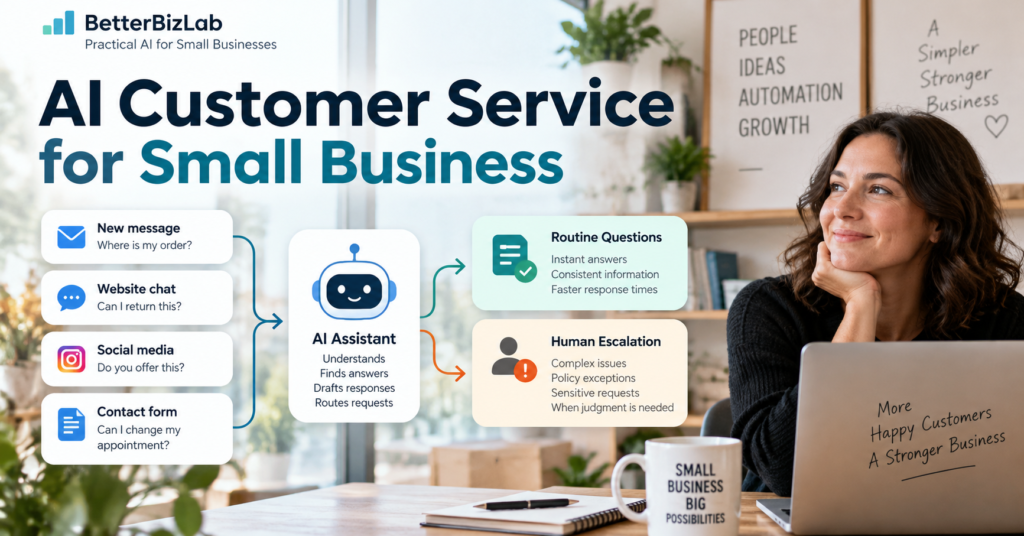
None of these questions may take very long to answer individually. But when the same questions arrive through email, website chat, social media, and contact forms every day, they can consume hours that could be spent on sales, operations, or more complicated customer problems.
This is where AI customer service automation can help.
But the goal should not be to replace every customer interaction with a chatbot.
A better approach is to automate the repetitive parts of customer service while keeping people responsible for situations that require judgment.
For many small businesses, that means creating a workflow where AI can identify a customer’s request, find approved information, prepare or send an appropriate response, and escalate unusual situations to a person.
Here is how to build that system step by step.
What Is AI Customer Service Automation?
AI customer service automation means using artificial intelligence to help manage repetitive parts of customer communication.
Depending on your business and software, AI can help:
- classify incoming customer messages
- answer frequently asked questions
- draft email responses
- summarize long customer conversations
- route messages to the right employee
- retrieve information from an approved knowledge base
- identify messages that require human attention
The important distinction is that AI does not need to control the entire customer interaction.
For example, imagine a customer emails:
“I received the wrong product. What should I do?”
Instead of an employee reading the email from scratch and figuring out where it belongs, an AI-assisted workflow might:
Receive message → Identify “Wrong Item / Return Issue” → Find the approved return procedure → Draft a response → Route the case to the appropriate employee if approval is required
The employee still controls the important decision.
AI simply removes some of the repetitive work surrounding that decision.
For a small business, this is often a safer and more useful starting point than trying to automate the entire customer service department.
What Should a Small Business Automate First?
Start with questions where the answer is repetitive, predictable, and based on information your business has already approved.
Good candidates may include:
Frequently Asked Questions
Examples include business hours, locations, shipping policies, basic product information, appointment availability, or standard service questions.
If employees repeatedly type nearly identical answers, AI may be able to help.
Order and Shipping Questions
Customers frequently ask whether an order has shipped, where they can find tracking information, or how long delivery normally takes.
Depending on the systems you use, some of these questions can be answered automatically or routed to the appropriate information.
Email Classification
AI does not necessarily need to answer the customer.
Simply identifying incoming emails as:
Order Status
Return Request
Product Question
Complaint
Wholesale Inquiry
can save employees time and make routing easier.
Drafting Routine Responses
This is one of the easiest ways for a small business to start using AI.
Instead of automatically sending messages, AI prepares the response and an employee reviews it before sending.
This provides much of the speed benefit while keeping a person in control.
Ticket Routing
AI can also analyze a customer message and determine which person or department should handle it.
A product question might go to customer service.
A wholesale inquiry might go to sales.
A damaged shipment might go to customer service or operations.
A billing question might go to accounting.
The exact routing rules depend on your business.
What Should You Not Fully Automate?
Not every customer interaction should be handled automatically.
The more money, risk, emotion, or judgment involved, the more carefully you should consider human review.
Examples may include:
- unusual refund requests
- policy exceptions
- highly dissatisfied customers
- legal threats
- safety concerns
- sensitive personal information
- repeated complaints
- situations where the AI cannot find a reliable answer
Consider a customer who says:
“Your policy says returns are allowed within 30 days, but I purchased this 45 days ago because I was hospitalized. Can you make an exception?”
An AI system may be able to identify the return policy.
But deciding whether the company should make an exception is a business decision.
That should normally go to someone with the authority to make it.
A useful principle is:
Automate repeatable work. Escalate judgment.
That distinction can prevent a small efficiency project from turning into a customer-service problem.
How to Automate Customer Service With AI
You do not need to automate everything at once.
In fact, starting with one clearly defined workflow is usually easier to test and improve.
Step 1: Find Your Most Repetitive Customer Questions
Before choosing software, look at the customer messages your business already receives.
Review recent:
- emails
- contact-form submissions
- support tickets
- chat conversations
- social media messages
Look for patterns.
You may discover that a large percentage of customer communication falls into a relatively small number of categories.
For example:
- Where is my order?
- How do I return something?
- Can I change my order?
- When will an item be back in stock?
- What is the difference between two products?
Do not start by asking:
“What can AI automate?”
Start by asking:
“Which repetitive customer task is consuming our time?”
That gives the automation project a specific problem to solve.
If you want to take a broader approach, this guide explains how to automate small business with AI across multiple workflows.
Step 2: Create a Reliable Source of Truth
This is one of the most important steps.
AI cannot reliably follow business policies that have never been clearly documented.
Before automating customer responses, collect the information employees already use when helping customers.
That might include:
- return policies
- shipping information
- product specifications
- pricing information
- appointment rules
- warranty information
- frequently asked questions
- escalation procedures
Think of this as the AI’s approved reference material.
If one document says returns are accepted for 30 days while another says 60 days, automation may simply make that inconsistency appear faster.
Your business should establish the truth first.
AI can then help communicate it.
If important procedures currently exist only in employees’ heads, documenting those processes as simple Standard Operating Procedures (SOPs) can also make future automation much easier.
Step 3: Decide What AI Is Allowed to Do
There are several levels of customer service automation.
You do not have to jump directly to automatic responses.
A simple progression might look like this:
Level 1: AI classifies the message
AI identifies the type of customer request but does not write or send anything.
Level 2: AI drafts the response
AI prepares a reply using approved information. An employee reviews and sends it.
Level 3: AI responds to specific low-risk questions
AI automatically handles narrowly defined questions where the answer is clear and approved.
Level 4: AI triggers additional workflow actions
More advanced systems may update a CRM, create a support ticket, retrieve order information, or trigger another automation.
For many small businesses, Levels 1 and 2 are excellent places to begin.
You can automate preparation before automating authority.
Step 4: Create Clear Escalation Rules
Your AI workflow needs to know when to stop.
Define situations that should automatically go to a person.
For example:
Escalate if:
- the customer requests an exception to company policy
- the requested information cannot be verified
- the customer has contacted the company repeatedly about the same unresolved problem
- the issue involves a significant refund or financial decision
- the customer mentions legal action or safety concerns
- the message contains information requiring special handling
- the AI is uncertain about the correct response
You should also decide who receives the escalation.
“Send to a human” is not a complete workflow.
Instead:
Refund exception → Customer Service Manager
Billing dispute → Accounting
Wholesale request → Sales
Technical issue → Product Support
The roles will vary by business, but ownership should be clear.
Step 5: Connect the Workflow
Once the rules are defined, automation software can connect the different steps.
A simple workflow might look like:
Customer Email
↓
AI analyzes the message
↓
Request is categorized
↓
Approved information is retrieved
↓
AI drafts the response
↓
Routine request → Employee review or approved automatic response
Exception → Human escalation
Tools such as ChatGPT can help with classification, summarization, and response drafting.
Automation platforms can then connect AI with other applications your business already uses.
The important part is not having the largest possible technology stack.
The workflow should solve a specific problem with the fewest unnecessary moving parts.
Step 6: Test Before Fully Automating
Do not immediately give an AI system permission to answer every customer.
Run the workflow in review mode first.
Let the AI classify or draft responses while employees continue approving them.
Then watch for mistakes.
Ask:
Did it understand the customer’s intent?
Did it use the correct policy?
Did it invent information?
Did it recognize when the situation required escalation?
Was the response appropriate for the customer?
Every mistake reveals something useful about the workflow.
Sometimes the prompt needs improvement.
Sometimes the escalation rules are incomplete.
Sometimes the real problem is that the company’s own policy documentation is unclear.
Fix those issues before expanding the automation.
Step 7: Measure and Improve
Once the workflow is running, review its performance regularly.
You might track:
- response time
- number of messages handled
- number of escalations
- employee corrections
- repeated customer contacts
- common unanswered questions
Do not judge the system only by how many messages AI handles automatically.
A high automation rate is not useful if customers receive incorrect answers.
The better question is whether the workflow helps your team respond faster and more consistently without reducing service quality.
Practical Example: A Small Ecommerce Business
Imagine a small ecommerce company receives this message:
“Hi, I ordered the blue version but received the black one. Can you send me the correct product?”
Without automation, an employee might need to:
- read the email
- identify the issue
- find the order
- check the company’s wrong-item procedure
- write a response
- determine whether another employee needs to take action
Now consider an AI-assisted workflow.
Step 1: AI identifies the intent
Category: Wrong Item Received
Step 2: AI extracts useful information
Customer issue: Incorrect product received
Requested resolution: Correct item
Information needed: Order number, if not already available
Step 3: AI checks approved instructions
The system retrieves the company’s documented procedure for incorrect shipments.
Step 4: AI prepares the response
The AI drafts a response based only on the approved procedure.
Step 5: Workflow determines authority
If the procedure allows the support employee to resolve the situation directly, the case continues.
If approval is required, the request is routed to the appropriate manager.
The important point is that AI did not invent a refund, replacement policy, or special exception.
It helped move the customer through an existing business process.
That is what practical AI automation should do.
A Copy-Ready Prompt for Customer Service Triage
You can test the concept before building a complicated automation.
Copy a customer message into ChatGPT and use a prompt like this:
You are helping a small business organize incoming customer service messages.
Analyze the customer message below.
Return:
- Customer intent
- Short summary of the issue
- Information missing from the customer
- Which approved company policy or procedure is needed to answer
- Whether this can be handled as a routine request or should be escalated to a human
- A draft response using only the company information provided below
Do not invent policies, discounts, refunds, shipping promises, product information, or exceptions.
If the provided information is not sufficient to answer accurately, say that human review is required.
Company information:
[PASTE YOUR APPROVED POLICY, FAQ, OR SOP HERE]Customer message:
[PASTE CUSTOMER MESSAGE HERE]
This is not a complete customer service automation system.
It is a simple way to test whether AI-assisted triage and drafting could be useful for your business before connecting additional software.
Which AI Tools Can You Use?
You do not necessarily need a dedicated AI customer service platform to start experimenting.
If you’re comparing software for a broader automation strategy, see our guide to the best AI automation tools for small business.
Different tools can handle different parts of the workflow.
ChatGPT
ChatGPT can help classify messages, summarize customer issues, draft responses, organize FAQs, and turn existing business information into structured customer-service instructions.
It can be particularly useful during the planning and testing stage.
Automation Platforms
Tools such as Zapier can connect applications and trigger actions when specific events occur.
For example, a new form submission could trigger classification, create a task, or route information to another system.
Help Desk Platforms
Businesses with larger support volumes may use dedicated help desk software with AI features for ticket classification, suggested responses, knowledge retrieval, or chat.
The right choice depends on your existing software and the complexity of the workflow.
Do not choose a tool simply because it offers the most AI features.
First design the workflow.
Then choose the technology required to run it.
Common Mistakes to Avoid
One common mistake is automating before documenting the process.
If employees do not agree on how a customer situation should be handled, AI will not solve that problem.
Another mistake is allowing AI to make decisions beyond its authority.
A system that can explain your refund policy is different from a system that can approve exceptions to that policy.
Small businesses should also avoid building overly complicated automations before proving that a simpler version works.
You probably do not need to automate email, chat, social media, phone calls, returns, refunds, and CRM updates at the same time.
Start with one repetitive workflow.
Test it.
Fix it.
Then expand.
Start With One Customer Service Workflow
AI customer service automation does not need to begin with a sophisticated chatbot or a large software investment.
It can begin with something much simpler:
One repetitive customer question.
Document the correct answer.
Define when AI can help.
Define when a person must take over.
Test the workflow.
Then improve it based on real customer interactions.
For a small business, the biggest opportunity may not be replacing customer service with AI.
It may be removing the repetitive work around customer service so employees can spend more time solving the problems that actually require a person.
Automate the routine. Keep humans responsible for judgment.
That is a much more practical way to build AI into a small business.