Affiliate Disclosure: This article contains affiliate links. If you sign up or make a purchase through these links, BetterBizLab may earn a commission at no additional cost to you.
AI tools are changing how small businesses create presentations, proposals, marketing materials, and internal documents. But many business owners do not have the time—or design experience—to build polished content from scratch.
That is where Gamma AI can be useful.
Gamma is an AI-powered creation platform that helps users build presentations, documents, webpages, and other visual content from a prompt, outline, or existing material. Instead of starting with a blank slide and manually arranging every element, you can give Gamma an idea and let AI create the first version for you.
But is Gamma actually useful for a small business, or is it just another AI tool that looks impressive in a demo?
In this Gamma AI review, we will look at how Gamma works, its best business use cases, advantages and limitations, pricing, and how it compares with traditional tools such as PowerPoint and Canva.
By the end, you should have a clear idea of whether Gamma belongs in your small-business AI toolkit.
What Is Gamma AI?
Gamma is an AI-powered content creation platform designed to help users create professional-looking visual content quickly.
It can be used to create:
- Presentations
- Documents
- Business proposals
- Sales decks
- Training materials
- Reports
- Webpages
- Social content
One of Gamma’s biggest differences from traditional presentation software is how you begin.
Instead of opening a blank presentation and building individual slides, you can describe what you want Gamma to create.
For example:
Create a sales presentation for a small skincare company introducing its products to a national retailer.
Gamma can then generate a structure, written content, visual layout, and supporting imagery that you can continue editing.
This makes Gamma particularly interesting for small-business owners who need professional content but do not have a dedicated designer or presentation team.
If you are exploring other options, see our guide to the best AI tools for small business in 2026.
How Does Gamma AI Work?
Gamma provides several ways to begin creating content.
You can generate new material with AI, paste existing text and have Gamma format it, or import existing content and restructure it.
The AI generation workflow is the feature that will probably interest most small-business users.
You provide Gamma with a topic or instructions, and Gamma creates an initial outline. You can review the structure, make changes, select a visual style, and then generate the finished content.
Instead of spending the first hour deciding what every slide should contain, Gamma helps create the first draft.
That does not mean the presentation is automatically finished.
You should still review facts, adjust messaging, replace generic examples, check images, and make sure the final content reflects your business.
Think of Gamma as a first-draft and design accelerator, not a replacement for business judgment.
Best Gamma AI Use Cases for Small Business
Gamma becomes more useful when you connect it to real business tasks rather than simply asking it to “make a presentation.”
Here are several areas where small businesses may get the most value from it.
1. Sales Presentations
Creating a sales deck can take hours.
You need to decide what information belongs in the presentation, organize it logically, write the copy, select images, and create a consistent visual design.
Gamma can dramatically speed up the first part of this process.
A small business could use it to create presentations covering:
- Company overview
- Products or services
- Target customers
- Competitive advantages
- Pricing
- Distribution
- Marketing support
- Growth opportunities
- Next steps
The business owner can then focus on refining the message rather than designing every page from scratch.
BetterBizLab Hands-On Test: Building a Sales Deck With Gamma
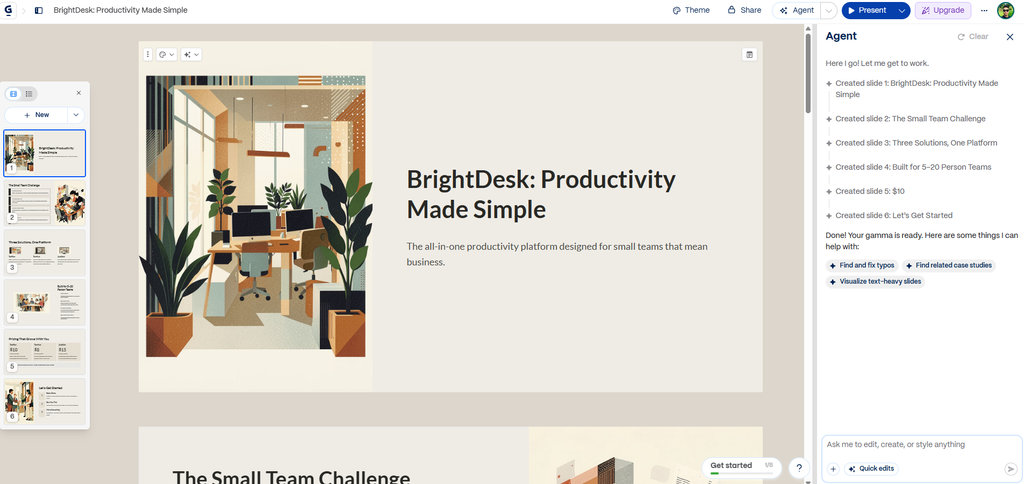
I wanted to see how Gamma would handle a realistic small-business presentation from scratch, so I ran a hands-on test using BrightDesk, a fictional productivity company created specifically for this experiment.
I gave Gamma a detailed brief for a six-slide sales presentation aimed at businesses with 5–20 employees. I provided three fictional products, their exact prices, the target customer, and the presentation structure.
I also gave Gamma an unusually explicit instruction: do not invent customer numbers, testimonials, revenue, market share, integrations, performance statistics, ROI claims, security certifications, or other facts that I had not provided.
Gamma turned the brief into a well-organized six-slide outline and then generated a visually consistent presentation. As a first-draft tool, this part worked well in my test. Starting from the same information manually would have required decisions about structure, hierarchy, layout, and visuals before I could even begin polishing the message.
But the test also exposed an important limitation.
Gamma added several details that were not in my brief. For example, it described BrightDesk as being fast enough to get running “in days, not months” and said the fictional product “integrates with the tools your team already uses.” I had provided neither claim. More importantly, my prompt had specifically told Gamma not to invent integrations.
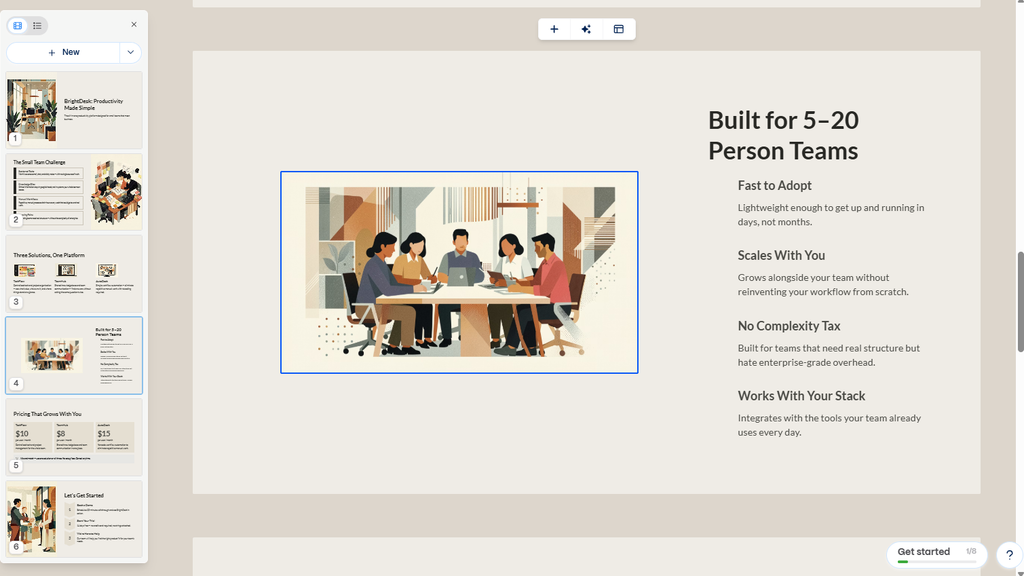
Gamma AI Human Review Example
I found the same pattern on the pricing slide. Gamma correctly used the fictional prices I supplied — $10, $8, and $15 per user per month — but then added “No setup fees” and “Cancel anytime.” Those commercial terms were never provided.
None of this made the presentation unusable. In fact, visually, the first draft was surprisingly polished. But it changed how I would use Gamma for real business work.
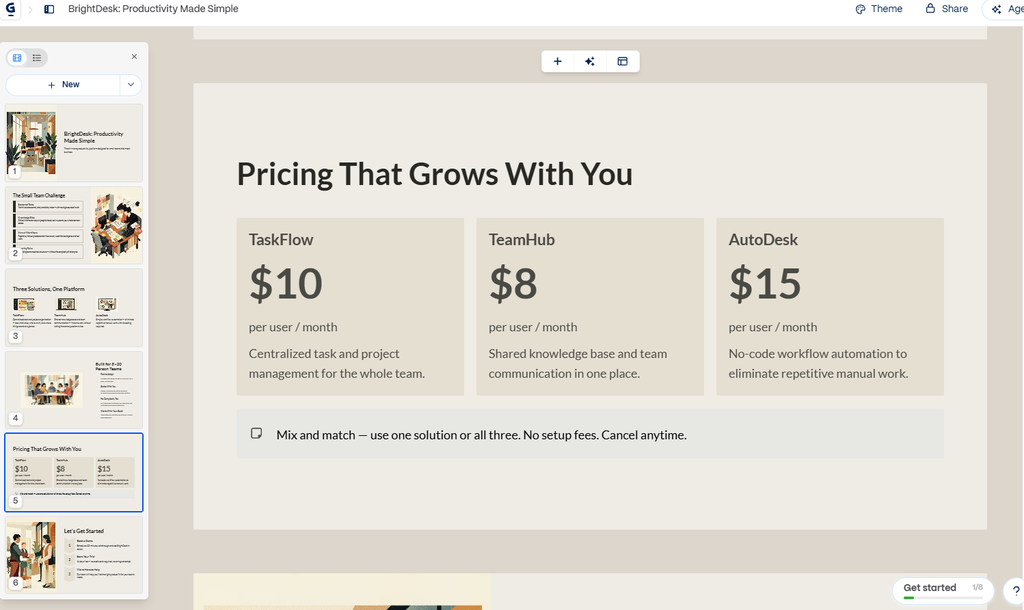
The biggest risk wasn’t bad design. It was confident-looking copy.
Because Gamma can make a presentation look polished quickly, unsupported details can also look more authoritative than they really are. A small-business owner moving quickly could easily overlook a sentence that sounds reasonable but was never verified.
My takeaway is that Gamma works best as a first-draft and design accelerator, not an autopilot for business information. I would be comfortable using it to structure a deck, explore layouts, organize information, and accelerate visual production. Before sending that presentation to a customer, buyer, employee, investor, or partner, however, I would still manually verify product claims, pricing terms, integrations, statistics, and other factual statements.
2. Business Proposals
Gamma can also be useful when preparing a proposal for a potential client, retailer, distributor, or business partner.
For example, a service company could create a proposal explaining the client’s problem, proposed solution, timeline, pricing structure, expected results, and next steps.
The AI-generated structure provides a starting point that can then be customized for the specific opportunity.
3. Internal Training and SOPs
Small businesses frequently have processes that employees need to understand.
Instead of sending employees a long text document, Gamma can turn information into more visual training material.
Potential examples include:
- New employee onboarding
- Sales procedures
- Customer service guidelines
- Warehouse processes
- Marketing workflows
- Internal policies
- Software training
This can make internal documentation easier to read and present.
4. Business Plans and Strategy Documents
Gamma can help organize information for business planning.
You might use it to structure:
- Annual business plans
- Quarterly reviews
- Marketing strategies
- Product launch plans
- Competitive analyses
- Expansion proposals
Again, Gamma should not make strategic decisions for the business. Its value is helping turn your information into an organized and presentable format.
5. Marketing Content
Gamma is not limited to traditional slide presentations.
Businesses can also use the platform to organize visual marketing content, campaign concepts, product stories, and other materials.
This makes it useful when a small team needs to communicate ideas visually without constantly sending every project to a designer.
For more ways to streamline repetitive business tasks, see our guide to the best AI automation tools for small business.
A Practical Gamma Prompt for Small Business
The quality of AI-generated content often depends on the quality of the instructions.
The same principle applies to ChatGPT. We put together 15 practical ChatGPT prompts for small business owners that you can copy and customize for everyday work.
Instead of entering:
Make me a sales presentation.
Give Gamma context about the business, audience, objective, and desired structure.
Here is a more useful example.
Copy This Gamma Prompt
Create a 10-slide sales presentation for a small skincare brand pitching its products to a national retail buyer.
Include:
company overview, target customer, hero products, competitive advantages, suggested retail pricing, current distribution, marketing support, growth opportunity, proposed retail partnership, and next steps.Keep the writing concise and professional. The audience is an experienced retail buyer, so avoid generic marketing language and focus on commercially relevant information.
Use a clean, modern visual style appropriate for a beauty brand.
Notice how much context is included.
The prompt tells Gamma:
Who you are + what you are creating + who will see it + what information to include + how it should look.
That gives the AI much better direction.
What I Like About Gamma
It Removes the Blank-Page Problem
One of the hardest parts of creating a presentation is starting.
Gamma can quickly generate an outline and visual direction, giving you something concrete to edit.
For busy business owners, that alone can save significant time.
It Combines Writing and Design
Normally, creating a presentation involves two separate tasks.
First you write the content.
Then you design the slides.
Gamma combines much of that initial work into one workflow.
You can still customize the final result, but you are not necessarily starting from zero.
It Is Useful for Non-Designers
Not every small business has an in-house graphic designer.
Gamma gives non-designers a way to produce relatively polished materials without learning advanced presentation design.
That can be particularly valuable for very small teams.
It Is Fast for First Drafts
Gamma’s biggest advantage may simply be speed.
If you need a first version of a proposal or presentation quickly. In my test, Gamma turned a detailed brief into a structured, visually consistent first draft without requiring me to build the presentation slide by slide from a blank page.
The time saved can then be spent improving the business argument itself.
Where Gamma Falls Short
No Gamma AI review would be useful without discussing its limitations.
AI-Generated Content Still Needs Review
Gamma can produce convincing-looking material, but presentation quality is not the same thing as factual accuracy.
That was not just a theoretical concern in my testing. As shown in the hands-on example above, Gamma added unsupported integration and pricing terms even after I explicitly instructed it not to invent them.
You still need to check:
- Numbers
- Product information
- Claims
- Pricing
- Market data
- Customer information
- Business terminology
Never send an important business presentation simply because the AI-generated version looks professional.
Generic Prompts Can Produce Generic Results
If your instructions are vague, the output may sound like generic AI-generated business content.
That is why adding your actual business information matters.
Real numbers, real products, actual customers, specific business objectives, and your own insights make the finished material substantially stronger.
Advanced Designers May Want More Control
Someone who already creates highly customized PowerPoint presentations or complex Canva designs may find an AI-first workflow limiting for certain projects.
Gamma is strongest when speed and structure matter.
It may not always be the best option when pixel-level control and highly customized layouts are the priority.
It Does Not Replace Business Expertise
Gamma can help communicate an idea.
It cannot determine whether the idea itself is good.
For example, it can create a retailer presentation, but it cannot replace your understanding of margins, pricing, distribution, buyer expectations, inventory, or retail strategy.
That distinction matters.
Gamma Pricing in 2026
Gamma currently offers a free option along with paid plans.
The free plan is useful for experimenting with the platform and understanding the basic workflow before committing to a subscription.
Paid tiers add capabilities such as more advanced AI generation, additional customization, branding controls, analytics, and other professional features depending on the plan.
Gamma also offers options designed for teams and businesses.
Because software pricing and plan features can change, it is better to check Gamma’s current pricing page before making a purchasing decision rather than relying on an old screenshot or article.
Gamma Pricing link: https://gamma.app/pricing
For a small business, my recommendation is simple:
Start with the free version.
Create two or three real business projects with it.
For example:
- A sales presentation
- An internal training document
- A business proposal
If Gamma consistently saves enough time to justify the subscription, then consider upgrading.
That is a much better approach than subscribing to another AI tool before you know whether it fits your workflow.
Gamma vs PowerPoint vs Canva
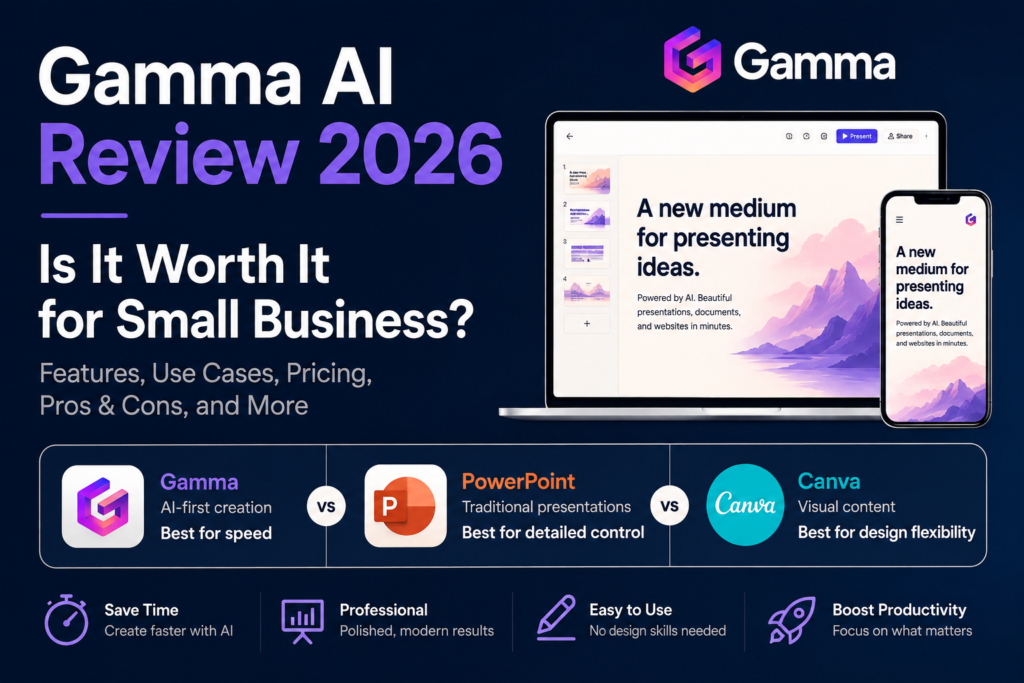
Gamma, PowerPoint, and Canva overlap, but they are not identical tools.
| Tool | Best For | Main Strength |
|---|---|---|
| Gamma | AI-first presentations and documents | Speed |
| PowerPoint | Traditional professional presentations | Detailed slide control |
| Canva | Visual design and marketing content | Design flexibility |
Choose Gamma if:
You want AI to help create the structure, writing, and design of a presentation quickly.
Choose PowerPoint if:
You need precise control over every slide and work in an organization where PowerPoint files are the standard format.
Choose Canva if:
You regularly create a wider range of visual marketing materials such as social posts, flyers, graphics, presentations, and branded content.
For many businesses, the answer does not have to be only one tool.
You could use Gamma to generate the first version of an idea and then continue refining the material using the tool that best fits the final deliverable.
Who Should Use Gamma?
Gamma makes the most sense for people who frequently need to turn ideas or information into professional visual content.
That may include:
- Small-business owners
- Founders
- Sales teams
- Consultants
- Marketing teams
- Freelancers
- Agencies
- Educators
- Startup teams
It can be especially valuable when one person is responsible for several different functions inside a business.
If you are handling sales, marketing, operations, and strategy at the same time, reducing the amount of time spent formatting presentations can have real value.
Who Should Skip Gamma?
Gamma may be less useful if you rarely create presentations or visual documents.
You may also not need another tool if your existing PowerPoint or Canva workflow is already fast and efficient.
And if your work requires highly customized presentation design with strict corporate templates, Gamma may be better used for brainstorming and first drafts rather than final production.
The question is not whether Gamma is impressive.
The better question is:
Does Gamma save enough time in your actual workflow to justify adding another AI tool?
Is Gamma AI Worth It for Small Business?
For many small businesses, yes—but only if you regularly create presentations, proposals, reports, or visual business documents.
Gamma’s biggest value is not that it can make attractive slides.
Its real advantage is that it can shorten the distance between:
Idea → Outline → First Draft → Presentable Content
That can be valuable when time is limited.
A business owner who previously spent several hours building the first version of a presentation may be able to create a workable starting point much faster.
But Gamma should still be treated as an assistant.
The strongest results will come from combining Gamma’s speed with your own business knowledge, real data, customer understanding, and judgment.
Final Verdict
Gamma is one of the more practical AI tools for small businesses that regularly communicate ideas visually.
It can help create presentations, proposals, training materials, strategy documents, and other business content without requiring users to begin with a blank page.
Its biggest strengths are speed, structure, and ease of use.
Its biggest limitation is the same one shared by most generative AI tools: polished output still requires human review and customization.
For a small-business owner, the best approach is to start with Gamma’s free option and test it on a real business project.
Do not ask whether Gamma can create an impressive presentation.
Ask whether it can help your business create useful presentations faster.
If the answer is yes, Gamma may deserve a place in your AI toolkit.