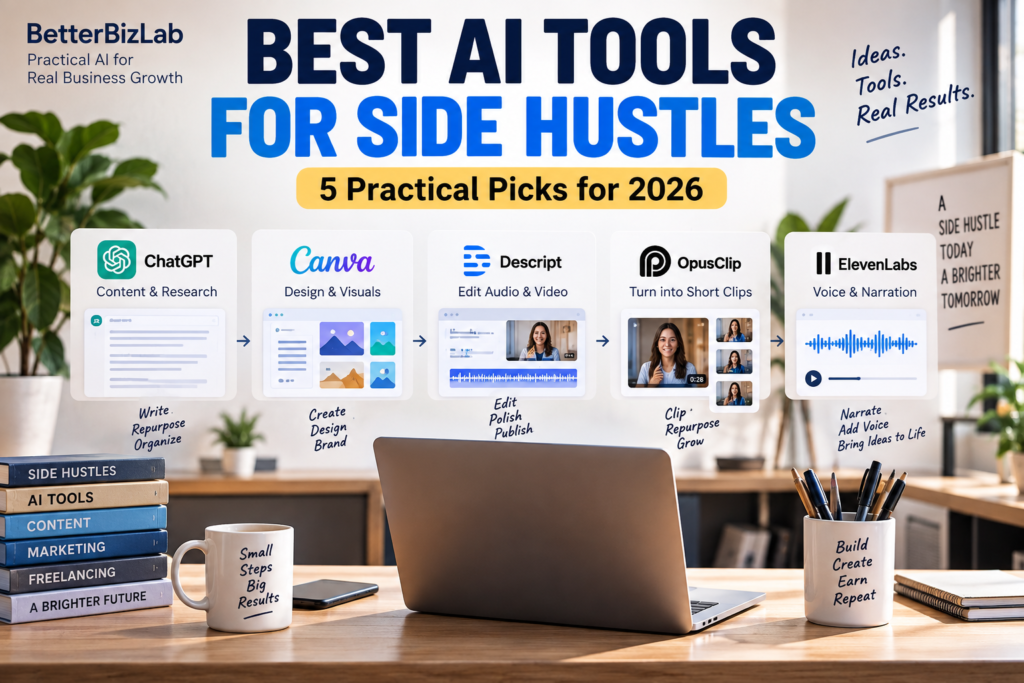
The best AI tools for side hustles aren’t necessarily the tools with the most features.
It’s the one that helps you produce something another person or business is actually willing to pay for.
That’s an important distinction because the AI tool isn’t the side hustle. The outcome someone is willing to pay for is.
A client doesn’t usually care that you used ChatGPT, Canva, Descript, OpusClip, or ElevenLabs. They care whether you can deliver useful content, better visuals, edited videos, short-form clips, or professional audio that solves a problem for them.
This guide looks at five AI tools through that lens: what you can realistically sell, who might pay for it, where AI helps, and what work still requires you.
If you haven’t chosen a side hustle yet, start with our guide to 8 AI Side Hustles You Can Start in 2026. This guide assumes you already have a direction and need to choose the right tool — and the right plan — to deliver it.
How we put this together: plan and pricing details come from each vendor’s official pricing page, checked September 24, 2026. Prices and allowances change often, so confirm them before you subscribe. The one BetterBizLab firsthand observation in this guide — an OpusClip credit limit — is labeled as such. Everything else is BetterBizLab analysis.
Quick Answer: Best AI Tools for Side Hustles
The best AI tool depends on the service you want to provide.
ChatGPT is strongest for research-assisted content, writing, and content repurposing.
Canva AI is useful for visual content and simple design services.
Descript works well for podcast, interview, and video editing workflows.
OpusClip is designed around turning longer videos into short-form clips.
ElevenLabs can support voiceover and narration production.
But don’t choose a tool first.
Choose a customer and a deliverable first, then decide which tool makes that work faster or better.
AI Tool vs. Side Hustle: Know the Difference
One of the biggest mistakes beginners make is thinking access to an AI tool automatically creates a business.
It doesn’t.
Thousands of other people can access the same software.
The value comes from combining the tool with judgment, communication, consistency, and a useful deliverable.
Think about it this way:
Tool → Skill → Deliverable → Customer → Result
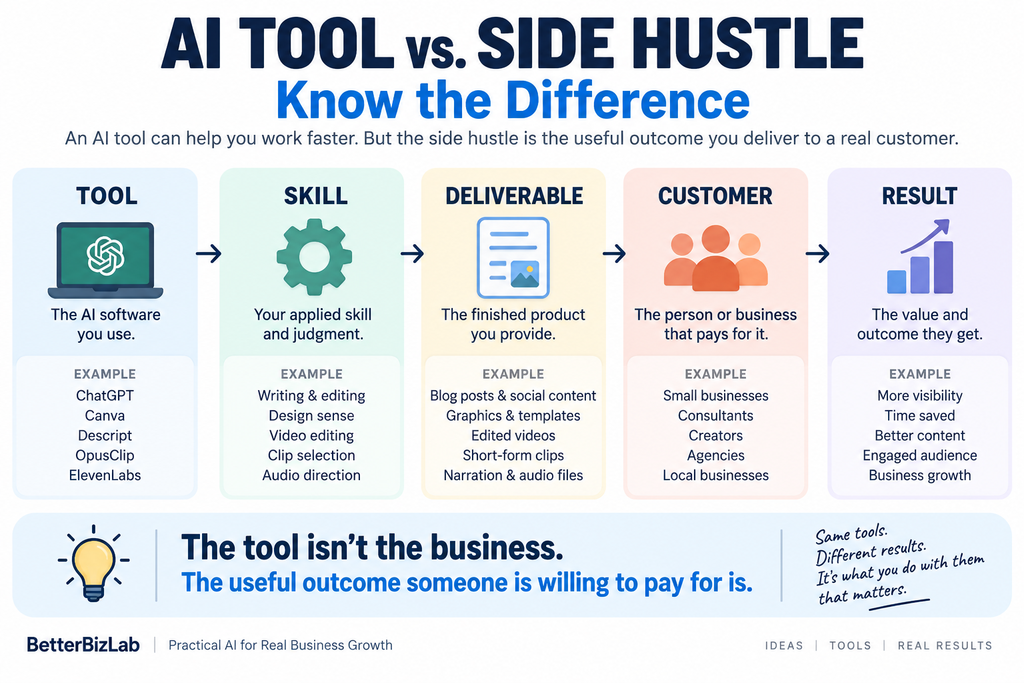
For example:
ChatGPT → research and editing → monthly content package → local business → consistent marketing content
That’s much more specific than:
ChatGPT → make money online
Before choosing any AI tool, you should be able to answer three questions:
Who is the customer?
What exactly will I deliver?
Why would that customer pay for it?
If those answers aren’t clear, buying another AI subscription probably won’t fix the problem.
1. ChatGPT — Best for Research-Assisted Content and Repurposing
ChatGPT can support research, drafting, rewriting, summarization, organization, and content repurposing.
That makes it flexible for service-based side hustles where the final deliverable involves information or communication.
What You Could Sell
Instead of selling “AI writing,” package the work around an outcome.
For example:
A monthly blog content package.
Email newsletter drafts.
Content repurposing.
Research briefs.
Product-description drafts.
FAQ development.
Social-media content based on existing business material.
Who Might Pay
Potential customers could include small businesses, consultants, professional-service firms, creators, or other organizations that need content but don’t have enough internal time to produce it consistently.
Practical Workflow
Imagine a consultant already publishes one useful article each month.
You could offer a content-repurposing service:
Client provides the original article
→ you identify the strongest ideas
→ ChatGPT helps organize and draft derivative content
→ you create an email newsletter draft
→ you create several social-post concepts
→ you fact-check and edit everything
→ client receives a finished content package
The client isn’t paying for access to ChatGPT.
They’re paying to avoid doing the repurposing work themselves.
Where AI Helps
Research organization.
First drafts.
Alternative headlines.
Summaries.
Reformatting existing information.
Turning one source asset into several draft formats.
What You Still Have to Do
Understand the client’s audience.
Verify factual claims.
Match the client’s voice.
Remove generic AI language.
Make editorial decisions.
Communicate with the client.
Deliver consistently.
ChatGPT can make production faster, but the service still depends on your judgment.
If you want to explore practical business workflows beyond content services, see our guide to using ChatGPT for small business.
Plans, Costs, and the Catch
- Free plan: Yes. Unlimited text chats on the free model, with limits on uploads, file analysis, and deep research.
- The catch: Free, Go, and Plus are individual plans. Connecting ChatGPT to Zapier or other automations requires the OpenAI API, which is set up and billed separately from any ChatGPT subscription.
- Entry paid plans: Go is $8/month (OpenAI notes it may include ads); Plus is $20/month.
- Best for: Writing, research, repurposing, and organization-heavy services.
- Skip it if: The deliverable is mostly visual, audio, or video editing — a specialized tool will do more of the actual work.
- Alternative: Claude is the most direct alternative general-purpose assistant. It also has a free plan, and Claude Pro is $20/month, or $17/month billed annually.
- Still needs human review: Facts, claims, client voice, and anything that goes out under the client’s name.
If you’re choosing between general-purpose AI assistants, our ChatGPT vs Claude comparison covers how the two differ for business work.
2. Canva AI — Best for Small-Business Visual Content
Canva combines templates, design tools, and AI-assisted features in a platform that is relatively accessible to non-designers.
That creates opportunities for people who can turn business information into clean, usable visual assets.
What You Could Sell
Social-media graphics.
Simple promotional materials.
Presentation graphics.
Lead-magnet layouts.
Basic marketing collateral.
Simple digital products.
Branded content templates.
Who Might Pay
Local businesses, solo professionals, real-estate agents, consultants, creators, restaurants, service businesses, or small teams without an internal designer may need recurring visual content.
Practical Workflow
Suppose a local service business wants a month’s worth of social content.
Client provides brand assets and offers
→ you establish a small visual system
→ Canva helps generate and adapt design concepts
→ you create reusable layouts
→ copy and visuals are reviewed
→ final files are organized for the client
This is different from generating dozens of random graphics and hoping someone buys them.
You’re solving a specific visual-content problem for a specific customer.
Where AI Helps
Initial concepts.
Background generation or editing.
Layout experimentation.
Resizing and adapting assets.
Drafting supporting copy.
Accelerating repetitive design tasks.
What You Still Have to Do
Maintain brand consistency.
Choose strong layouts.
Check readability.
Review generated images carefully.
Understand what the client actually needs.
Know when a design looks cheap or generic.
AI can accelerate design production. It doesn’t automatically provide good design judgment.
Plans, Costs, and the Catch
- Free plan: Yes, including a limited monthly allowance of AI uses (Canva lists up to 20 on Free).
- The catch: That AI allowance runs out quickly at client volume, and premium templates, assets, and brand tools sit on paid plans.
- Entry paid plan: Canva Pro is US$144/year for one person. Canva Business is US$250/year per person.
- Best for: Social graphics, simple marketing collateral, and templates for people who aren’t trained designers.
- Skip it if: The client needs a full brand identity, a logo system, or print work with strict specifications — that calls for a professional designer.
- Alternative: Adobe Express also offers a free plan and covers similar quick-design work.
- Still needs human review: Brand consistency, readability, and whether each generated image is appropriate for the client to use.
3. Descript — Best for Podcast and Video Editing Services
Businesses and creators increasingly produce interviews, webinars, podcasts, educational videos, and other recorded content.
The recording itself is only part of the work.
Someone still has to edit it.
That’s where a tool such as Descript can support a service business.
What You Could Sell
Podcast editing.
Interview cleanup.
Talking-head video editing.
Transcript cleanup.
Show-note preparation.
Content repurposing packages.
Basic audio cleanup.
Who Might Pay
Podcasters, consultants, coaches, YouTube creators, small businesses, agencies, or companies producing educational content can all have recurring editing needs.
Practical Workflow
Client uploads a recorded interview
→ Descript helps transcribe and organize the recording
→ you remove unnecessary sections
→ you clean up the edit
→ you identify key moments
→ you prepare supporting text or show notes
→ you perform final quality control
→ client receives the finished files
Again, the product isn’t “Descript.”
The product is an edited piece of content the client can actually publish.
Where AI Helps
Transcription.
Finding sections in long recordings.
Removing some repetitive editing work.
Drafting summaries.
Organizing recorded material.
What You Still Have to Do
Understand pacing.
Recognize what should be removed.
Preserve meaning.
Check audio and video quality.
Make editorial decisions.
Perform final quality control.
An AI-assisted edit can still be a bad edit. Human judgment remains part of the service.
Plans, Costs, and the Catch
- Free plan: Yes, with 60 media minutes per month.
- The catch: Watermark-free export isn’t included on Free, so it’s fine for learning the tool but not for delivering client files.
- Entry paid plan: Hobbyist is $24 per person per month, or $16 per month with annual billing, and includes 10 media hours a month and watermark-free 1080p export.
- Best for: Podcast, interview, and talking-head edits where editing the transcript saves real time.
- Skip it if: The job depends on heavy motion graphics or cinematic editing — a traditional video editor is a better fit.
- Alternative: If you only need short social clips from long videos, OpusClip (below) is more specialized.
- Still needs human review: Pacing, meaning, audio quality, and every cut before delivery.
4. OpusClip — Best for Short-Form Video Repurposing
Many businesses and creators already have long-form content.
They may have podcasts, interviews, webinars, presentations, or YouTube videos but lack the time to consistently turn that material into Shorts, Reels, or TikTok-style clips.
That creates a clear service opportunity.
What You Could Sell
Long-form-to-short-form repurposing.
Monthly short-video packages.
Podcast clip packages.
Webinar highlights.
Short-form content preparation.
Who Might Pay
Podcasters, YouTubers, consultants, coaches, founders, agencies, and businesses already producing long-form video are logical potential customers.
The key phrase is already producing.
If a client doesn’t have useful source material, the clipping tool alone doesn’t create a strong content strategy.
Practical Workflow
Client provides one long-form video
→ OpusClip helps identify potential short clips
→ you review the suggestions
→ weak clips are rejected
→ strong clips are refined
→ captions and framing are checked
→ titles or hooks are improved where necessary
→ client receives a curated short-form package
The word curated matters.
Sending every AI-selected clip to a client isn’t much of a service.
Where AI Helps
Finding candidate moments.
Creating initial cuts.
Reframing video.
Generating captions.
Reducing the manual work involved in reviewing long footage.
What You Still Have to Do
Choose clips people might actually care about.
Understand context.
Improve weak openings.
Check caption accuracy.
Avoid misleading edits.
Maintain the client’s positioning.
Quality control is the difference between “AI generated some clips” and an actual content service.
Plans, Costs, and the Catch
- Free plan: Yes, with 60 credits per month.
- The catch: Free exports carry a watermark, and clips can only be exported for three days — so free output isn’t client-ready.
- Entry paid plans: Starter is $15/month (150 credits, watermark-free). Pro is $29/month, or $14.50/month billed annually ($174/year), with 300 credits.
- Best for: Repurposing long videos for clients who already publish podcasts, webinars, or YouTube content.
- Skip it if: The client has little long-form source material, or needs carefully edited narrative videos rather than clips.
- Alternative: If you’re already editing the full recording in Descript, you can cut clips there by hand instead of paying for a second tool.
- Still needs human review: Which clips to keep, caption accuracy, framing, and whether a clip misrepresents what was said.
BetterBizLab Test Note: Check Your OpusClip Credits Before Starting
BetterBizLab logged into an existing OpusClip account and tried to process another BetterBizLab video. Instead of starting, OpusClip displayed “Oops! It looks like you’ve used up all your credits.” and prompted us to buy more credits. We could not process another video without adding credits.
This was an existing account, so it doesn’t tell you what a brand-new account will see — OpusClip’s pricing page currently lists 60 free credits per month on the Free plan. We also didn’t complete a new clipping test, so this note says nothing about clip selection, captions, reframing, or export quality.
The practical takeaway: check your available credits before you promise a client a turnaround, and build credit costs into your pricing.
5. ElevenLabs — Best for Voiceover and Narration Workflows
AI-generated voice technology can support projects that require narration without recording every line manually.
But simply generating a voice file isn’t a strong side hustle by itself.
The stronger opportunity is packaging voice generation into a useful finished deliverable.
What You Could Sell
Narration for educational videos.
Voice tracks for product demonstrations.
Audio versions of approved written content.
Voiceovers for internal training material.
Narration integrated into short-form or presentation content.
Who Might Pay
Creators, small businesses, course producers, agencies, or teams producing recurring video and educational content may need narration.
Practical Workflow
Client provides or approves a script
→ you prepare the text for spoken delivery
→ ElevenLabs generates candidate narration
→ pronunciation and pacing are reviewed
→ problematic sections are regenerated or adjusted
→ audio is edited as necessary
→ narration is synchronized with the final content
→ client receives a finished deliverable
Where AI Helps
Voice generation.
Producing alternative takes.
Reducing recording requirements.
Testing pacing and delivery options.
What You Still Have to Do
Prepare a good script.
Direct the delivery.
Check pronunciation.
Control pacing.
Edit the final audio.
Ensure you have appropriate rights and permissions for the voices and material being used.
The professional value comes from producing usable audio, not simply pressing a generate button.
Plans, Costs, and the Catch
- Free plan: Yes, with 10,000 credits per month.
- The catch: ElevenLabs’ plan comparison lists commercial use starting on the paid Starter plan, so client work shouldn’t be produced on Free.
- Entry paid plan: Starter is $6/month.
- Best for: Narration for training, explainer, and product-demo content where recording a human voice isn’t practical.
- Skip it if: The client wants a recognizable real voice without documented permission, or a brand-critical ad where a professional voice actor matters.
- Alternative: Record the narration yourself or hire voice talent — often the better choice for short, high-stakes pieces.
- Still needs human review: Pronunciation, pacing, and rights to every voice and script you use.
AI Side Hustle Tool Comparison
| Tool | What you can sell | Human skill still needed |
|---|---|---|
| ChatGPT (content & research) | Content packages, research, repurposing | Editing, fact-checking, judgment |
| Canva AI (visual content) | Graphics, templates, marketing assets | Design judgment, branding |
| Descript (audio & video) | Podcast and video editing | Editing, pacing, storytelling |
| OpusClip (short-form video) | Repurposed clips and content packages | Selection, hooks, strategy |
| ElevenLabs (voice production) | Narration and finished audio assets | Direction, editing, quality control |
The table isn’t meant to tell you which tool is universally “best.”
It helps identify which tool matches the type of deliverable you want to sell.
Best AI Tool Stack by Side Hustle
If you’ve already picked one of the ideas in 8 AI Side Hustles You Can Start in 2026, this is a sensible place to start. It’s BetterBizLab’s recommendation, not a sponsored list — and one primary tool is usually enough until a real workflow needs a second.
| Side hustle | Tools to start with | Why |
|---|---|---|
| AI content services | ChatGPT; Canva for supporting graphics | Most of the work is writing and research; Canva covers simple visuals. |
| AI social media management | Canva and ChatGPT | Visuals and captions are the core work; add OpusClip if clients have video. |
| AI automation services | Zapier; ChatGPT via the OpenAI API | The workflow tool does the automating. The AI step is billed separately through the API. |
| AI research services | ChatGPT or Claude | Organizing and summarizing sources, with every fact still checked. |
| AI digital products | Canva and ChatGPT | Canva for layout; ChatGPT for outlines and copy. |
| AI video repurposing | OpusClip and Descript; ElevenLabs for narration | OpusClip finds clips; Descript cleans up the edit. |
| AI services for local businesses | ChatGPT; Zapier once a task repeats | Drafting first; automate follow-up only when the workflow is proven. |
| AI virtual assistant services | ChatGPT | Drafts, summaries, and meeting notes; the client’s own email and calendar do the rest. |
For the automation-heavy rows, our comparison of the best AI automation tools for small business covers Zapier and its alternatives in more detail.
How to Choose the Right AI Tool for Your Side Hustle
Before subscribing to anything, run the idea through this five-question test.
1. Who Pays?
Name the customer.
“Businesses” is too broad.
“Independent real-estate agents who need weekly social content” is much clearer.
2. What Do You Deliver?
Describe the finished product in one sentence.
For example:
“I turn one client podcast episode into five edited vertical clips ready for review.”
That’s a deliverable.
“I use AI for video” isn’t.
3. Can You Create a Good Sample?
Before asking someone to pay, prove that you can produce something useful.
Create a sample from your own material or material you have permission to use.
The sample should demonstrate the outcome, not the AI interface.
4. Does AI Actually Improve the Economics?
Measure the workflow.
If producing a deliverable manually takes four hours and the AI-assisted version takes two hours at comparable quality, that may improve the economics of the service.
But include:
Tool costs.
Corrections.
Client revisions.
Setup.
Quality control.
Your own time.
AI only helps the business model if the entire workflow becomes better.
5. What Still Requires You?
This may be the most important question.
If the customer can get the exact same result by opening the same AI tool and clicking one button, your service has a weak moat.
Your value should come from something beyond tool access:
Judgment.
Industry knowledge.
Editing.
Taste.
Strategy.
Reliability.
Communication.
Workflow design.
Or simply taking responsibility for getting the job finished correctly.
Before You Pay for Any Tool
A common mistake is building the tool stack before the side hustle: several subscriptions, a website, a logo — and still no one who has agreed to pay you. Reverse the order:
Customer → Problem → Deliverable → Workflow → Tool
If you’re starting from zero, one primary AI tool plus the software you already use is usually enough. Before upgrading, check the catches above — watermarks, credit limits, and commercial-use terms decide whether a free plan can actually produce client work.
Two mistakes are specific to tools. Ignoring tool costs: several monthly subscriptions can quickly turn a small side hustle into an expensive experiment, so include them in your pricing. Using material or voices without rights: AI doesn’t remove your responsibility to use content and voices appropriately.
For the steps that come before tools — validating the idea in a week, finding a first customer, and why a service often beats chasing passive income early — see 8 AI Side Hustles You Can Start in 2026. If you’re considering a service built around automating business processes, our guide to starting an AI automation side hustle goes deeper. And if your focus is running a business rather than a side hustle, our guide to the best AI tools for small business compares tools from that angle.
Which AI Tool Should You Start With?
If your strength is writing, research, or organization, start by exploring ChatGPT.
If you naturally understand visual communication, Canva may fit better.
If you enjoy editing conversations, podcasts, or videos, consider Descript.
If you understand short-form content and hooks, OpusClip may support that workflow.
If you’re interested in audio production and narration, ElevenLabs may be relevant.
But don’t choose based solely on which tool is trending.
Choose the intersection of:
Something customers need + Something you can learn to deliver well + Something AI makes meaningfully faster
For workflows that require connecting multiple apps or automating repetitive processes, compare the best AI automation tools for small business.
That’s a much stronger foundation for a side hustle.
Final Thoughts
AI has made it easier to produce drafts, graphics, edited content, clips, and audio.
That doesn’t mean every AI output is a business.
A sustainable side hustle still needs a customer, a problem, a deliverable, and a reason someone would rather pay you than do the work themselves.
Use AI as leverage.
Let it reduce repetitive production work.
Let it help you research, organize, draft, edit, or accelerate the workflow.
But keep responsibility for the finished product.
The tool isn’t the business.
The useful outcome you consistently deliver is.