How small businesses can use AI effectively starts with identifying the repetitive tasks that consume time every week.
Most small businesses don’t lose time because of one huge problem.
They lose it 10 minutes at a time.
An employee rewrites a similar customer email. Someone copies information from one system into another. A manager turns meeting notes into a task list. The owner answers a question that has already been answered five times this month.
Individually, these tasks seem small. Repeated across a week, a team, and an entire year, they become a meaningful operating cost.
That’s where small businesses can use AI to save time.
The goal isn’t to automate everything. It’s to identify repetitive work where AI can handle part of the process while a person remains responsible for the result.
Quick Answer
Small businesses can save time with AI by using it for repetitive, information-heavy tasks such as drafting routine communications, summarizing information, documenting processes, organizing research, preparing meeting follow-ups, and assisting with common customer questions.
A simple rule:
Don’t start with the AI tool. Start with the task you keep repeating.
Then decide what AI can assist with, where human review belongs, and whether the new workflow actually saves time.
The U.S. Chamber of Commerce also recommends that small businesses start with a specific business problem and use AI where it can create measurable value.
This guide focuses on finding and measuring time your team can win back. If your bigger constraint is growth — attracting, converting, or retaining customers — our guide to using AI for small business growth starts by diagnosing that bottleneck instead.
How Small Businesses Can Use AI: A Time-Saving Framework
Before automating a task, break it into four parts:
TASK → AI ASSIST → HUMAN REVIEW → MEASURE
TASK
Identify a specific piece of repetitive work.
Not “improve productivity.”
Something concrete, such as:
“Turn meeting notes into action items.”
AI ASSIST
Decide which part AI can reasonably handle.
That could be drafting, summarizing, categorizing, extracting information, reorganizing text, or preparing a first version.
HUMAN REVIEW
Decide who checks the result and what that person needs to verify.
The more consequential the task, the more important this step becomes.
MEASURE
Compare the old process with the new one.
Did it actually save time?
Did quality remain acceptable?
Did it create additional corrections or management work?
If the answer is no, the workflow needs to change — even if the AI itself appears impressive.
1. Routine Emails and Customer Communication
Email is a good example of a task that often contains both repetitive work and important human judgment.
A small business may repeatedly answer questions about:
Availability.
Order status.
Appointments.
Product information.
Next steps.
Documents.
Basic service questions.
AI can help prepare the first draft without being responsible for the final communication.
Example Workflow
Incoming customer message
→ AI identifies the type of request
→ AI prepares a draft using approved business information
→ employee checks facts, tone, and context
→ employee sends or edits the response
The employee is still responsible for the communication.
AI simply reduces the amount of time spent starting from a blank page.
For more practical examples, see our guide to using ChatGPT for small business.
This distinction matters.
A customer asking a routine question about store hours is very different from an angry customer demanding a refund. The second situation may require judgment, context, or authority that shouldn’t be delegated to an automated response.
2. Meeting Notes and Follow-Up Tasks
Meetings create work after the meeting ends.
Someone has to organize notes, identify decisions, assign action items, and remember what needs to happen next.
AI can reduce some of that administrative work.
Example Workflow
Meeting notes or transcript
→ AI creates a summary
→ AI extracts proposed action items
→ meeting owner checks the summary
→ owners and deadlines are confirmed
→ approved tasks move into the team’s task system
The important word is approved.
AI may incorrectly interpret who owns a task or whether a discussion actually resulted in a decision.
The meeting owner should verify the output before it becomes part of the company’s workflow.
3. SOPs and Process Documentation
Small businesses often rely on knowledge that exists primarily in someone’s head.
One employee knows how returns are processed.
Another knows how a weekly report is created.
The owner knows what happens when an unusual customer request comes in.
That works until someone is absent, leaves the company, or the business begins to grow.
AI can help turn real process knowledge into clearer documentation.
Example Workflow
Employee explains the actual process
→ AI organizes the steps
→ manager checks the sequence and rules
→ missing details are added
→ final SOP is approved
→ team uses the documented process
The important principle is:
Your business provides the truth. AI provides the structure.
If documentation is one of your recurring bottlenecks, see our step-by-step guide to creating SOPs with ChatGPT.
AI shouldn’t invent policies or decide how your company operates.
It should help organize the information your business already knows.
4. Customer Service Triage
Customer service often includes a mix of predictable questions and unusual problems.
AI can help separate the two.
For example:
Customer question
→ AI compares the request with approved support information
→ routine question receives a suggested response
→ employee reviews when required
→ exceptions are routed to a person
The purpose isn’t to prevent customers from reaching employees.
It’s to keep employees from repeatedly spending time on questions that can be handled through a consistent, approved process.
A good escalation rule is essential.
Refund disputes, damaged orders, billing problems, sensitive complaints, or anything outside the approved knowledge base should have a clear path to a person.
For a complete workflow example, see how to automate customer service with AI.
5. Research and Information Organization
Research can consume hours before the actual decision even begins.
A small-business owner might need to compare software, review customer feedback, analyze competitor positioning, organize vendor information, or summarize several documents.
AI can help organize the material.
Example Workflow
Source material collected
→ AI summarizes or categorizes information
→ important claims are traced back to the original sources
→ employee verifies the information
→ decision-maker reviews the organized findings
This can reduce reading and organization time.
But AI summaries should not automatically become business facts.
If a decision depends on a price, contract term, regulation, product specification, or other important detail, verify it against the original source.
6. Repetitive Administrative Work
Some of the best AI opportunities aren’t exciting enough to make a good demo.
That’s exactly why they’re useful.
Think about tasks such as:
Turning unstructured information into a standard format.
Extracting information from documents.
Preparing recurring report summaries.
Categorizing incoming requests.
Creating first drafts from templates.
Organizing lists.
Preparing internal status updates.
The task may only take five or ten minutes.
But if three employees perform it several times each week, the cost changes quickly.
For more worked examples of specific tasks, see 7 small business tasks you can automate with AI.
This is where a task audit becomes useful.
The 10-Minute AI Task Audit
You don’t need a consultant or complicated automation map to find your first AI opportunity.
Take 10 minutes and make a list of repetitive tasks performed by you or your team.
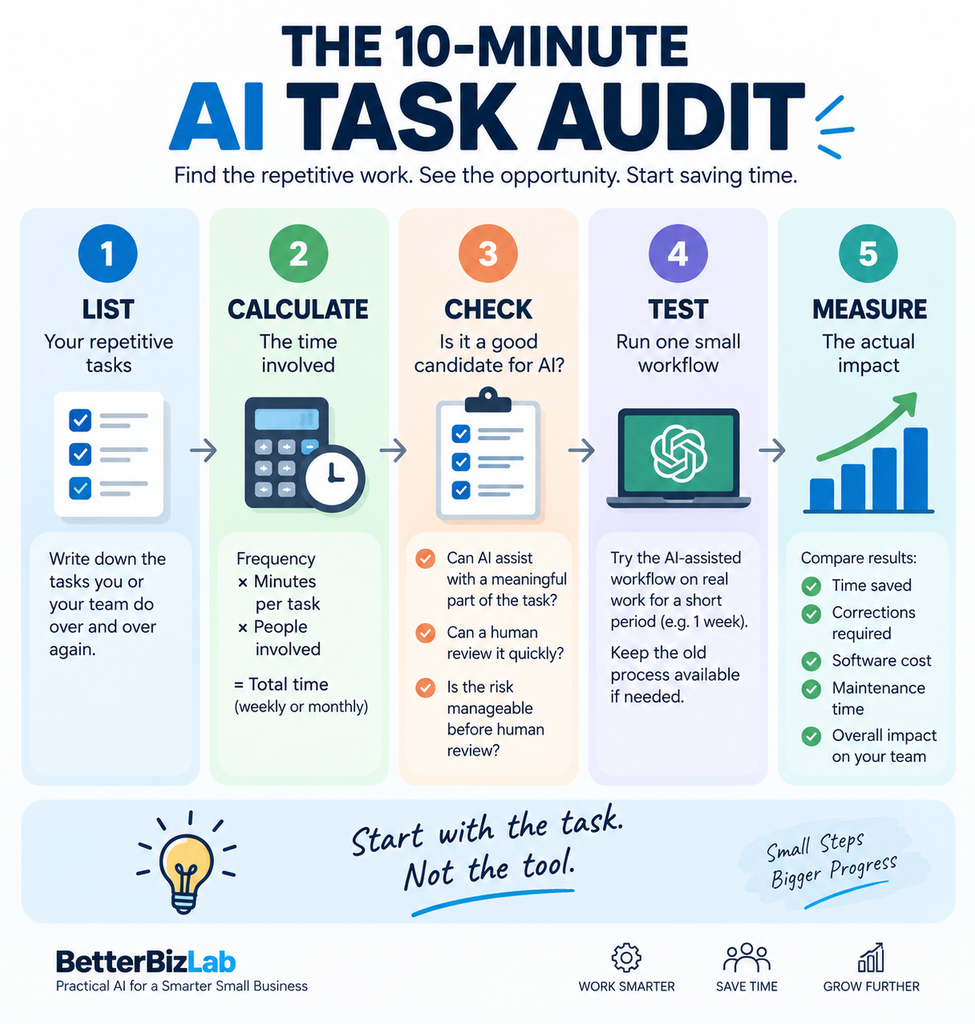
For each task, estimate:
Frequency × Minutes Per Task × People Involved
Suppose a routine task takes 12 minutes.
It happens 15 times per week.
Two employees handle it.
That’s:
12 × 15 × 2 = 360 minutes
or approximately 6 hours of team time per week.
That doesn’t mean AI can eliminate all six hours.
It tells you that the task is worth investigating.
Now add three more questions:
Can AI assist with a meaningful part of the task?
Can a person review the output quickly?
Is the consequence of an AI mistake manageable before human review?
If the answers are yes, you’ve probably found a reasonable candidate for a small pilot.
Which Tasks Should You Automate First?
A good first AI-assisted task usually has these characteristics:
High Frequency
It happens repeatedly.
Predictable Inputs
The information arriving each time is reasonably consistent.
Predictable Output
You know what the finished result should look like.
Low-to-Moderate Risk
A mistake can be caught before creating a serious consequence.
Easy Human Review
Someone can quickly determine whether the output is correct.
Routine internal summaries can fit this model well.
Final contract approval does not.
Tasks That Usually Need More Human Control
Saving time isn’t worth creating unnecessary business risk.
Be cautious when AI is involved in:
Contracts.
Legal commitments.
Hiring and disciplinary decisions.
Sensitive employee information.
Financial decisions.
Pricing exceptions.
Confidential customer information.
Serious customer complaints.
Regulated or safety-sensitive decisions.
AI may still assist with organizing information or preparing a draft.
But assistance and authority are different things.
Keep the appropriate person responsible for consequential decisions.
Don’t Automate a Bad Process
AI can make an inefficient process happen faster.
That doesn’t make it a good process.
Before automating anything, ask:
Why are we doing this step?
Sometimes a repetitive task exists because two systems don’t communicate.
Sometimes a report nobody reads is still being produced because it has always been produced.
Sometimes employees manually enter information that could simply be collected correctly at the beginning.
Removing the unnecessary step is better than automating it.
The order should be:
Eliminate → Simplify → AI Assist → Automate
Not:
Automate everything that currently exists.
Once you’ve identified a process worth automating, our guide to how to automate a small business with AI explains how to build the workflow step by step.
Start With One Workflow, Not Ten Tools
It’s easy to discover AI tools faster than you can implement them, and end up with more software but not necessarily more productivity.
Instead, start with one workflow: define the problem, test one solution, train the people who actually perform the work, and measure the result. Only then decide whether another tool or automation is necessary.
When you’re ready to compare platforms, see our guide to the best AI automation tools for small business to match the software to the workflow you actually need.
How to Measure the Time You Actually Save
Don’t rely on the feeling that a workflow is faster.
Measure it.
Before the change, record a simple baseline.
For example:
Average time per task: 15 minutes
After implementing the AI-assisted workflow:
Average time per task: 7 minutes
At 20 tasks per week:
Before:
15 × 20 = 300 minutes
After:
7 × 20 = 140 minutes
Potential difference:
160 minutes per week
But don’t stop there.
Also consider:
Time spent correcting AI output.
Software cost.
Setup time.
Employee training.
Workflow maintenance.
Errors or rework.
A tool that saves three hours but creates two hours of corrections isn’t saving three hours.
Measure the whole process.
A Simple 7-Day AI Productivity Test
If you’re unsure where to begin, run a small experiment.
Day 1: Choose One Task
Use the 10-Minute AI Task Audit to identify one repetitive task.
Day 2: Document the Current Process
Write down how the task works today and approximately how long it takes.
Day 3: Design the AI-Assisted Version
Define exactly what AI will do and where human review happens.
Days 4–6: Test It
Use the workflow on real work while keeping the old process available if necessary.
Record the time required and any errors or corrections.
Day 7: Decide
Compare the results.
Keep it.
Modify it.
Or stop using it.
All three outcomes are useful.
A failed test can save a business from spending months paying for a workflow that never created meaningful value.
Final Thoughts
Using AI to save time for a small business doesn’t require a dramatic transformation.
It’s finding small pieces of repetitive work that happen again and again.
Those are often better starting points than trying to automate an entire department.
Use a simple process:
Find the repeated task.
Decide where AI can assist.
Keep human review where it matters.
Measure the result.
Then move to the next bottleneck.
That’s how AI can help a small team save time and work smarter without creating another complicated system to manage.